
Local-first long-term memory, hybrid RAG, and agent personalization for AI coding agents.






Quick Start · Web UI · First use · Documentation
AI coding assistants lose preferences, architectural decisions and investigation context between sessions. memory_plugin keeps that knowledge available across OpenCode, Codex, Claude Code, Gemini CLI, Antigravity and other MCP clients.
- Keep useful context across sessions. Save concise facts and working instructions in human-readable Markdown, with tags, history and explicit persona controls.
- Retrieve the details when needed. Search long-form Notes, PDF, DOCX, spreadsheets, web pages and code with hybrid full-text/vector retrieval, source links and a knowledge graph.
- Follow the project across checkouts. Git-based identity keeps project memory consistent while isolating unrelated projects and global context.
- Manage memory in one local panel. Browse and edit records, instructions and sources, configure models, and review backup and maintenance actions.
- Run locally. CPU inference and local storage need no Docker, external vector database or hosted embedding API. Full ZIP cloud checkpoints through Turso are optional; there is no telemetry.
- Node.js 22.16+ in the 22.x branch, or 24+ (
^22.16.0 || >=24.0.0); Node 23 is excluded. - npm/npx and a supported coding client or another MCP-capable client.
CPU execution is the stable default. WebGPU is experimental.
Choose the client you want to configure. For Codex:
npx -y @lotargo/memory_plugin setup --codexOther client flags: --opencode, --claude, --gemini, --antigravity.
Setup installs the selected integration and bundled skill, and adds managed memory instructions where supported. Existing unrelated configuration is preserved.
Configure all five client integrations
To set up OpenCode, Codex, Claude Code, Gemini CLI and Antigravity together, omit the client flag:
npx -y @lotargo/memory_plugin setupRestart the configured client or open a new session to load the integration. For Codex, check the connection with:
npx -y @lotargo/memory_plugin doctor --codexSee installation and client integration for marketplace installation, client configuration locations, headless setup and removal.
Open the shared local panel:
npx -y @lotargo/memory_plugin webBrowse and edit Notebook records, active instructions, history, project scopes and knowledge sources. The panel also provides source links and graphs, settings, model controls, and reviewed backup and maintenance actions.
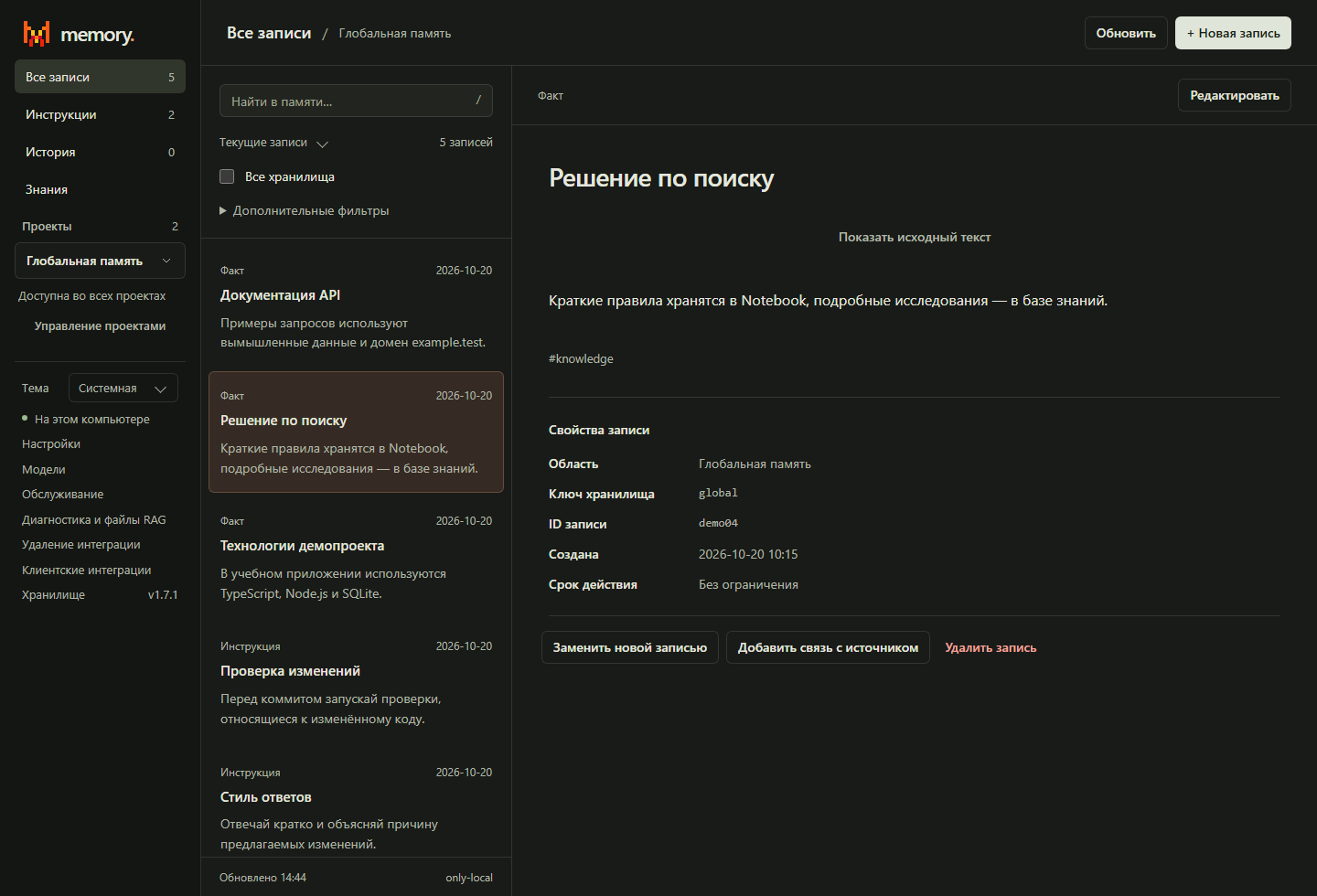
The screenshot uses fictional demo records. The panel supports English (default), Russian and Simplified Chinese, with a saved language choice, plus light, dark and system themes. It listens on 127.0.0.1 and opens with a private connection URL. Saved-memory browsing needs no cloud account or embedding model.
See the web UI guide for editing, lifecycle, authentication, ports and autostart.
In a Git project, ask your connected agent to save a fact:
Remember for this project: the API uses Fastify and Zod.
After the agent confirms it has saved the fact, open a new session in the same project and ask:
What API stack have we saved for this project?
The agent reads the saved Notebook context with recall(scope: "project"). You can also inspect the saved record in the web panel. Global memory is available outside Git projects; pass directory when explicitly targeting a workspace.
Tool arguments for saving the example fact
The agent can call remember with:
{
  "fact": "The project API uses Fastify and Zod.",
  "title": "API Stack",
  "kind": "fact",
  "scope": "project"
}
OpenCode initializes memory automatically. For other supported clients, restart the client or open a new session after setup to load the managed startup instructions. See installation and client integration for client-specific behavior and troubleshooting.
For an instruction the agent should actively apply, use kind: "directive". Save a long investigation with remember_note, and external source material with ingest_document. Notes and sources are searched on demand instead of being injected into every session.
See memory architecture and personalization for routing, source links and client behavior.
Working memory stays local: Markdown Notebook files, SQLite indexes and archived source text. Optional cloud-snapshots mode stores full ZIP checkpoints in Turso; it does not perform live synchronization. Snapshot upload is manual by default and can be scheduled explicitly.
- Agent scope
allmeans global + current project, keeping unrelated project memory isolated. - No telemetry or analytics are sent.
- Model weights download from Hugging Face on first use and are cached locally.
- URL ingestion and configured cloud operations use the network.
- Cloud credentials are encrypted locally and machine-bound; this is not an OS keychain.
- Removing client integrations preserves memory unless a data purge is explicitly requested.
Older hybrid-sync / only-cloud installations require the documented migration flow. See storage, cloud snapshots and security before migrating or restoring data.
The documentation index contains the full guides and release records.
| Guide | What you will find |
|---|---|
| Installation and clients | Setup flags, verification, headless setup, uninstall and recovery |
| Memory architecture | Facts, Notes, sources, Git scopes, hybrid retrieval and graph |
| Personalization | Directives, native persona, client prompts and migrations |
| Web UI | Notebook/projects, knowledge editing, graphs, models and panel lifecycle |
| Maintenance and recovery | Migrations, RAG import/export/reset, diagnostics and file cleanup |
| Storage and cloud snapshots | Checkpoints, scheduling, legacy recovery, authentication and security |
| MCP / CLI / configuration | Tool and command reference, defaults, model controls and troubleshooting |
| Development and tests | Local repository linking, test commands and evaluation |
| Benchmarks | Included corpora, methodology, results and limitations |
| Local marketplaces | Codex / Claude Code channels and migration |
Repository benchmarks describe the included datasets and configurations; they do not establish general benchmark superiority.