
An agent harness for your terminal. Ready to type in 47 ms, 21 MB of memory while idle.
One small native binary. Use the Claude, ChatGPT or Copilot plan you already pay for, or any model, even local.


Website · Docs · Benchmarks · What is an agent harness? · Changelog
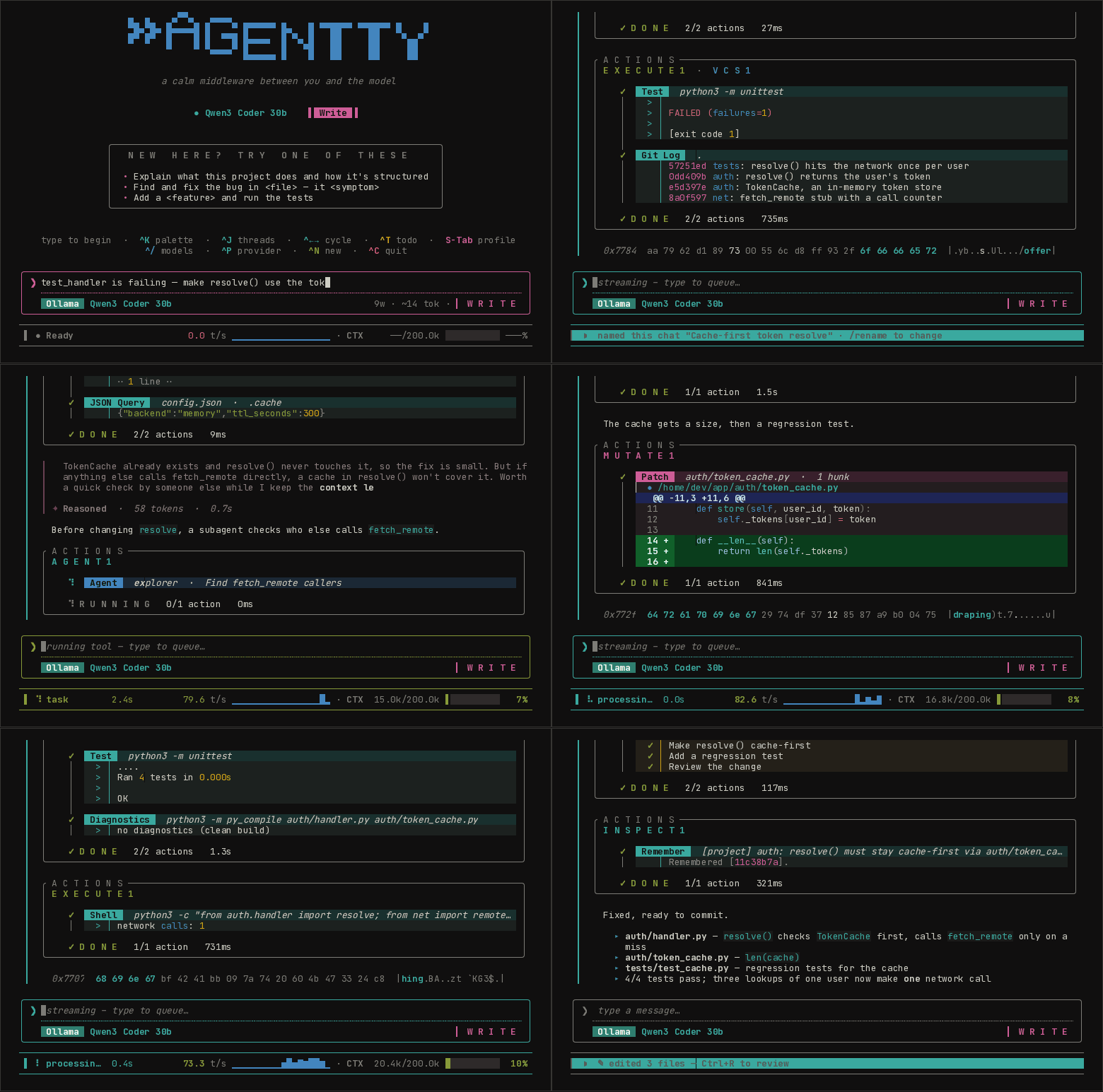
A real session with the current release, replayed from the terminal.
curl -fsSL https://agentty.org/install.sh | sh    # Linux · macOS
irm https://agentty.org/install.ps1 | iex # Windows (PowerShell)The model decides what to do; the harness is everything around it: the tools it can call, the sandbox they run in, what goes into its context, which model handles which turn, and the interface you steer it from. agentty is that harness, written in C++26 and shipped as a single static binary.
- One small binary. About 23 MB, starts in milliseconds, no Node, Python or Electron, no
npm install. Download it and run it. - Any model. Sign in with the Claude Pro/Max, ChatGPT, GitHub Copilot or Kimi plan you already
have, use an API key for OpenAI, DeepSeek, Gemini, Grok, Mistral, Groq, OpenRouter and more, or run
a local model through Ollama. Switch mid-thread with
^Pand^/. - Sandboxed by default. Every shell command runs behind a wall the operating system enforces;
your
~/.ssh,~/.awsand.envfiles are masked. - Frugal with context. A local retrieval engine finds the code that matters instead of pasting whole files, so turns stay small and cheap.
- Everywhere you work. In the terminal, inside Zed or JetBrains over ACP, as an MCP server, in scripts and CI, or on an air-gapped machine over SSH.
- Open source (MIT).
Coming from another tool? vs Claude Code · vs Codex CLI · vs Gemini CLI · vs opencode · vs jcode · vs Aider · vs Cursor · all alternatives
What each harness costs you before the model does any work. Same machine, fresh install, no
login, runs interleaved across tools; median of 10 launches (30 for --version).
| ready to type | idle memory | on disk, with runtime | --version |
|
|---|---|---|---|---|
| agentty 0.9.51 | 47 ms | 21 MB | 23 MB | 2.6 ms |
| jcode 0.99.1 | 56 ms | 106 MB | 163 MB | 17 ms |
| Codex CLI 0.167.0 | 402 ms | 152 MB | 536 MB | 77 ms |
| Claude Code 2.1.319 | 635 ms | 152 MB | 325 MB | 14 ms |
| Aider 0.86.2 | 1.0 s | 74 MB | 653 MB | 1.1 s |
| Gemini CLI 0.67.0 | 3.0 s | 441 MB | 197 MB | 2.6 s |
| opencode 1.19.5 | 5.2 s | 651 MB | 409 MB | 0.8 s |
Measured 2026-11-08 on an Intel i5-6200U (4 threads, 16 GB), Linux. "Ready to type" is the time until the first prompt is fully drawn, read from the rendered terminal. agentty and jcode launch within the same range; call that a tie. Method, ranges and the script to reproduce it: agentty.org/benchmarks.
curl -fsSL https://agentty.org/install.sh | sh
cd your-project
agentty
The first launch asks how to connect: sign in with Claude Pro/Max, ChatGPT, GitHub Copilot or
Kimi (no API key), paste an API key for any provider, or pick a local Ollama model that needs no
key at all. Then type a request and press Enter. The quick start
walks through the first session.
The same line updates agentty later. Other ways to install are under Installation.
|
A ~2.6 ms cold start and a prompt on screen in under 50 ms. Independent tool calls run in parallel, and read-only tools start while the model is still writing, so tool-heavy turns finish sooner. Subscriptions you already pay for, API keys for ten more providers, any OpenAI-compatible endpoint, or local Ollama. One model picker across every provider you're signed into. Providers ↓ Shell and build commands run inside claybin: seccomp, Landlock and cgroups on Linux, seatbelt
on macOS, AppContainer and job objects on Windows. Credential files are masked, file tools refuse
paths outside your workspace, and network goes through a proxy that refuses your LAN,
|
read · edit · write · apply_patch · shell · grep · glob · outline · find_definition · repo_map · git · test · diagnostics · web · search_code · search_docs · task · todo · remember — each with a purpose-built widget in the UI. A fully local retrieval engine (keyword plus embeddings, code-aware chunking and reranking),
Agent Skills compatible with Claude Code's format, and A flagship model plans; cheaper models do the legwork. Effort scales to each turn, and the router learns your repo across sessions. Off is a strict no-op. Smart Mode ↓
|
Sign in with a subscription you already have:
agentty login # → Claude Pro/Max · ChatGPT (Plus/Pro) · GitHub Copilot · KimiOr point it at any of these:
--provider |
What | Key |
|---|---|---|
anthropic |
Claude (the default): API key or Pro/Max sign-in | agentty login |
chatgpt |
Codex models with your ChatGPT plan | agentty login |
copilot |
GitHub Copilot models | agentty login |
kimi |
Kimi K2 models | agentty login |
openai |
GPT and o-series | OPENAI_API_KEY |
deepseek |
DeepSeek V4 (chat and reasoner) | DEEPSEEK_API_KEY |
gemini |
Google Gemini | GEMINI_API_KEY |
xai |
xAI Grok | XAI_API_KEY |
mistral |
Mistral, Codestral, Magistral | MISTRAL_API_KEY |
groq |
Llama, Mixtral, Kimi on Groq LPUs | GROQ_API_KEY |
cerebras |
Wafer-scale inference | CEREBRAS_API_KEY |
together |
Open models on together.ai | TOGETHER_API_KEY |
fireworks |
Open models on fireworks.ai | FIREWORKS_API_KEY |
openrouter |
Any model via openrouter.ai | OPENROUTER_API_KEY |
ollama |
Local models on localhost:11434 |
none |
host:port |
Any OpenAI-compatible server (llama.cpp, vLLM, LM Studio…) | optional |
agentty --provider ollama -m qwen2.5-coder        # local, no key, no cloud
agentty --provider deepseek -m deepseek-v4-pro
agentty --provider openrouter                     # pick any model in-app
--provider persists. Inside a thread, ^P switches provider and ^/ switches model, with no
restart. Behind a gateway, --auth-header X-API-Key sends the key under a custom header.
Full reference: Providers & Models.
Rather than pasting a repository or every document into each prompt, agentty retrieves a small, source-tagged set of relevant passages only when the task needs them. That keeps context focused and avoids paying to resend irrelevant text on every turn.
The engine is fully local, behind two tools. Keyword search works from the first run with no setup; a local Ollama adds search by meaning.
search_codefinds code by what it does ("where is retry backoff handled") when you don't know its name. The complement togrep.search_docssearches your docs folder (./docs, orAGENTTY_DOCS_DIR), your installed skills, and facts you asked it toremember.
Every passage is tagged with its source (docs: · skill: · memory: · MCP URI) and line range,
so the model can cite it, open it or follow it.
Turn on search by meaning with one command:
ollama pull qwen3-embedding:0.6b # or nomic-embed-text, smalleragentty finds Ollama on localhost by itself. agentty diagnostics shows whether it's on
(probe: ok). The index is built once per repo and then updated only for files you change.
On agentty's own judged questions, search_code puts the right file first 63–78% of the time with
qwen3-embedding and in the top 8 93–97% of the time (keyword only: 57–60% first, 92–95% top 8).
Measure it on your repo with agentty rag-eval.
The retrieval funnel
Each search runs, in order:
- Structure-aware chunking. Code splits at functions and classes, docs at headings; each chunk is indexed with its title and heading path.
- Hybrid retrieval. BM25 (identifiers split into words, so
onClipboardReadmatches "clipboard read") and dense embeddings (HNSW), fused per query. - Rerank. A deterministic feature reranker; for code, source ranks above tests and docs
unless you ask for them, and a header lifts its
.cpp. - Diversify and de-duplicate. MMR, near-duplicate removal, and stitching of adjacent chunks into one span.
- Compress and budget. Passages are trimmed to the sentences that match the query and packed under a hard byte budget.
- Confidence. Each result carries a confidence; weak results say so.
Opt-in stages (off by default; measure before turning on): pseudo-relevance feedback
(AGENTTY_RAG_PRF=1), GraphRAG (AGENTTY_RAG_GRAPH=1), corrective retry
(AGENTTY_RAG_CORRECT=1), and two that cost a model call: multi-query expansion
(AGENTTY_RAG_EXPAND=1) and HyDE (AGENTTY_RAG_HYDE=1).
Proactive retrieval (off until you turn it on in /settings → Proactive retrieval (RAG))
runs the funnel before the model asks and adds a source-tagged <retrieved-context> block to
the turn, shown as one card with a confidence bar and the sources it used.
All of it is in-house C++ (rag-cpp), every stage
degrades gracefully, and each is tunable via AGENTTY_RAG_*. Full write-up:
docs/website/retrieval.md.
One model rarely fits every turn. A one-line rename and a cross-file refactor don't deserve the
same effort, and spending flagship reasoning on trivia is slow and expensive. Smart Mode (^S)
uses an orchestrator–workers design: a strong model owns the plan and delegates well-scoped
subtasks to cheaper ones.
- Three roles. Strategic (flagship) plans and delegates, Implementation (mid) writes code,
Utility (cheap) handles summaries and grunt work. Roles map to
(model, effort)and never check a model by name, so any model can go in any slot. - Effort that fits the turn. Each turn is sized from trivial to complex, and a cascade retries at higher effort only when a cheap attempt actually falls short.
- It learns your repo. The loop sees outcomes a stateless router can't (the build fails, the
test goes red, you correct the next turn), so Smart Mode keeps a per-workspace effort prior and
recalls decompositions that worked. All learning is local (
.agentty/) and wipeable.
The overlay's footer shows what it has learned in this repo. Off is a strict byte-for-byte
no-op: zero extra tokens, zero latency. Full write-up:
docs/website/smart-mode.md.
| Key | Action | Key | Action |
|---|---|---|---|
Enter |
Send / queue | ^K |
Command palette |
Esc |
Cancel / reject | ^J |
Thread list |
S-Tab |
Cycle permission profile | ^P |
Provider picker |
Alt+Enter |
Newline | ^/ |
Model picker |
^B |
Loop: resend until off | ^N |
New thread |
^G |
Run a code block | ^S |
Smart Mode |
^R |
Review changes | ^T |
Plan / todo |
^O |
Read a retrieved-context card | ^E |
Expand composer |
^C |
Quit | Alt+←/→ |
Cycle threads |
The composer is a full readline-style editor:
| Key | Action | Key | Action |
|---|---|---|---|
^←/→ |
Move by word | ^W / Alt+D |
Delete word back / forward |
^U / Alt+K |
Kill to line start / end | ^Z / ^Y |
Undo / redo |
^V / Alt+V |
Paste image | / @ # |
Command / file / symbol picker |
↑ |
Recall queue / history | Alt+↑/↓ |
Edit queued messages one at a time |
Full keymap: docs/website/keybindings.md. Pasting images over SSH needs one terminal setting; see Clipboard & Images.
Anywhere (Linux, macOS)
curl -fsSL https://agentty.org/install.sh | shIf the prebuilt binary won't run on your system (a libc mismatch, for example), pass --build to
compile from source instead. The installer also does this by itself when the downloaded binary
fails to execute:
curl -fsSL https://agentty.org/install.sh | sh -s -- --buildWindows
irm https://agentty.org/install.ps1 | iex
# or
winget install agentty
# or
scoop bucket add 1ay1 https://github.com/1ay1/scoop-bucket; scoop install agentty
macOS
brew tap 1ay1/tap && brew install agenttyLinux packages (V = the release you want, e.g. 0.9.51)
# Debian / Ubuntu
curl -fsSLO https://github.com/agentty-org/agentty/releases/latest/download/agentty_${V}_amd64.deb
sudo dpkg -i agentty_${V}_amd64.deb

# Fedora / RHEL / CentOS
sudo dnf install https://github.com/agentty-org/agentty/releases/latest/download/agentty-${V}-1.x86_64.rpm

# openSUSE
sudo zypper install https://github.com/agentty-org/agentty/releases/latest/download/agentty-${V}-1.x86_64.rpm

# Arch (AUR)
yay -S agentty-bin   # prebuilt static release
yay -S agentty-git   # build HEAD from source, dynamically linked

# Alpine: no .apk yet; use the install script above
Package filenames carry the version, so latest/download/ needs it spelled out; see the
releases page for the exact names, or
use the install script, which resolves it for you.
Termux / Android (no root, no proot)
agentty builds natively against Termux's Bionic/libc++ toolchain. The install script detects
Termux and installs into $PREFIX/bin:
pkg install git cmake clang openssl libnghttp2
curl -fsSL https://agentty.org/install.sh | sh -s -- --build
Shell and build tools run unsandboxed on unrooted Android (claybin needs user namespaces
Android doesn't grant); everything else works. See packaging/termux/ for
the pkg install agentty recipe.
Every release is a single fully static executable: x86_64 and aarch64 on Linux, Intel and Apple
Silicon on macOS, x86_64 on Windows. Packaging details: packaging/README.md.
Needs a C++26 toolchain (GCC 14+, a recent Clang, or MSVC).
git clone --recursive https://github.com/agentty-org/agentty.git
cd agentty && cmake -B build && cmake --build build -j
Use the presets if you're going to edit the code. debug rebuilds in about 1.7 s after a
one-line change, against about 36 s for the plain configure above, because it skips LTO. See
Building from source.
cmake --preset debug   && cmake --build --preset debug     # fast Debug loop (no LTO, ccache)
cmake --preset release && cmake --build --preset release   # optimized -O3 + LTO binary
ctest  --preset debug                                      # run the suite
Every preset shares one build/ tree, so switching presets reconfigures it in place instead of
leaving a second multi-gigabyte copy on disk. cmake --list-presets shows them all (debug,
debug-full, release, ci, sanitizer, standalone, pch).
Air-gapped hosts
agentty airgap --setup user@host   # first time: copies credentials
agentty airgap user@host           # every time after
Your laptop relays the traffic via SOCKS5 over SSH. TLS is pinned to the real upstreams, so the network in between can't intercept it. Docs ↗
Inside Zed or JetBrains (ACP)
agentty speaks the Agent Client Protocol, the same protocol Zed uses for Claude Code. Add it to Zed's settings:
{
  "agent_servers": {
    "agentty": {
      "command": "agentty",
      "args": ["acp"]
    }
  }
}
JetBrains IDEs and other ACP clients: Zed / JetBrains / ACP.
MCP, both ways
agentty mcp-serve exposes agentty's native tools to any MCP client over stdio. agentty also
uses other MCP servers configured in .agentty/mcp.json; their tools appear next to the native
ones. agentty mcp import copies the MCP servers you set up in another tool, and mcp-login
authorizes servers that use OAuth. Docs ↗
Loop a prompt until it's done (Ctrl+B)
Some prompts are worth sending more than once: "fix the next failing test", "keep refactoring
until the build is clean", "check if the deploy finished". ^B sends the composer's message
and then re-sends it automatically after every completed turn, until you press ^B again.
While armed, the composer keeps showing the prompt and becomes read-only, so the box can never say
one thing while agentty sends another. A ⟳ LOOP ×N chip and a tinted border make an
auto-sending session impossible to mistake for an idle one, and the count tells it apart from a
hang. The model can't tell the difference: an auto-sent turn goes through the same path as one
you typed.
If a turn fails, the loop doesn't hammer the endpoint. It obeys the provider's Retry-After
when there is one, otherwise waits with a delay that grows per error class (rate limit and auth
from 30 s, transient errors from 5 s) and resets after the next success. The chip counts down
(⟳ RETRY 24s), so a paused loop reads as waiting, not stuck. Esc cancels the turn; ^B stops
the loop.
Run code blocks from replies (Ctrl+G)
When a reply hands you a block of commands, don't copy and paste it. ^G lists the blocks from
the last reply; Enter (or a digit) runs one interactively on your real terminal: the UI
steps aside, sudo prompts work, output streams live, and Ctrl+C stops the command, not agentty.
When it exits, a result card lets you attach the captured output to the composer (a), copy it
(y), or discard it (Esc), so "it failed with X" reaches the model without retyping.
Each block runs in the right shell for its language on every OS, prompt $ markers are
stripped, and capture is capped at 2 MB. Details: docs/RUN_CODE_BLOCK.md
Agent Skills
Drop a SKILL.md anywhere under .agentty/skills/ or ~/.agentty/skills/ and it's live on the
next turn. Compatible with Claude Code's .claude/skills/ format.
A skill that runs programs or reaches the network says so in its frontmatter
(effects: [exec, net]) and installs through agentty skill add, which shows you what it declared
and pins your approval to its content; edit the body and it asks again. Prose-only skills are never
gated. See installing skills.
The catalog of discovered skills is capped at 64 entries; set AGENTTY_MAX_SKILLS (8–4096) to
lower it for small-context models or raise it for large skill libraries.
Architecture
A pure-functional update loop, (Model, Msg) -> (Model, Cmd); the view is Model -> Element,
rendered by maya. Processes run via posix_spawn and
poll(2). File writes are atomic (write, fsync, rename).
Deep dive: docs/ARCHITECTURE.md · docs/RENDERING.md
Releasing (maintainers)
Cutting a release is one command:
scripts/cut-release.sh X.Y.Z      # POSIX / macOS / Linux / Git Bash
scripts\cut-release.cmd X.Y.Z     # Windows cmd.exe
It bumps project(agentty VERSION …) in CMakeLists.txt (the single source of truth every
manifest derives from), promotes CHANGELOG.md's [Unreleased] section to [X.Y.Z], commits,
tags vX.Y.Z and pushes. The tag push fires GitHub Actions, which builds every binary and OS
package (Linux x86_64/aarch64 on native runners, macOS Intel/ARM, Windows .exe/.msi) and
submits to winget, Homebrew, Scoop and the AUR; nix, snap and gentoo manifests are attached to the
release. --dry-run previews without writing anything.
Join the Discord to ask questions, share sessions and get
help. The server has an AI helper bot that answers agentty questions using the real agent:
@mention it, DM it, or use /ask.
Prefer IRC? #agentty on Libera.Chat (irc.libera.chat,
port 6697, TLS). Matrix users can join #agentty:libera.chat.
MIT; see LICENSE.