
Live playground · Documentation · Examples


Adaptive text-stream smoothing for AI chat interfaces. Keep your existing Markdown renderer and pace incoming text with a zero-dependency headless core. React, Vue, Svelte and Web Component integrations are included; a fade-in reveal is optional.
When a language model answers, the chunks arrive unevenly: one word, then twenty at once, then a pause while the server thinks. Rendering each chunk the moment it lands means the text stutters, and the eye reads the stutter before it reads the words.
smooth-stream-text sits between your transport and your renderer. You hand it the
text received so far and whether the answer is finished; it hands back a prefix that
grows at an even, adaptive rate, which you render exactly as before. It works with any
provider (OpenAI, Anthropic, Google, your own backend) because it only sees text.
- A real pacing controller. Not a fixed characters-per-second you tune per model - the rate follows from holding a constant distance behind the live text, so it adapts to whatever is feeding it.
- Headless first. Take the smoothed string and render it however you already do. The ready-made component is a convenience, not the only way in.
- Zero runtime dependencies. The core is pure logic and runs in Node, which is why its timing is tested without a browser and without waiting.
- Every framework. React, Vue, Svelte and a
<smooth-stream-text>Web Component - which also covers Angular, Solid, Qwik, Astro and plain HTML. Each framework is an optional peer dependency. - Careful about the text itself. The text grows a character at a time, or a
whole word at a time if you prefer - in Chinese, Japanese and Thai too - and
never stops inside a
**, a half-written link or an emoji, so a markdown renderer downstream never flashes broken syntax.
It fits when text arrives in bursts and you want it to read as a steady flow, you already have a renderer (react-markdown, Streamdown, marked, your own), and history must appear at once while only new answers are paced.
It does not fit when you only render static Markdown, need transport features
(retries, reconnects), want a CSS typing effect for a heading, or already pace text
in another layer such as the AI SDK's smoothStream() and are happy with it: two
layers add their delays. The core runs anywhere JavaScript runs, but only the web
bindings are built and tested. Choosing an approach
compares the alternatives.
npm install smooth-stream-textFull documentation, with a guide per framework and runnable examples:
smooth-stream-text.vercel.app/docs.
For tools and coding assistants, llms.txt
lists every page as plain Markdown, and the package ships
INTEGRATION.md, a short guide readable offline in
node_modules/smooth-stream-text/. An optional
Agent Skill for coding agents installs with
npx skills add crmapache/smooth-stream-text.
Most chat UIs parse markdown themselves and render it with their own components. Those only need the smoothed string:
import { useSmoothText } from 'smooth-stream-text/react'

function Answer({ answer, streaming }: { answer: string; streaming: boolean }) {
  const { text } = useSmoothText(answer, { done: !streaming })

  // `text` is a prefix of `answer` that grows evenly. Parse and render it exactly
  // as you did before.
  return <Markdown>{text}</Markdown>
}
That is the whole integration. Feed it your accumulated answer, render what comes
back. useSmoothText re-renders only when the visible text or the phase changes,
at most once per animation frame while text appears. That can be more often than
chunks arrive, so if your Markdown rendering is expensive, see the
benchmarks. useSmoothStream
takes the same arguments and returns the full state as well - the backlog, the
current rate, the source - for debugging and charts.
One hook serves a whole conversation. A message that is already done when it
first arrives is history and appears at once. A different message starts over.
done closes whichever answer is current, including when its last chunk lands
after done was already set.
If your transport hands you deltas and you would rather not accumulate them:
import { useSmoothStreamController } from 'smooth-stream-text/react'

const { text, push, end } = useSmoothStreamController()
// push(delta) on each chunk, end() when the stream closesAI SDK useChat with react-markdown
import { useChat } from '@ai-sdk/react'
import ReactMarkdown from 'react-markdown'
import { useSmoothText } from 'smooth-stream-text/react'

function Answer({ text, streaming }: { text: string; streaming: boolean }) {
  const { text: smooth } = useSmoothText(text, { done: !streaming })
  return <ReactMarkdown>{smooth}</ReactMarkdown>
}

export function Chat() {
  const { messages, status } = useChat()

  return messages.map((message, index) => {
    const text = message.parts.map((part) => (part.type === 'text' ? part.text : '')).join('')
    if (message.role !== 'assistant') return <p key={message.id}>{text}</p>

    // Only the newest answer can still be streaming; everything above it is history.
    const streaming = index === messages.length - 1 && (status === 'submitted' || status === 'streaming')
    return <Answer key={message.id} text={text} streaming={streaming} />
  })
}
If the server already runs smoothStream() from the AI SDK, the two delays add
up. Pick one: the server-side transform sends evenly sized chunks at a fixed
delay, this package adapts the rate on the client to whatever actually arrives.
Streamdown
Streamdown renders markdown and can fade words in by itself. Let it own the animation and use this package only for pacing - two layers animating the same words would fight.
import { Streamdown } from 'streamdown'
import 'streamdown/styles.css'
import { useSmoothText } from 'smooth-stream-text/react'

function Answer({ text, streaming }: { text: string; streaming: boolean }) {
  const { text: smooth, phase } = useSmoothText(text, { done: !streaming })
  return (
    <Streamdown animated isAnimating={phase !== 'done'}>
      {smooth}
    </Streamdown>
  )
}
Vue and Nuxt
<script setup lang="ts">
import { SmoothText, useSmoothStream } from 'smooth-stream-text/vue'

const props = defineProps<{ answer: string; streaming: boolean }>()

// Headless: `text` and `phase` are computed refs; render `text` with your own
// markdown component.
const { text } = useSmoothStream(() => props.answer, { done: () => !props.streaming })
</script>

<template>
  <MyMarkdown :source="text" />

  <!-- or the ready-made component, for plain text -->
  <SmoothText :text="answer" :done="!streaming" @settled="showActions" />
</template>
done accepts a boolean, a ref or a getter. Both work under Nuxt's server
rendering: finished text is in the server output, and nothing is scheduled on the
server.
Svelte 5 and SvelteKit
<script lang="ts">
  import { smoothStream, smoothText } from 'smooth-stream-text/svelte'
  import { onDestroy } from 'svelte'

  let { answer, streaming } = $props()

  // Headless: a store you render yourself.
  const smooth = smoothStream()
  const sync = () => smooth.apply(answer, !streaming)
  // Effects do not run on the server: apply once during setup too, so finished
  // text is already in the server HTML.
  sync()
  $effect(sync)
  onDestroy(smooth.destroy)
</script>

<p>{$smooth.text}</p>

<!-- or the action, which owns the element -->
<p use:smoothText={{ text: answer, done: !streaming, onSettled: showActions }}></p>
Actions do not run on the server, so an element with the action is empty in the server output and fills in on the client. For server-rendered history, use the store.
The reveal is a separate layer, so you can hang it on the pieces your renderer produces - paragraphs, list items, headings, table cells:
import { Reveal, RevealProvider } from 'smooth-stream-text/react'

function Answer({ answer, streaming, messageId }) {
  const { text } = useSmoothText(answer, { done: !streaming })
  const blocks = parseMarkdown(text) // whatever you already use

  return (
    <RevealProvider resetKey={messageId}>
      {blocks.map((block, i) =>
        block.type === 'paragraph' ? (
          <Reveal key={i} as="p">
            {block.text}
          </Reveal>
        ) : (
          <CodeBlock key={i} {...block} />
        ),
      )}
    </RevealProvider>
  )
}
RevealProvider shares one wave across everything beneath it, so the stagger stays
continuous when an answer is split into separate blocks. Its settings can change at
any time, and every Reveal already on screen follows. Reveal takes a string
and animates only what was appended since the last render. Other props - id,
aria-*, style, a ref - go to the element it renders.
Two behaviours make this safe with a parser that rebuilds its tree:
- Mounting seeds, it does not animate. A freshly created
Revealtreats its text as already settled, so a recreated node shows its text instantly instead of replaying it. Changingasmoves the text to the new element the same way. - A non-extension is a silent reseed. If the text is no longer an extension of what was shown - the parser re-split a paragraph, or moved text between blocks - it reseeds rather than re-animating text the reader already saw.
When you are rendering plain text and want both layers in one element:
import { SmoothText } from 'smooth-stream-text/react'

<SmoothText text={answer} done={!streaming} as="p" onSettled={showActions} />
onSettled fires once per answer, when the last word has finished animating - the
moment to show copy buttons or the next prompt. An answer unmounted before then is
never announced; one hidden by <Activity> is announced when it shows again. className styles the host;
unitClassName goes on every animating word. Other props, including a ref, go
to the host element.
Plain JavaScript
import { createSmoothText } from 'smooth-stream-text/dom'

const handle = createSmoothText(document.getElementById('answer')!)
handle.onSettled(() => console.log('fully on screen'))

handle.push('Hello ')
handle.push('there')
handle.end()

// while the element is hidden or detached
handle.pause()
handle.resume()

// for good - the text stays on screen
handle.destroy()
The element is owned entirely by the handle - give it a host with no other children.
Vue 3
<script setup lang="ts">
import { SmoothText, useSmoothStream } from 'smooth-stream-text/vue'
import { computed, ref } from 'vue'

const answer = ref('')
const streaming = ref(true)
const finished = computed(() => !streaming.value)

// headless: `text` and `phase` are refs
const { text, phase } = useSmoothStream(answer, { done: finished })
</script>

<template>
  <p>{{ text }}</p>

  <!-- or the ready-made component -->
  <SmoothText :text="answer" :done="finished" :options="{ targetLatencyMs: 150 }" @settled="onSettled" />
</template>
Vue 3.2 or newer. Inside <KeepAlive> both pause while deactivated and carry on
when shown again.
Svelte
<script lang="ts">
  import { smoothStream, smoothText } from 'smooth-stream-text/svelte'
  import { onDestroy } from 'svelte'

  export let answer = ''
  export let streaming = true

  // headless: a plain readable store
  const stream = smoothStream()
  $: stream.apply(answer, !streaming)
  onDestroy(stream.destroy)
</script>

<p>{$stream.text}</p>

<!-- or the action, which owns the element -->
<p use:smoothText={{ text: answer, done: !streaming }}></p>
Both the actions and the store are plain objects - nothing is imported from Svelte, so they work in Svelte 4 and 5 alike. For runes, see the recipe above.
Web Component (Angular, Solid, Qwik, Astro, plain HTML)
<script type="module">
  import 'smooth-stream-text/web-component'
</script>

<smooth-stream-text text="Hello there" done></smooth-stream-text>
const el = document.querySelector('smooth-stream-text')
el.options = { targetLatencyMs: 150 }
el.push(' more text')
el.end()
el.addEventListener('sst:done', () => console.log('finished'))Attributes: text, done, unit, duration, stagger, blur, translate,
target-latency, min-cps, max-cps, boundary. text and done are also
properties, for frameworks that bind properties. Anything structured goes through
the options property; removing an attribute brings back the option or the
default underneath it.
The stream belongs to the element rather than to its place in the page. Moving the
element, or taking it out and putting it back, pauses and resumes it with nothing
lost or replayed, and text pushed before the element is in the page is kept.
sst:done fires once per answer, when it is fully on screen: for an element taken
out of the page, once it is back, and never if it is removed for good before then.
Importing the module on a server does not throw, so pages that render on the
server can import it directly. To use another tag name, call
defineSmoothStreamTextElement('my-tag').
Every frame the controller asks for the rate that would drain the current backlog over the target latency, then eases the current rate towards it:
const desired = pending / targetLatencyMs
const alpha = 1 - Math.exp(-dt / adaptMs)
rate += (desired - rate) * alpha
That is the whole idea, and it is why there is no speed to configure per model:
- A fast producer builds a bigger backlog and gets drained faster; a slow one is drained slower.
- A twenty-word burst becomes a visible acceleration over a couple of tenths of a second instead of a wall of text, because the rate is smoothed, not the backlog.
- When the producer stops - closed outright, or silent past the grace period - the
target decays to zero across the settle window, so the tail accelerates gently
into a stop instead of stalling three characters from the end. A closed answer
is complete within about twice
settleMs. - If the backlog grows past what can be drawn sanely (a tab returning from the background, a whole message handed over at once) the display jumps rather than crawling.
The rate moves a fractional cursor, and the visible text ends at the last allowed
position it has passed - any character by default, or the last whole word with
unit: 'word'.
boundary: 'markdown' (the default) means the visible prefix is never something a
markdown parser would render wrongly:
- Never inside a delimiter run -
**,~~,```, the](of a link. A lone*where the author wrote**is exactly the flicker being removed. - Never while an inline construct is open - emphasis, inline code, a link, a
line-leading
#/-/>/1.before its first word, a table row before its newline. - Never inside a fenced code block's body. Holding one to its closing fence would stall the stream for thousands of characters; only the fence marker itself is atomic.
- Two safety valves, so a hold can never become a freeze:
- the producer has been silent for
holdMs, which means the closing delimiter - or, with whole words, the rest of the last word - is never coming. Measured from the last input rather than from the start of the hold, so a model pausing to think mid-URL or mid-word does not leave half of it on screen; - the hold is withholding more than
holdCharscharacters, which means the construct is not closing any time soon. From that point the cursor simply carries on at its normal pace with the markup literal, rather than stalling.
- the producer has been silent for
Grapheme safety applies in every mode, including 'char', and follows
Unicode's own rules (UAX #29, through Intl.Segmenter): a cut never splits a
surrogate pair, a combining mark, a flag, an emoji sequence, a Hangul syllable or
an Indic conjunct. Where Intl.Segmenter is missing, a smaller hand-written set of
rules covers the common cases.
Other modes: 'char' (any grapheme, no markdown rules), 'word' (whole words, no
markdown rules), or your own function (source, desired, closed) => number
returning the largest allowed index.
unit decides what appears as one piece. 'char', the default, lets the text
grow a character at a time, and each character fades in place as plain inline
text, so line breaking and joined scripts such as Arabic are never disturbed.
'word' only ever adds whole words, and each word also rises by translatePx:
- in space-separated languages a word ends wherever whitespace starts or ends, so punctuation, contractions and URLs stay with their word;
- Chinese, Japanese, Thai and the other scripts written without spaces are split
at dictionary words through
Intl.Segmenter, with punctuation kept on the word it closes. The dictionary can still change its mind about a word at the live edge, so such a word waits until something outside its script follows - punctuation, a space, a Latin word - or enough further text arrives that the answer can no longer change.
Pacing and reveal read the same key, so <SmoothText unit="word" />, the Web
Component's unit attribute and createSmoothText(el, { unit: 'word' }) switch
both at once. On the headless path, pass unit to the hook and to
RevealProvider.
| Option | Default | Meaning |
|---|---|---|
targetLatencyMs |
180 |
How far behind the live text the display runs. The main feel knob. |
adaptMs |
250 |
Time constant for smoothing the rate. Larger means lazier acceleration; 0 means none. |
minCharsPerSecond |
12 |
Floor; 0 means none. |
maxCharsPerSecond |
900 |
Ceiling. What keeps a burst from becoming a dump. |
settleMs |
400 |
How long the tail takes to drain once the producer stops. The hard deadline is twice this. |
idleGraceMs |
200 |
Silence tolerated before the tail drains anyway, on a still-open stream. |
maxLatencyMs |
2000 |
Above this projected lag the display jumps instead of catching up. |
maxFrameMs |
100 |
Per-tick clamp on elapsed time, so a stalled frame cannot cause one big jump. |
boundary |
'markdown' |
Where the cursor may stop. |
unit |
'char' |
'char' or 'word': what appears as one piece. Shared with the reveal. |
holdMs |
1500 |
How long the producer must be silent before a held construct or a half-arrived word is released. |
holdChars |
120 |
Most characters a boundary may hold back before it is released anyway. |
clock |
rAF | Injected time source. See testing. |
| Option | Default | Meaning |
|---|---|---|
unit |
'char' |
What animates as one unit: 'char' or 'word'. Shared with pacing. |
durationMs |
380 |
How long one unit takes to appear. |
staggerMs |
36 |
Delay between neighbouring units of one batch. |
blurPx |
4 |
Starting blur. |
translatePx |
3 |
Starting upward shift. 0 keeps the spans display: inline, for zero layout impact. |
easing |
cubic-bezier(.22,.61,.36,1) |
Timing function. |
maxWaveLagMs |
240 |
Above this queue depth the stagger compresses, so a batch cannot queue a long wave. The queue then drains at least half as fast as the clock runs. |
maxAnimatedUnits |
64 |
Most units one update animates. Anything before them in a bigger batch appears at once. |
respectReducedMotion |
true |
Under prefers-reduced-motion no spans are created at all. false animates anyway. |
injectStyles |
true |
Set to false to skip the built-in stylesheet and supply your own. |
className |
- | Extra class on every animating unit. |
Every option can be changed at runtime: through setOptions, or simply as new
props of the React and Vue components. Props are applied as they change, so a
setting changed through setOptions - a "faster" button - stays until its own
prop changes, and a prop or option you stop passing returns to its default. A
value that cannot work - NaN, a ceiling of zero or below, a floor above the
ceiling - falls back to its default or is clamped rather than freezing the stream,
and comes back once it can.
Copying and selecting stay clean. A word lives in a <span> only while it is
animating; once finished it collapses back into the surrounding text node. A
finished answer is plain text with no spans; while one arrives, only the units still
animating are spans (a few hundred at the peak of a very fast stream). A selection
copies exactly the characters on screen, and a selection made while the answer is
still arriving survives the collapse.
Styles. No CSS file to import: the stylesheet is adopted on first use into the
document, or into the shadow root the element renders in. It is a constructed
stylesheet, so a Content Security Policy without 'unsafe-inline' does not block
it, and it sits in a cascade layer, so any rule of your own wins without a
specificity fight. Every visual parameter is a CSS custom property
(--sst-duration, --sst-blur, --sst-translate, --sst-easing) set on the
host. With injectStyles: false, import smooth-stream-text/styles.css or copy
REVEAL_CSS from smooth-stream-text/dom into your own pipeline.
Reduced motion produces no spans at all: the text is simply extended. Switching the preference mid-answer keeps the text in order.
Big batches - a tab returning from the background, a whole message handed over
at once - show everything but their last maxAnimatedUnits units immediately and
animate only that tail. requestAnimationFrame stops while a tab is hidden; on
return, a backlog that could not be drawn within maxLatencyMs at the maximum rate
jumps into place, and a smaller one is caught up at that rate.
Long words such as URLs and identifiers animate as plain inline text even with
unit: 'word', so they wrap in a narrow column while they fade in instead of
overflowing and jumping onto new lines when they settle.
Server rendering. Reveal and SmoothText render their text as ordinary
markup on the server pass, so SSR output and hydration contain the real text; the
imperative renderer only takes over after mount. A message that is already done
on first render appears instantly, with no animation - which is what makes
rendering an existing conversation cheap. The React entry is marked 'use client'
for the Next.js App Router. The Vue hook schedules nothing on the server.
One stream, a whole conversation. end() closes an answer, not the instance:
text arriving afterwards reopens the stream and is paced normally. So a panel can
hold a single hook for every message it will ever show, rather than one per
message.
Detaching a view calls pause(), not destroy(). A paused stream keeps its
state and its buffer, draws nothing, and picks up where it stopped on resume() -
which is what makes a remount harmless (React StrictMode, an <Activity>
boundary, a kept-alive Vue component, a moved Web Component). destroy() is final
and meant for a view that owns its stream outright. The bindings do this for you.
Units. cursor, pending and the rates count UTF-16 code units, the way
JavaScript string lengths do - not words or visible characters.
Building another binding? createSourceSync from the root entry is the rule
every binding here uses to turn a (text, done) pair into stream calls.
Time is injected, so anything built on this can be tested without waiting:
import { createManualClock, createSmoothStream } from 'smooth-stream-text'

const clock = createManualClock(0)
const stream = createSmoothStream({ clock })

stream.push('hello world')
stream.end()
for (let i = 0; i < 100; i++) clock.advance(16)

stream.getState() // { text: 'hello world', phase: 'done', ... }- React 18 and 19, Vue 3.2 and newer, Svelte 4 and 5 (actions and stores), and any framework that renders custom elements.
- The core runs in Node 18 and newer, ESM or CommonJS, with no DOM.
- Browsers: every current engine. Unicode-exact cluster boundaries and dictionary
words in scripts without spaces need
Intl.Segmenter(Chrome 87, Safari 14.1, Firefox 125); older engines fall back to simpler rules.
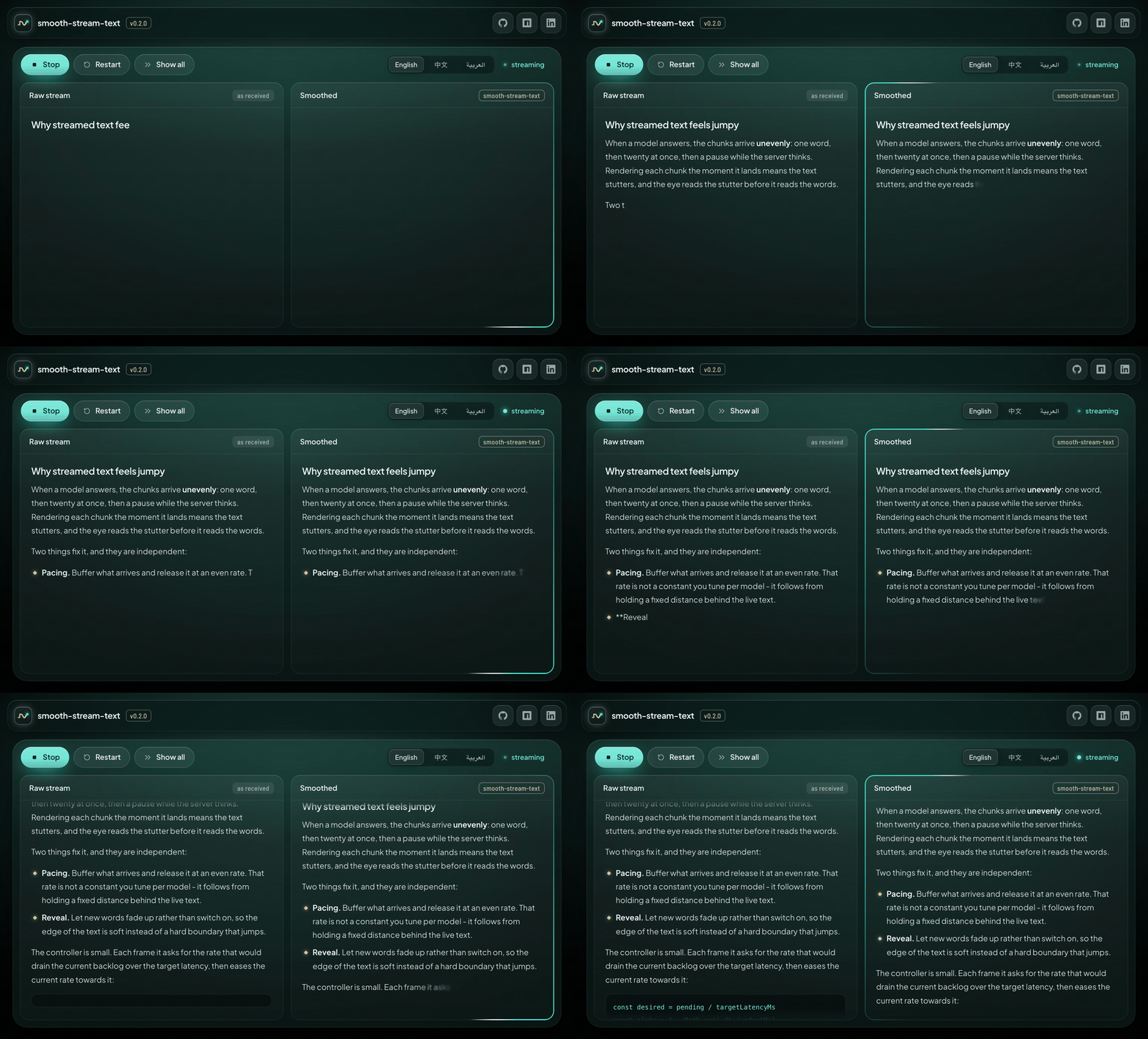
Both panes run the same markdown renderer, so the only difference between them is the stream: the left one is fed chunks as they arrive, the right one is paced and revealed. It has a simulator with adjustable speed, chunk size, jitter and stalls, live controls for every option, sample answers in English, Chinese and Arabic, and a chart of the backlog and draw rate - the fastest way to find settings you like.
The renderer in the playground is about 200 lines of plain TypeScript with no
dependencies, and it doubles as a worked example of the headless path: parse the
smoothed string yourself, then hang createReveal on the text runs you produce.
git clone https://github.com/crmapache/smooth-stream-text
cd smooth-stream-text && npm install && npm run dev- No markdown parsing or syntax highlighting. That is what forces heavy
dependencies on similar packages; bring your own renderer and use
Revealon its output. - No transport helpers. The package takes text, not connections.
- The markdown boundary scanner is a pragmatic approximation, not a CommonMark parser. Inline state resets at every newline, which bounds each hold to one line; a false positive costs a brief hold and nothing else.
- Screen readers get the text as it is added to the page. If you announce answers
with
aria-live, prefer announcing the finished answer fromonSettledover announcing every word.
MIT