






▶ the reel: 400k+ views on Instagram · ▶ the film: the whole story, on YouTube
Photosensitivity warning. Patternflow displays rapidly changing light patterns that may trigger seizures in people with photosensitive epilepsy. If you experience any discomfort, stop use immediately.
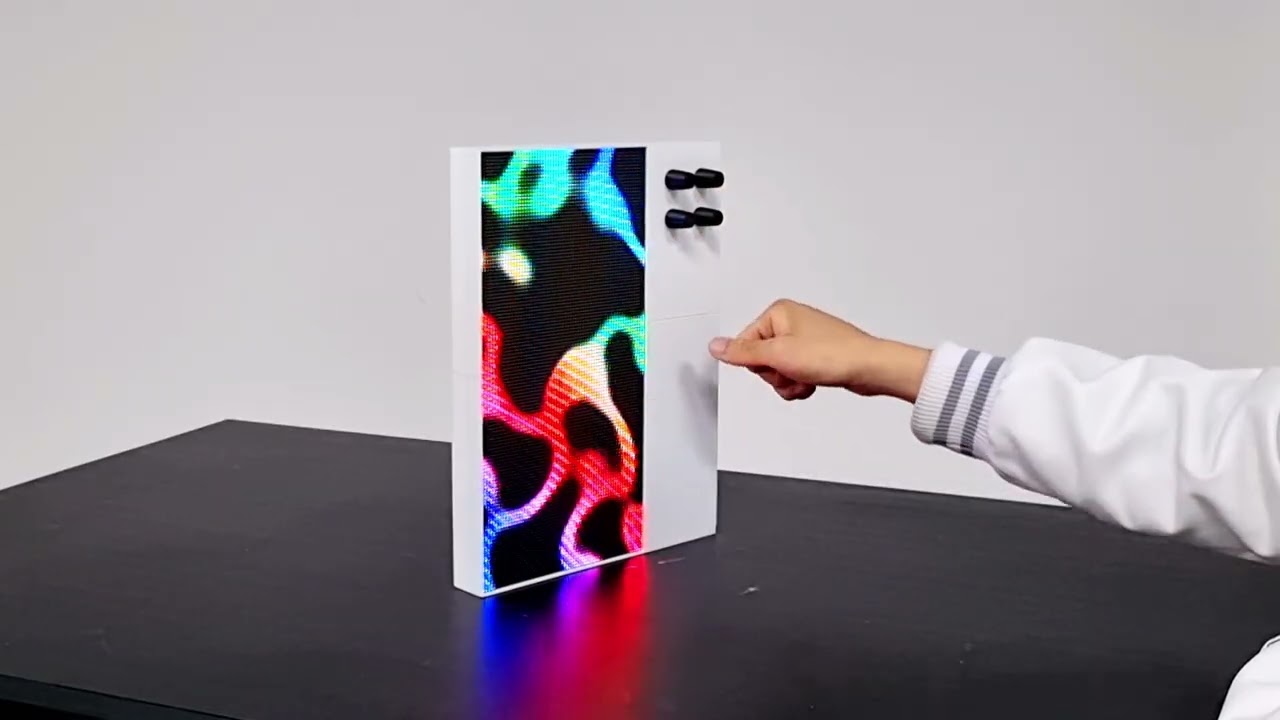
Patternflow is an open-source LED synthesizer. You play it with four knobs. 8,192 pixels across a 128 × 64 matrix respond the instant you turn one; nothing is pre-rendered, every frame is computed live on the device. A pattern is just a small file, so every Patternflow plays every pattern anyone makes.
Almost every screen around us is a playback device. It takes in content and shows it to us, and we sit in front of it and watch. Patternflow is different: touch it and it answers in that instant, and nobody plays the same thing twice.
In January 2026 I stopped by the Nam June Paik Art Center, which happened to be running an event marking twenty years since Paik's death. That is how I ended up standing in front of Participation TV (1963): you speak into a microphone and the picture on the screen moves with your voice. It turned the viewer from someone watching into someone taking part. I spoke into it, and my voice became the picture.
Two months later I connected an LED matrix and a potentiometer for the first time.
Where Paik brought the audience into the work, Patternflow hands over the making of it.
I put that first pattern, Patternflow: Origin, on an LED matrix with four knobs and posted it online. Some people asked how to buy it; far more asked how to build it. So everything went public: schematics, firmware, 3D models, the build guide, and the whole workflow for making new patterns.

Builds by Nath (UK), shooter (Poland), day (France), Enerjoy (Norway), SimonePDA (UAE), Nick (USA), and Jon (USA).
Builders from around the world keep adding pins to the build map. Someone built theirs as a Raspberry Pi port with a 64 × 32 matrix, another layered paper and acrylic into a diffuser, others cut their own enclosures. Two of them live in DJ booths.
I started this alone. It hasn't worked that way for a while now. The web-upload feature wasn't mine: someone suggested it, built a proof of concept, and shared the code, and two days later it shipped as a main feature. The .pfm pattern modules came the same way. A contributor designed the loader, built it, and proved it on hardware before proposing it. They're core to the instrument now.
The clearest case started on the other side of the world. A media art collective took Patternflow's pattern modules, added MIDI control and a microphone, and built a browser-based instrument of their own: MOTIFLOW, recently shown in a gallery. Patternflow had become something people build their own instruments out of.
Patternflow is a thing we're all making now.
The Full Build Guide covers the official route: the custom PCB and a 3D-printed enclosure. Don't want to order a board? The Breadboard Build Guide wires the same electronics with jumper wires instead, and that's a real Patternflow, not a temporary prototype. Every other combination is on the Assembly Map. Parts run about US$100–200 (BOM), it's all big through-hole joints, and every first-timer who has built one finished it. Most came back saying the soldering was the fun part.
When yours lights up, tell us. Post it in Discord or Discussions and it goes on the build map, a globe of Patternflows where each pin carries its build's story. The map is for the ones people made themselves: every pin is someone who built one from these files, in their own material, wherever they are. The goal is simple: cover it with pins.

If you'd rather have one arrive assembled, tested, and flashed, the Crowd Supply campaign launches Q4 2026. Subscribe on the page and you'll hear the moment it opens.
You don't need hardware to start. The Live Editor is a full Patternflow simulator: turn the virtual knobs and it behaves like the real thing. Patterns start as JavaScript in the browser, and you don't have to write it yourself. Click Copy creation prompt, paste it into your AI assistant with a description of the look you want, paste back the code it returns, and play. You don't write GLSL or touch a rendering pipeline: the template handles the encoder mapping, brightness curve and pixel buffer, and you describe the visuals.

Pattern Lab is the full studio, and where a pattern reaches the hardware. Generate variations in batches, shape color ramps, retune knob ranges, then send it to your device: it builds into a small .pfm module and installs over Wi-Fi, about ten seconds start to finish. You never plug in a cable, reflash the board, or open an IDE. The Capture panel takes the same pattern off the panel: a PNG at print size for a business card, or an MP4 loop for a post, rendered in your browser with nothing uploaded.
When it looks right, publish it to the Community. More than a hundred patterns are up already and the range keeps widening, from quiet waves to chaos-theory studies, every one written as code and every one playable under the same four knobs. Collect patterns into a deck and send it to your board in one click. Browsing needs no account, and publishing asks a username and password, no email. The Pattern Guide walks the whole loop.

Patterns don't stay on the wall, either. New pattern studies go up on Instagram almost daily. Publish something that stands out and it can get featured there, or ask for a collab on Instagram and we'll post yours together.
Patterns are the surface. Underneath is an instrument still being designed, in the open, by whoever shows up. This is the whole system on one napkin:

The Workshop is where the project's future is worked out. It's a map of directions Patternflow could take: a wired OSC version, laser-cut enclosures, bigger panels. Anyone can pin themselves to a direction, say what they're working on, and start a thread.
It's already moving in directions I didn't choose. One contributor is building out MQTT further than I've had time to follow: units reaching each other across a network, one person's playing coming out of somebody else's device. Another is working on sound on the board itself. Another is taking the TouchDesigner link further than I did. None of it was assigned.
CONTRIBUTING.md covers how contributions flow. Questions and ideas go to Discussions or the Discord, whichever you can reach.
| Display | 128 × 64 HUB75 RGB LED matrix, P2.5 (320 × 160 mm) |
| Brain | ESP32-S3-WROOM-1 N16R8 (16 MB flash, 8 MB PSRAM) · standalone, no sending card |
| Input | 4× EC11 rotary encoders with push-switch; long-press encoder 4 to switch patterns (controls) |
| Power | 5 V over USB from any power bank; about 4 h per 10,000 mAh at max brightness with a typical pattern (see runtime) |
| Size / weight | 245 × 325 × 36 mm (9.6 × 12.8 × 1.4 in) · 933 g (2.06 lb) |
| Firmware | Arduino-compatible C++, modular pattern architecture, runtime switching (no reflash) |
| Flashing | Everything from the browser: one USB flash the first time, then it's all Wi-Fi. Patterns install as modules in seconds, full firmware builds land wirelessly too. Arduino IDE only for firmware development or other matrix resolutions |
| Connectivity | Wi-Fi and USB. Bidirectional OSC (Ableton/Max/TouchDesigner), MQTT and audio-react each ship in an edition you install in one click — the way patterns do — and switching keeps your patterns, networks and settings |
| Firmware | One image ships on the board; others are a click away on the shelf. Writing a feature or cutting your own firmware starts at docs/EDITIONS.md |
| Build | ~1 h hands-on (≈30 min soldering + ≈30 min assembly, first-build friendly) + ~10 h 3D printing · US$100–200 in parts (BOM) |
| License | MIT (firmware & web code) · CC-BY-SA 4.0 (hardware, docs, bundled patterns) · community patterns are licensed by their authors (summary) |
Patternflow runs off any standard USB power bank that can supply a couple of amps at 5 V. You don't need a wall adapter, so it stays portable. Rule of thumb: about 4 hours per 10,000 mAh at maximum brightness with a typical pattern.
Measured runtimes
In testing, a 40,000 mAh bank dropped about 13% over 2 hours at full brightness, which is roughly 15 hours on a full charge:
| Power bank | Approx. runtime (max brightness) |
|---|---|
| 10,000 mAh | ~4 hours |
| 20,000 mAh | ~8 hours |
| 40,000 mAh | ~15 hours |
These were measured with a bright generative pattern at maximum brightness, which is how the device is normally used. Lowering the brightness (long-press encoder 1) extends runtime well beyond these figures.
Sleep mode takes it further: the panel goes dark, the HUB75 transfer stops and the board idles, while staying on Wi-Fi so it can be woken again from MQTT or a browser. Hold encoder 2 for the NETWORK screen, then turn encoder 1; any knob or button wakes it. The pattern that was running comes back, as it does after a full power cut.
A pattern that fills the screen with white is a different story. The same 40,000 mAh bank dropped 9% in 30 minutes: about 26.6 W, or roughly 4.8 A at 5 V, which is above what a typical USB-A port is rated for and enough to make the connector warm. That works out to ~5.5 hours on a 40,000 mAh bank. A total-pixel-power clamp is going into the firmware so this can't happen; until then, avoid near-full-white patterns on a power bank, or use a supply and cable rated for the current.
Every encoder does two jobs. Turn it, or give it a short press, and you are moving the pattern that's running. Hold it down and a device function opens instead, and a second long-press closes it again.

What a knob does to a running pattern is the pattern's own decision, so the same knob feels different on every one of them. That is what encoder 3 is for: hold it and each knob puts its own number on the panel, which saves counting around the front.
The device functions themselves are fixed. Encoder 1 is brightness. Encoder 4 opens the pattern list, where you turn to browse the names and long-press again to load one, choosing from whatever is installed at the time. Encoder 2 puts the board's IP address on the panel, and typing that into a browser opens the web console, which carries every feature the device has and works from a phone.
A new board boots into Origin, concentric sine waves sampled by an emergent grid, and long-pressing encoder 4 opens the list of whatever else is installed. Patterns live on the filesystem rather than inside the program. The firmware compiles in Origin alone, as the failsafe a board can always boot into, and everything else installs as .pfm modules over Wi-Fi, up to 128 of them, no reflash. Adding a pattern never costs a firmware update, and a firmware update never touches your patterns, your Wi-Fi, or your storage.
A new board is therefore nearly empty, so a set ships with it: the Basics pack, 33 patterns, at the top of the decks shelf. One click installs the lot, no account and no build queue, or drop the .zip on your board's Patterns page yourself. The Live Editor opens with its own preset library of 42 patterns, each loadable and remixable in the browser.
The Arduino IDE is only needed for firmware feature development or targeting an LED matrix with a different resolution; see firmware/patternflow/README.md and Custom Patterns. To rebuild the shipped pack from the repo's own preset sources, see firmware/toolchain/make_pack.py.

Each of these lives in an edition — a firmware you install from the shelf in one click, the same way patterns arrive, and switching keeps your patterns, Wi-Fi networks and settings. OSC and audio-react are in Audio; MQTT is in Performance, alongside sequences and the Director. Why it is arranged that way, and how to build your own: docs/EDITIONS.md.
Bidirectional OSC. Over Wi-Fi, Patternflow speaks OSC in both directions: knob turns, button presses, and pattern switches stream out to a remote host (Ableton Live, Max/MSP, TouchDesigner, anything that speaks OSC), and incoming OSC messages drive the device exactly like physical encoder motion. Play Patternflow as a controller for your set, let your set drive the light, or both at once. If you play MIDI instruments, this will feel like home. For Ableton Live Suite there's a ready-made Max for Live bridge in integrations/ableton. Click Connect, map the four knobs to any Live parameters, done. The wire protocol is documented in docs/osc-spec.md.
MQTT. Patternflow also speaks MQTT, both ways, on the broker you already run. Knob turns and pattern changes publish as they happen; messages coming the other way move the knobs and switch patterns exactly as a hand on the encoder would. Two boards pointed at the same broker follow each other, which is the short version of why it exists. It also puts the device on the same bus as the rest of a home or venue setup, so Home Assistant, Node-RED or a lighting desk can drive it without anything Patternflow-specific in the middle. Point it at a broker on the device's own MQTT page; a pattern can be addressed by name or by slug. Publishing 1 to <prefix>/sleep puts the panel to sleep and 0 wakes it, with the current state mirrored on <prefix>/sleep/state. That is enough for a Home Assistant switch, and it is the one command a panel obeys whether it is set to Publisher or Subscriber. Contributed by @SimonePDA (Simone Majocchi), along with the browser-side zip unpacking that makes pattern packs install in one click.
Home Assistant. There is a ready-made integration in integrations/homeassistant, installable through HACS as a custom repository: the panel is discovered on the network and appears as a device with an On/Sleep switch, a pattern picker, the four knobs, and the numbers worth watching. It also ships a dashboard card that plays the running pattern with the four encoders laid over it as zones you drag — by mouse or by thumb. Everything runs on your LAN over the device's own HTTP API; the only thing that needs the broker above is turning a knob, because that is the one command the HTTP API has no endpoint for. The card never asks the panel for pixels — it runs the pattern's own code in your browser, sandboxed, which is the only version of a live preview this device can afford. The wire protocol behind all of it is documented in docs/rest-api.md.
Audio-react. The Chrome/Edge extension in tools/patternflow-audio-extension captures the current tab's audio, splits it into four bands you shape on a response graph, and sends the levels to the panel over a WebSocket. A pattern reads them as ordinary parameters, so every encoder-driven pattern reacts with no audio code of its own. The panel can also listen for itself: an on-board microphone runs the same analysis on the device, with no browser involved.
Patternflow is built around a standalone ESP32-S3 driving a HUB75 RGB LED matrix at low resolution, where each pixel reads as a discrete point of light with its own brightness and color. Four rotary encoders feed firmware written in Arduino-compatible C++ around a modular pattern architecture: each pattern is a self-contained module with its own setup, update, and draw routines, while the shared framework handles input, LED rendering, mode transitions, and color calibration. I designed the PCB myself; the enclosure is 3D-printed by default, with stainless steel, transparent acrylic, and laser-cut variations in progress.
Moving fast. v3.3.0 is out: the panel's color is tunable while you look at it, and ramps interpolate in OKLab instead of collapsing to grey. v3.2.0 made patterns install over Wi-Fi as
.pfmmodules, no reflash. On v2.x hardware? Everything you need stays bundled at v2.1.0. Follow the changelog and the journal for what's current.
| Folder | Contents |
|---|---|
firmware/ |
Arduino code for ESP32-S3, the custom pattern template, and the toolchain that builds patterns into .pfm modules and packs |
hardware/ |
Enclosure files and electronics source files (case, PCB, Gerbers, schematic PDF) |
web/ |
Next.js site (landing, Live Editor, Pattern Lab, community, browser flasher & build server, journal) |
docs/ |
Assembly map, build-guide media, manifesto, license summary |
tools/ |
Desktop-side helpers, including the audio-react browser extension |
custom_components/ |
The Home Assistant integration itself. At the root because that is the only path HACS reads; its tests, lint config and scripts live in integrations/homeassistant/ |
integrations/ |
Host-software bridges: Ableton Live / Max for Live (OSC knob mapping), Home Assistant (device, entities and a dashboard card) |
Docs: Full Build Guide · Pattern Guide · Assembly Map · Custom Patterns · HTTP API · OSC Spec · Manifesto · Changelog · License Summary
Links: patternflow.work · Community · Crowd Supply · Releases · Discord · Instagram
Builds, documentation fixes, part sourcing tips, and custom patterns are all welcome. CONTRIBUTING.md covers how contributions flow, including the inbound = outbound pattern licensing.
| When | Milestone |
|---|---|
| Jan 2026 | Patternflow: Origin, the first work as a new media artist, built around 3D-printed forms and the seed of what became Patternflow · visited the Nam June Paik Art Center |
| Mar 2026 | The Origin pattern ran on a physical LED matrix with four knobs for the first time |
| Apr 2026 | Instagram and the Arduino subreddit responded strongly (150,000+ views and 3,700 upvotes), and the community asked for the files, not a product, so Patternflow went open source · first PCB fabricated (sponsored by PCBWay) · website live |
| May 2026 | Reached 100 GitHub stars · the first collaborator joined · Crowd Supply agreement · Discord community growing |
| Jun 2026 | Crowd Supply pre-launch page live, backed by countless refinements toward mass production · Instagram passed 1,000 followers · first community-made pattern shared |
| Jul 2026 | Refining the design for mass production · growing an active community · outreach and promotion |
| Aug 2026 | Community rebuilt end to end (the live wall, decks, and the Workshop) · patterns now install as Wi-Fi modules, and the Pattern Guide documents the whole loop · Crowd Supply launch prep in full swing |
| Next | Launch the Crowd Supply campaign (Q4 2026) at the lowest sustainable price · send Patternflow further out into the world · collaborate with more artists · earn academic recognition |
| 2028 | Grow Patternflow into a self-sustaining community and ecosystem, then move on to the next project |
Longer write-ups and the full story behind each step live on the journal: the whole process, written up at least weekly since the beginning, the thinking and the emotions included, and the parts that went badly too. If you want to know why this project exists and what it costs to keep alive, start there.

Patternflow's PCB fabrication and 3D-printed enclosure are sponsored by PCBWay. The first PCB came back clean and on-spec, ordering was straightforward, and the team has been genuinely responsive throughout. That support made these milestones possible.

The first Patternflow PCB, fabricated by PCBWay.
The SPDX header inside a file is the authority; folders are not license boundaries. Full breakdown in the License Summary.
- Firmware & web code: MIT (LICENSE-MIT)
- Hardware, designs & docs: CC-BY-SA 4.0 (LICENSE-CC-BY-SA)
- Bundled patterns (the presets shipped in the firmware and the editor): CC-BY-SA 4.0, per-file SPDX headers.
- Patterns contributed to the repository: inbound = outbound. By sending a pattern as a PR, issue or Discord post you license it under CC-BY-SA 4.0, attribution kept in the code header (no CLA). See CONTRIBUTING.md.
- Patterns published to the Community: licensed by their author, either CC-BY-SA 4.0 (default) or CC-BY-4.0. Both permit commercial use with credit; CC-BY-SA additionally requires adaptations to stay under the same license. A fork can never be looser than what it came from, and carries a
Based on:credit to the original author in its source.
"Patternflow" is a trademark of SeungHun Lee.
The Patternflow series: LED Synthesizer (2026) · Origin (2026)