
A Chrome extension that lets you control the volume of each browser tab independently — boost a quiet tab up to 150% or silence one that's too loud, all without leaving your current tab.
- Per-tab volume control from 0% (mute) to 150% (boost)
- Lists all currently audible tabs so you can see and jump to them
- Volume adjustments take effect in real time
- Built on the Web Audio API — no native code or external dependencies
-
Go to the Releases page and download sound-control.zip.
-
Unzip the file. You'll get a folder called
SoundControl— put it somewhere you won't accidentally delete it (e.g. your Documents folder). -
Open Chrome and type
chrome://extensionsin the address bar, then press Enter. -
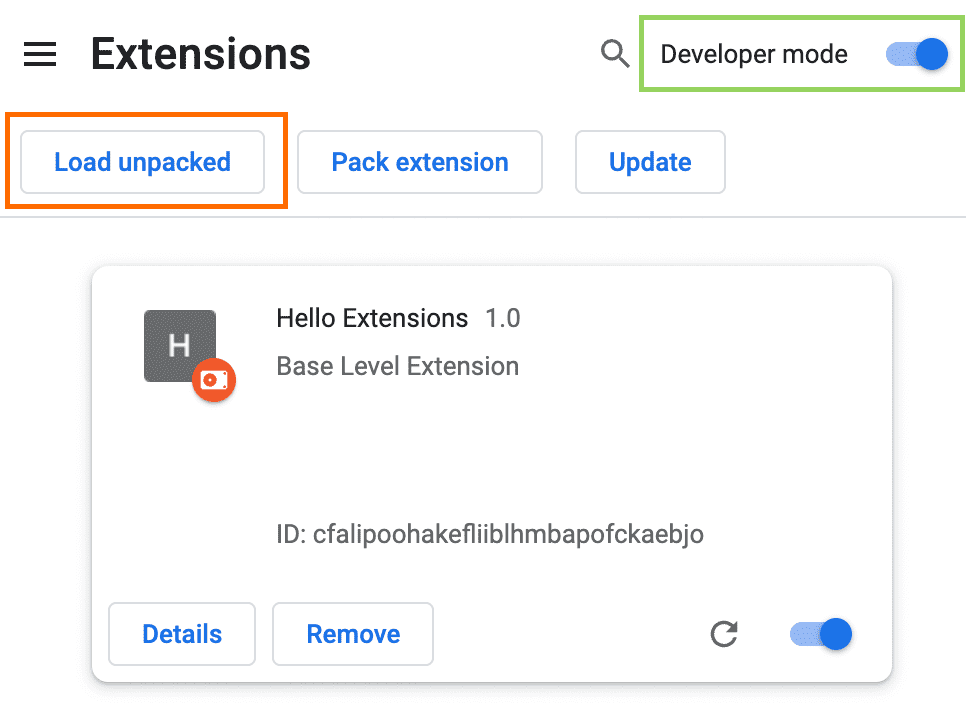
Turn on Developer mode using the toggle in the top-right corner of the page.
-
Click Load unpacked, then select the
SoundControlfolder you unzipped in step 2. -
Sound Control is now installed. Click the puzzle-piece icon (🧩) in the Chrome toolbar and pin Sound Control so it's always visible.
git clone https://github.com/feissn/SoundControl.git
Then follow steps 3–6 above, selecting the cloned folder in step 5.
- Click the Sound Control icon in the toolbar while any tab is playing audio.
- Drag the slider to set the volume for the currently active tab (0–150%).
- The Audible tabs list shows every tab currently producing sound, along with its current volume level.
- Click a tab title in the list to switch to that tab.
Note: Volume changes only take effect after you move the slider for the first time on a given tab. The browser needs to capture the tab's audio stream before volume can be adjusted.
Sound Control uses the Chrome tabCapture API to obtain an audio stream from a tab, then routes it through the Web Audio API gain node to adjust the volume before it reaches your speakers.
Because Manifest V3 service workers cannot access browser audio APIs, the audio processing runs inside a hidden offscreen document that stays alive in the background.
Popup → Service Worker → Offscreen Document
                              └── tabCapture stream → GainNode → speakers
SoundControl/
├── manifest.json          # Extension manifest (Manifest V3)
├── html/
│   ├── popup.html         # Extension popup UI
│   └── offscreen.html     # Hidden document for audio processing
├── css/
│   └── popup.css          # Popup styles
├── js/
│   ├── background.js      # Service worker — message routing, tab capture coordination
│   ├── offscreen.js       # Audio capture and gain control via Web Audio API
│   └── popup.js           # Popup UI logic
└── image/
    ├── 48.png             # Toolbar icon
    └── 128.png            # Extension store icon
Bump the version in manifest.json, then push a version tag:
git tag v2.0.1
git push origin v2.0.1
GitHub Actions will automatically build sound-control.zip and attach it to a new GitHub Release.
- Google Chrome 116 or later (for
chrome.tabCapture.getMediaStreamIdand offscreen document support)
MIT