
One brain for the company. A filtered copy for every person.
Shared team knowledge on plain, Obsidian-compatible markdown and git. A compiler builds each person a copy containing only the notes they're allowed to see — anything else is never on their machine, so there's nothing to leak. Works with the AI agents and tools your team already uses.



Prefer pictures? Three visual walkthroughs, shallow to deep: the quick version, how it works, and where the brain lives — the production deployment architecture.
The complete system, not a demo. What you clone is the whole thing: the same code built to run a company's shared brain, with nothing held back for a paid tier. It's early — pre-1.0, installed from source, no PyPI package yet — and honest about its limits, which are spelled out below rather than hidden.
Every team hits the same wall with shared knowledge:
- A wiki nobody updates goes stale.
- A tool that auto-copies everything into one place overshares — client details, HR notes, and half-formed drafts end up in front of people who were never meant to see them.
brainkit takes the middle path, and makes the "never meant to see it" part a structural guarantee.
Your company keeps one master vault of notes — plain markdown files, readable in Obsidian or any editor. brainkit builds a personal copy for each person that contains only the notes they're allowed to see. Each person works inside that copy, alone or with whatever tools they connect to it.
flowchart TB
    In["Notes come in<br/>email · chat · voice · webhooks · uploads"]

    subgraph server["On your server"]
        M[("Master vault<br/>one git repo — everything")]
        C{{"The compiler<br/>filters per person"}}
        V["Alice's vault<br/>only what she may read — one per person"]
        Q["Sharing queue<br/>a human approves every publish"]
    end

    subgraph laptop["On Alice's machine"]
        E["Her copy of the vault<br/>editor · CLI · AI tools"]
    end

    In --> M
    M --> C
    C -->|"leaves out what she can't read"| V
    V -->|"git pull"| E
    E -->|"her edits — validated server-side"| M
    E -.->|"suggests: share this with the team"| Q
    Q -->|"approved"| M
Sharing something new goes through one door: someone drafts a suggestion ("this looks useful for the whole team") — a person, or an agent acting on their behalf — and a person approves it before it's published. Nothing moves from private to shared any other way.
The third-party tree (Clients/ by default) works the same way from the other direction: a person's agent can request its own new client space instead of an admin hand-editing config, and once granted, that client's owner can share access to a colleague themselves — new grants still go through the same human approval, revokes apply immediately. See Spaces & permissions.
Want it beyond work? Run your own instance — solo as a brain of one, or for your household as a family brain.
Most tools protect data with permission checks at read time — one misconfigured rule and the note is on screen. brainkit is different: if a note isn't yours to read, it is never copied to your machine at all. There is nothing for an app, an AI agent, or a sync bug to leak.
- Fails closed. If anything goes wrong while building your copy, you keep the previous copy. A failure can only ever mean you see less than you should — never more.
- Sensitive folders are locked by default. Client folders are hidden unless someone is explicitly granted access. Forgetting a rule hides a note; it never exposes one.
- One door for sharing, with a human at it. Private notes reach the shared brain only through a review queue a person approves — and the destination is checked again at publish time.
- Every change is on the record. Everything is a git commit with its own identity — a complete, tamper-evident history of who added what, when.
- Tested, not just promised. The test suite generates randomized company layouts seeded with trap notes that must never escape, and verifies they never do.
The deeper story — link stubbing, symlink and path-traversal defenses, the two-phase swap — is in The compiler.
The brain is a shared platform for people and software. Your team works in Obsidian; agents and any MCP client reach the same vault as a tool, and every one of them inherits the boundary, so an agent can only ever see what its person can see. It's runtime-independent, too: underneath it's plain markdown and git, with no hard dependency on any AI vendor.
- Claude Code — zero install. Every compiled vault ships a generated
CLAUDE.mdthat carries the working protocol, scoped to that person. - Hermes Agent (NousResearch) — first-class support via
hermes profile install, plus a ready-to-run Docker image indeploy/agents-box. - Any MCP client —
brain mcpexposes search, note reading, links, typed-relation graph walks, recent changes, and time-stamped facts over the Model Context Protocol, so Claude Desktop, Cursor, Codex, and friends can use the vault as a tool. - Or no agent at all — the vault is just files. Obsidian,
grep, and your editor all work.
| Capture | Email, chat (Telegram), voice, file uploads, and signed webhooks (brain webhook — Fathom, Zapier, Composio triggers) all funnel through brain ingest — one hardened path that refuses unknown senders and path tricks |
| Corrections | People/<id>/Corrections/ — when someone tells their agent it got something wrong, the agent writes the rule down; once that person confirms it in their dashboard, it becomes part of their generated protocol on the next compile, so the agent loads it every turn instead of forgetting it. Personal by default; one worth sharing goes to the team through the same human-approved queue |
| Retrieval telemetry | .brain/retrieval-stats.json — counts of what search returned, so an index that never built or a query that always comes back empty is visible instead of silent. Counts only, never the words anyone typed. An opt-in raw log is available for retrieval design work and reports its own state while it runs |
| Search | Hybrid search (brain search) fusing keyword, semantic, and graph (Personalized PageRank over typed relations and wikilinks) legs, built per-vault so it can only ever surface notes you're allowed to see |
| Live user dashboard | brain dashboard in a person's vault — inbox, open actions, notes-by-space, an interactive 2D/3D map of how their notes connect, a Facts tab of time-stamped facts (ask what was true on any date), and search across everything they may see. Updates live over WebSocket; --html writes a static snapshot |
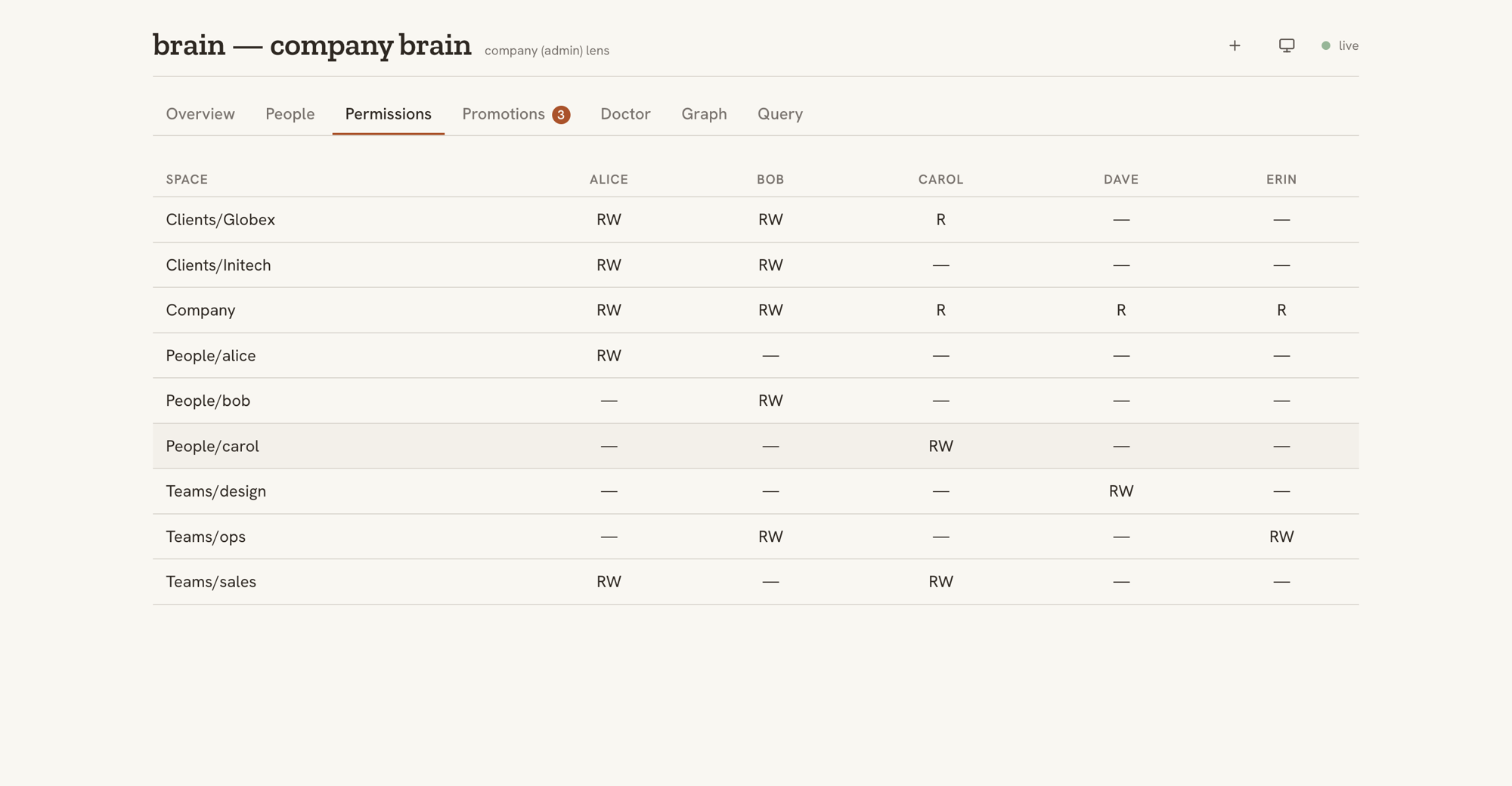
| Admin dashboard | brain dashboard on the master — every person's vault at a glance, the sharing review queue, a read/write permissions matrix, and live brain doctor findings (including the name-leak check) |
| Sharing queue | brain promotions — a person or an agent drafts, a human approves; the only private→shared path |
| Write-back | Edits flow back to the master vault with every path validated server-side; one out-of-bounds edit rejects the whole batch |
| Automation | brain cycle — one cron-able command: apply edits, sweep drafts, rebuild everyone's copy |
| Health checks | brain doctor — read-only audit for CI or cron; even flags a restricted client's name typed into a shared note |
| Plain files | Obsidian-compatible markdown + git — portable, diff-able, yours |
Run brain dashboard and you get a live, self-hosted view of the brain — no extra service, no SaaS. It updates in real time over a WebSocket, and can also export a static HTML snapshot with --html. There are two lenses.
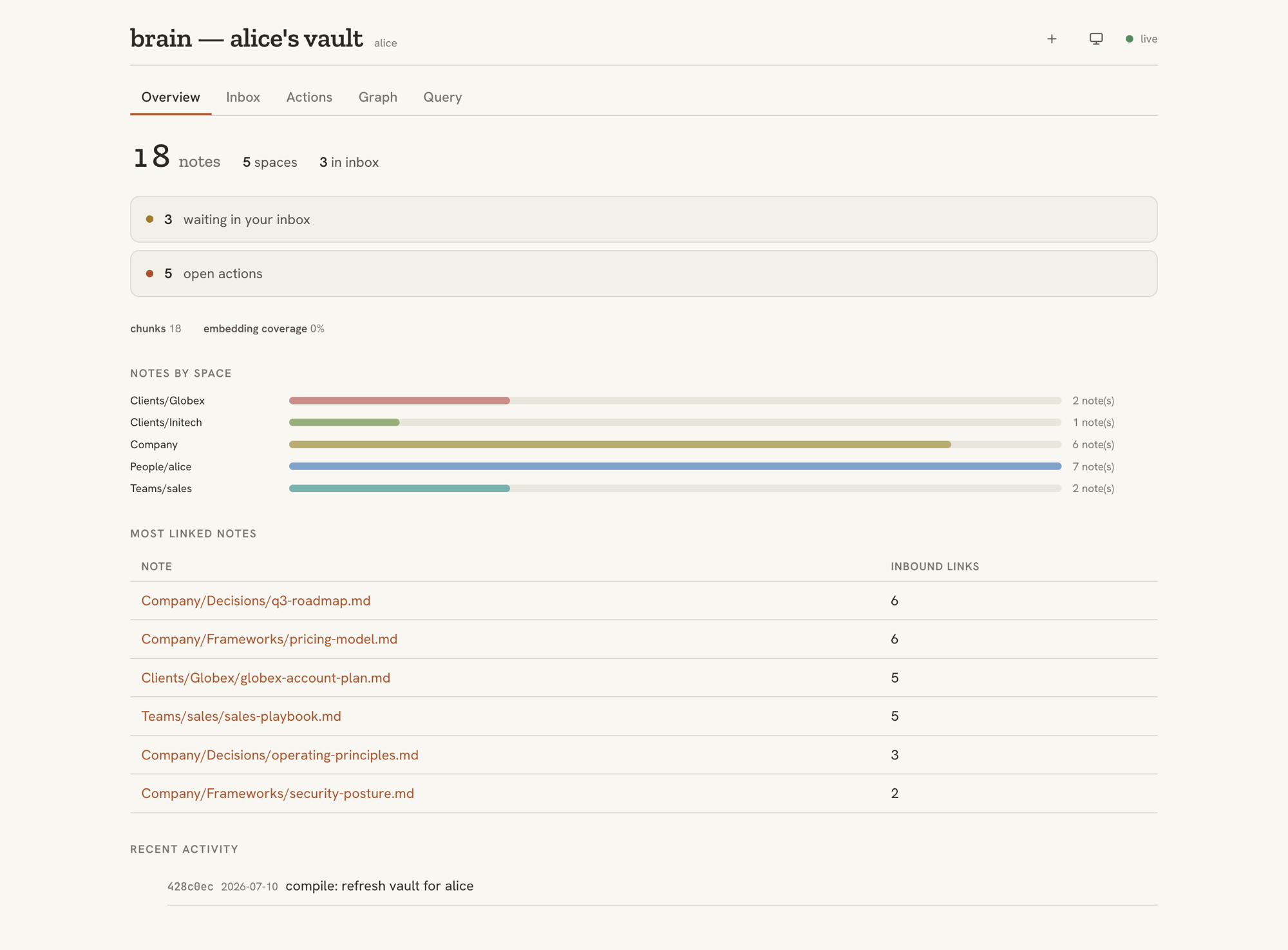
Each person's live dashboard shows their own vault, and only their own: what's waiting in the inbox, open actions, notes by space, their most-linked notes, an interactive 2D/3D map of how those notes connect, and search across everything they're allowed to see. Notes can be captured straight from the dashboard, too. A Facts tab lists the vault's time-stamped facts — filter by entity or type, or pick a date to see what was true then — and the 2D map rings typed entity pages (clients, people, projects) by type.
The admin dashboard is the operator's view of the whole company: every person's vault at a glance, the human-approval sharing queue, live brain doctor findings — and a read/write permissions matrix that makes "who can see what" impossible to get wrong by accident.
Everything runs on your infrastructure. No SaaS, no accounts, no phoning home. Semantic search is optional and points at any OpenAI-compatible embedding endpoint — including one you host yourself, so note text never has to leave your network.
The repo ships the documented two-box reference deployment used in production:
- A brain box holds the master vault and everyone's compiled copies, served over SSH with a restricted, single-purpose key.
- An agents box runs one Docker container per person, each mounting only that person's vault. The mount is the boundary — an agent physically cannot read a colleague's notes.
- Encrypted offsite backups, per-person agent snapshots, supervised sync, and health checks are included as scripts in
deploy/, not left as an exercise. What gets protected and how each failure recovers: What survives, or the full Backups & Restore guide.
Start smaller if you like: a single machine and a cron job is a complete, working setup.
Five minutes, one machine, no accounts. You need Python 3.12+, uv, and git.
# install
uv tool install git+https://github.com/joedanz/brainkit

# create a company vault, describe your people, build everyone's copies
brain init /srv/brain/master --company "Acme Co"
$EDITOR /srv/brain/master/_meta/org.yaml
brain compile --master /srv/brain/master --out /srv/brain/compiled

# check the result
brain doctor --master /srv/brain/master --out /srv/brain/compiled
Keep it fresh with two cron lines:
*/10 * * * * flock -n /var/lock/brain-cycle brain cycle --master /srv/brain/master --out /srv/brain/compiled --index --json
0    * * * * brain doctor --master /srv/brain/master --out /srv/brain/compiled --json
flock -n (util-linux; brew install flock on macOS) is what keeps a busy brain honest: a cycle that outruns its interval would otherwise have the next one start on top of it, and two compilers rebuilding the same vault race each other. If a cycle is still running, the next tick skips instead. doctor is read-only, so it needs no lock.
Each person then clones their own copy and, if they want, plugs in a tool:
git clone brain-box:/srv/brain/compiled/alice ~/brain
brain index --vault ~/brain
claude mcp add brain -- brain mcp --vault ~/brain   # any MCP client — optional
Full walkthrough: Getting started · Per-employee setup
| Command | What it does |
|---|---|
brain init |
Scaffold a new master vault with the default layout and config |
brain ingest |
Safely file an incoming note into one person's inbox |
brain webhook |
Receive signed webhooks (Fathom, Composio, Zapier…) as inbox notes |
brain compile |
Build each person's filtered copy from the master vault |
brain writeback |
Apply a person's edits to the master, validating every path |
brain promotions |
List, approve, or reject drafts waiting to be shared |
brain shares |
List, approve, reject, or revoke access someone requested to share on a space they own |
brain cycle |
The cron loop: write-back → materialize clients → sweep shares → sweep share decisions → sweep promotions → recompile |
brain triage |
Route doctor findings into the inbox of whoever can act on them |
brain index |
Build or refresh a vault's local search index |
brain search |
Query a vault — keyword, semantic, or both |
brain graph |
Walk a note's typed relations (up/down, same, prev/next) |
brain facts |
Query time-stamped facts (now, as-of, or believed-on a date) |
brain mcp |
Serve search, reading, links, recent changes, and facts to MCP clients |
brain status |
Counts, freshness, and health at a glance |
brain dashboard |
Live local dashboard (or a static HTML snapshot) |
brain doctor |
Read-only integrity audit, CI-friendly exit codes |
brain rename-entities |
Rename the third-party tree (Clients/ → whatever fits you) across rules, requests, and the queue |
brain --version reports the installed version, plus the exact commit when you installed from git or a container image — because a version reads the same for every commit between releases, and deployments rarely sit on a release.
Flags and exit codes: CLI reference.
- Python 3.12+ and git. Runtime dependencies are just
pyyaml,sqlite-vec, andaiohttp. - Semantic search (optional): set
BRAIN_EMBED_BASE_URLto any OpenAI-compatible embedding endpoint. Without it, search runs keyword-only. Note: configuring a provider sends note text to that endpoint — point it at something you host if that matters to you. sqlite-vecneeds a Python whosesqlite3was built with loadable-extension support. Homebrew, pyenv, uv-managed, and most Linux distro Pythons have it; the common exception is the python.org macOS installer, which ships it disabled. Check yours withpython -c "import sqlite3; print(hasattr(sqlite3.Connection, 'enable_load_extension'))". If it's unavailable, search degrades gracefully to keyword-only — nothing breaks, you just lose the semantic leg.
Known and measured, so you find out here rather than in production.
- Disk multiplies with headcount. Every person gets a full copy of every space they can read, and each vault is its own git repo. A measured example — 1 MB of master content, 60 shared notes, 10 people — compiles to 8.8 MB, and 13 MB once each vault is indexed.
.gitis 57% of a vault, not the notes. Budget on readers-per-space, not on vault size. Sizing → - Concurrent edits to one file are last-write-wins. Within a shared writable space (
Teams/*by default), two people editing the same note both apply cleanly and the later cycle wins — no merge, no conflict flag. Per-person spaces are immune by construction: only one person can writePeople/<id>/. Details → - Revoking access does not un-deliver what was already read. A revoke removes the space from that person's next compile, but their vault is a git repo: notes they could read while granted stay in its history, and a fresh clone carries that history. Revocation governs the future, not recall — rotate anything whose value survives being read, and to purge the server's copy, delete their compiled vault and recompile (it rebuilds with a fresh history). A clone already on their laptop is beyond any server's reach. Details →
- The dashboard has no authentication. It binds
127.0.0.1, rejects non-localHostheaders, and enforces a strict CSP — but those defend the loopback assumption rather than replace a login. Pass a non-loopback--hostand you have published the vault; the CLI warns, and that warning is the whole protection. The reference deployment reaches it through a tunnel, not an open port. - Semantic search sends note text to your embedding provider. Keyword-only is the default and leaks nothing. If that tradeoff matters, point
BRAIN_EMBED_BASE_URLat something you host. - Not packaged yet. No PyPI release — install from source. There is a tagged release with a built wheel and sdist attached.
- Pre-1.0. Minor versions may break vault layouts or
_metaschemas. Breaking changes are called out in CHANGELOG.md with what to do about them. - Scale is tested in the tens. The design target is a 5–25 person pilot growing to 150+, where growth adds capacity rather than changing the architecture. Above that, nothing is known to break — and nothing has been measured either.
- Getting started — a working brain in five commands
- The compiler — why the privacy guarantee is structural
- Spaces & permissions — who sees what, and why deny-by-default
- Promotions — the human-approved sharing queue
- Retrieval — hybrid search that inherits the boundary
- Getting things in — email, chat, voice, webhooks, and uploads
- A brain of one — run it solo as a personal brain
- Reference deployment — the secure two-box setup
- Backups & Restore — encrypted offsite, and the restore drill for every failure
- Configuration —
org.yamlandspaces.yaml
git clone https://github.com/joedanz/brainkit && cd brainkit
uv sync --extra dev
uv run pytest
The test suite is the contract — especially the no-leak property tests. If you're touching the compiler, ingest, or write-back, start there.
See CONTRIBUTING.md for the full guide, CHANGELOG.md for what's in each release, and SECURITY.md to report a vulnerability privately — never in a public issue.
MIT