


AdjustNamespace is a Visual Studio 2026 (and 2022 17.14) extension which brings the C# namespaces in accordance with the location and rules the resulting regressions in the code (including XAML), e.g. fixes the broken references. This extension works like Resharper Adjust namespaces function. If you know Resharper, you know what this extension is trying to do.
The same job is done by the console utility adjustns (see Console utility), which needs no Visual Studio at all and is therefore usable on a build server.
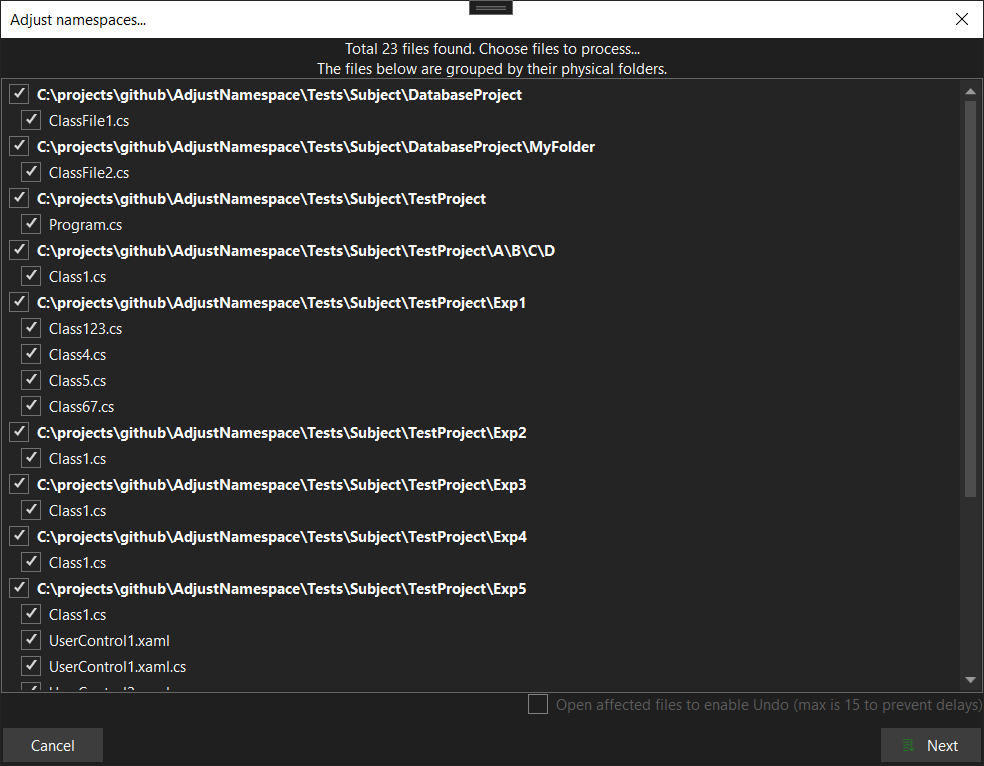
Select object (solution, project, folder or file) in solution explorer, click RMB, choose Adjust Namespaces... and follow the wizard.
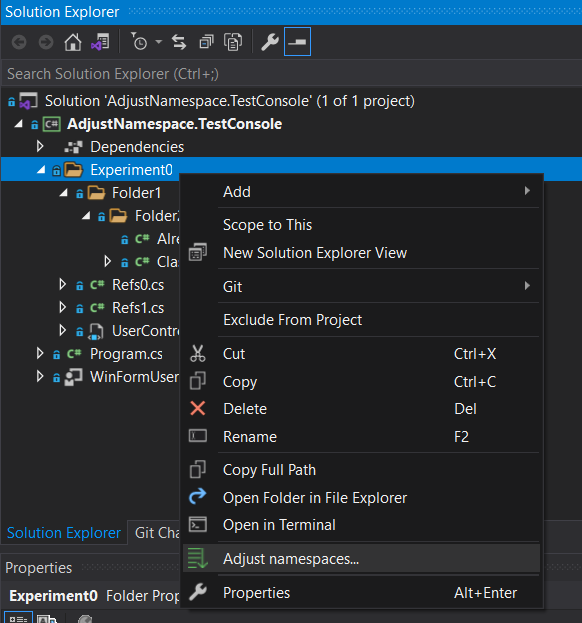
or choose the whole solution by this way:
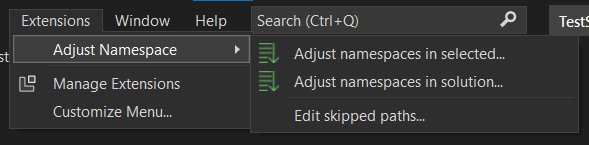
You can also exclude some folders from participating in namespace chain. AdjustNamepace stores such settings in its configuration xml file, in the folder of your solution. Commit that file to share it across your team.
| Command | Where it lives | What it does |
|---|---|---|
Adjust namespaces... |
Solution explorer context menu (solution, project, folder, file) | Adjusts the files of the selected items. |
Adjust namespaces in solution... |
Extensions -> Adjust Namespace |
Adjusts every file of the opened solution. |
Adjust namespaces in selected... |
Extensions -> Adjust Namespace |
Same as the context menu command, but available regardless of the active window. |
Edit skipped paths... |
Extensions -> Adjust Namespace |
Edits the folders which must not take a part in the namespaces. |
Show release notes... |
Extensions -> Adjust Namespace |
Opens RELEASE_NOTES.md of the installed version. |
- Preparation. Every project of the solution is compiled and the found errors are reported. The adjusting is based on the Roslyn semantic model, so a broken solution may lead to incorrect results. You are allowed to move next anyway.
- Selection. The chosen files are scanned and only those which really have to be changed are shown, grouped by their folder. Here you may uncheck the files you do not want to touch, tune the target namespace with a regex (see below) and decide whether the changed files have to be opened in the editor. If the target namespace of a file already contains a type with the same name, the scan stops with an error: such a move would break the compilation.
The same step has a collapsible Text references block: the aggressiveness of the search of the names of the moved types that are written as a text (see Text references) and which kinds of files are searched.
Review (only if the search has found something to show). Every text reference is a row: a level badge (Certain, Likely, Possible), the line with the name highlighted,
old -> newand a check box which the aggressiveness has preset; the tooltip tells why the score is what it is. Filter the rows by level,Check all Likely,Check allandUncheck allare there, a double click opens the file at the line.Nextruns the adjusting with the checked rows only. - Performing. The files are processed one by one, then the using clauses of the namespaces which became empty are removed from the whole solution.
- Report. The window does not close right after the run: it shows what has been adjusted (per file: the old and the new namespace, the files that had to be changed because of it and what was done in each), what has not been adjusted and why (blocked, nothing to move, not reached because of the cancel, failed) and the using clauses the cleanup has removed. What the run has not fixed (the text references that were left, the new compilation errors of the optional build check) is also put into the Error List as warnings, so it stays visible after the window is closed.
Copy as Markdownputs the report on the clipboard,Save report...writes it to a file (Markdown, or JSON by the extension), a double click on a file opens it. Whether the step is shown is an option, see Settings.
For every file the target namespace is built as
<default namespace of the project> + <folders between the project folder and the file>
and then modified by the optional user regex.
- The default namespace is taken from the project properties (C# and
sqlprojprojects). For the other project kinds (a shared project, for example) the project name without its last part is used:MyApp.Shared->MyApp. - The folders excluded by the user (see
Edit skipped paths...) do not take a part in the resulting name. - The user regex is applied to the whole resulting namespace. The second step of the wizard offers a few built in samples, e.g.
^[^.]+with an empty replacement renames the first part of every target namespace. - Files located outside of their project folder (linked files) are skipped.
- Files compiled by more than one project are skipped: a file of a shared project (
.shproj) which is referenced by several projects would get a namespace derived from one of them, which does not match the other ones. A shared project referenced by a single project is adjusted as usual, and so is a multi target project (net48;net8.0), whose files belong to several projects too but to a single project of the solution. - A file of a multi target project is skipped when its target frameworks disagree whether the namespace it is moved out of stays alive (a type of that namespace is declared under
#if NET8_0, for example): theusingclause of such a namespace is required by one target framework and does not compile for another one, and both of them are built of the same file.
The settings are stored in adjust_namespaces_settings.xml, in the folder of your solution. Commit that file to share the settings across your team.
<?xml version="1.0"?>
<AdjustNamespaceSettings xmlns:xsd="http://www.w3.org/2001/XMLSchema" xmlns:xsi="http://www.w3.org/2001/XMLSchema-instance">
  <SkippedFolderSuffixes>
    <!-- a rooted path -->
    <string>C:\projects\MySolution\MyProject\A\B\C\</string>
    <!-- or a path relative to the folder of the solution -->
    <string>MyProject\A\B</string>
  </SkippedFolderSuffixes>
</AdjustNamespaceSettings>
The per user options live in Tools -> Options -> Adjust Namespaces:
| Option | Default | What it does |
|---|---|---|
Aggressiveness |
Balanced |
The default aggressiveness of the search of the text references: Off, ReportOnly, Conservative, Balanced, Aggressive. The wizard shows it on the selection step, where it can be changed for this run; a solution can override it in its settings file. |
Search the comments, Search the xml configs, Search the json files, Search the Razor files, Search the project and settings files |
off, on, on, on, on | Which kinds of files the search looks into besides the string literals of C#. |
Run the build check |
off | Count the compilation errors of the affected projects before the run and after it; the new ones are listed in the report. It compiles the projects, so it takes time on a big solution. |
Show the report |
Always |
When the wizard shows the report after the run: Always, WhenSomethingIsLeft (a file is blocked, not processed or failed) or Never (the window closes as soon as the run is over). A failed run is always shown. |
The extension also keeps a few hidden options for the release notes gold bar and for the rating request.
C# files:
- the namespace declarations, both the classic (
namespace A { }) and the file scoped (namespace A;) ones; - the references to the moved types across the whole solution: a new
usingclause is added, or the fully qualified name is rewritten in place; - the usages of the extension methods declared in the moved static classes;
- the using clauses which point to the namespaces emptied by the adjusting are removed.
XAML files (.xaml and Avalonia .axaml):
- the
x:Classattribute; - the tags which reference a moved class through an xmlns alias;
- the
{x:Type}and{x:Static}markup extensions; - the other places where a class is referenced through an xmlns alias: an attribute value (
TargetType="local:MyButton"), an attached property (local:Helper.IsEnabled="True"), a custom markup extension ({local:UpperCase}) andx:TypeArguments; - the
xmlns:…="clr-namespace:…"andxmlns:…="using:…"clauses: a clause for the target namespace is created when required (in the same form as the source) and the clauses which became unused are removed.
Roslyn sees the references to a type that are written as code. A name written as a text keeps its old name after the move and breaks the program at run time only: Type.GetType("A.B.C, MyAsm"), new ResourceManager("A.B.Properties.Resources", ...), a comment. From 0.8.0 the extension searches for such names, gives every match a confidence score (0..100, with the list of the reasons) and changes the ones you trust.
- Only the full names of the moved types are searched (
A.B.C,global::A.B.C,A.B.Outer+Inner,A.B.C`1,A.B.C, MyAsm, Version=...), never a short name likeCustomer. A name has borders:X.A.B.CandA.B.CExtraare notA.B.C,A.B.C.Memberis. - The score depends on the place the name is found in (a string passed as a type name is worth much more than a name inside a sentence) and on the signs around it (the assembly of the moved type, a file extension, prose, a type of the same name in another assembly, test data).
- The levels are Certain (90..100), Likely (70..89), Possible (45..69) and Unlikely (below 45, hidden).
| Mode | Changed on its own | Offered (unchecked) |
|---|---|---|
Off |
||
ReportOnly |
nothing | from Possible |
Conservative |
Certain | Likely, Possible |
Balanced (default) |
Certain, Likely | Possible |
Aggressive |
Certain, Likely, Possible |
What is searched: the string literals of C# files (always, except in the Off mode) and, if you switch them on, the comments of C#; the directives of the Razor files (@using, @model, @inherits, @inject, @typeparam, @implements, @namespace of .cshtml and .razor files); <StartupObject> and CustomToolNamespace of a project file (a moved startup class is a build error otherwise); GeneratedClassNamespace and the Type of a setting of a .settings file; the xml configs (*.config: type, typeName, mapTo, contract, factory, the name of a service, any other value that is the name as a whole); appsettings*.json (the values of $type, type, class, the elements of Using, any other value that is the name as a whole). Other xml and json files are searched if you name them in the settings file (<TextReferenceFiles>). A $type in a json file gets a note in the report: data serialized with the old name (a database, a queue) cannot be fixed by an edit of the sources. A namespace (@using A.B) is changed only if the run empties it and all of its types go to the same place, and it is never more than Likely; a namespace that stays alive is left as it is. Every offered match is listed in the report with the line, the old and the new name and the score with its reasons. A match is changed only if the file still has the name where it was found.
Not detectable, and therefore not handled: names built at run time ("A.B." + name), and short or partial names inside strings ("B.C" for A.B.C).
To override the defaults for a solution, add the elements to adjust_namespaces_settings.xml (all of them are optional, a file without them keeps working):
<AdjustNamespaceSettings ...>
  <SkippedFolderSuffixes />
  <TextReferenceMode>Conservative</TextReferenceMode> <!-- Off, ReportOnly, Conservative, Balanced, Aggressive -->
  <ScanComments>true</ScanComments>
  <ScanXmlConfigs>true</ScanXmlConfigs>   <!-- also ScanJson, ScanRazor, ScanProjectFiles -->
  <TextReferenceFiles>                    <!-- xml and json files besides the usual configs -->
    <string>Services.xml</string>
    <string>MyApp\Config\*.json</string>
  </TextReferenceFiles>
</AdjustNamespaceSettings>The whole adjusting run is wrapped in a global linked undo transaction
(IVsLinkedUndoTransactionManager with mdtGlobal). One Ctrl+Z undoes every file the run
touched, including files that were never opened as editor tabs: C# edits go through
VisualStudioWorkspace.TryApplyChanges (invisible buffers) and xaml edits go through
InvisibleXamlBodyProvider. A cancelled or failed run aborts the transaction instead of
committing a half-finished undo unit. The console utility has no editor, so its safety net is
version control.
adjustns is the same core without the IDE: it opens a .sln, a .slnx or a .csproj with MSBuild, adjusts the namespaces and writes the files. It needs the .NET SDK installed (the projects are evaluated by the MSBuild of it) and nothing else — no Visual Studio, no extension.
It is not published to NuGet yet, so it is built from the sources:
dotnet pack AdjustNamespace.Cli -c Release
dotnet tool install --global --add-source AdjustNamespace.Cli\bin\Release AdjustNamespace.Cli
adjustns MySolution.sln
or simply run in place:
dotnet run --project AdjustNamespace.Cli -- MySolution.sln --dry-run
adjustns <solution> [options]
| Option | What it does |
|---|---|
<solution> |
The .sln, .slnx or .csproj to adjust. A folder is accepted too if it contains exactly one of them. |
-p, --path <path> |
Adjust this file, or the files under this folder, only. May be repeated; the whole solution is taken if it is omitted. |
--regex <regex>, --replacement <text> |
The same user regex the second step of the wizard offers: it is applied to every target namespace. Both of them are required for the regex to take effect. |
-n, --dry-run |
Report what would be changed and change nothing. |
--check |
Change nothing and exit with the code 2 if there is something to adjust. This is the mode a CI job runs the utility in. |
--force |
Adjust even if the solution does not compile. |
-v, --verbose |
Report every processed file and not the changed ones only. |
--text <mode> |
How aggressively the text references are searched and changed: off, report, conservative, balanced (the default), aggressive. With --dry-run the matches are listed with their scores (add -v for the reasons of every score). A match left at the Likely level is not an error: the exit code is not affected by the text references. |
--text-kinds <list> |
Where the text references are looked for besides the string literals of C#: a comma separated list of comments, xml, json, razor, project (the default is everything but comments). |
--build-check |
Count the compilation errors of the affected projects before the run and after it and list the new ones in the report. |
--report <path> |
Write the report of the run to this file: Markdown, or JSON if the extension is .json. The very same report is printed on the console after every run. |
--debug |
Write the detailed [Adjust] diagnostics into %TEMP%\AdjustNamespace.cli.log. |
-h, --help |
Show the help. |
The exit code is 0 when the run is over (including "there was nothing to do"), 1 when the utility has failed (or at least one file cannot be adjusted) and 2 when --check has found the files to adjust.
A few things which differ from the extension:
- the solution has to compile, otherwise the run stops: there is no wizard to ask, and the adjusting is based on the semantic model.
--forcesays "I know what I am doing"; - the changes cannot be undone with Ctrl+Z — the safety net here is your version control, so commit before the run and review the diff after it;
- the files under
binandobjare never touched: unlike the solution tree of Visual Studio, MSBuild reports the generated sources as usual files of a project; - naming a
.csprojadjusts the files of that project only. The projects it references are loaded as well (the semantic model needs them and the references to the moved types are fixed in them), but their own namespaces are left alone; adjust_namespaces_settings.xmlis read from the folder of the solution, exactly as the extension reads it.
I test it against plain C# code, WPF Xaml, MAUI Xaml, Avalonia (.axaml / using: xmlns),
and C# code from sqlproj. I encourage you test against your codebase and report bugs
(with minimal repro) to https://github.com/lsoft/AdjustNamespace/issues.
A few things which are worth to know:
- make sure your solution is compiled successfully before the adjusting, otherwise the results may be incorrect;
- the
System*andMicrosoft*namespaces are never touched; - the xaml files (including Avalonia
.axaml) are processed as a plain text (with a set of regexes) to keep your formatting untouched, so an exotic markup may be missed; - both
clr-namespace:andusing:xmlns forms are rewritten; a new mapping keeps the form of the source one; - one Ctrl+Z undoes the whole adjusting run (a global linked undo transaction).
- Visual Studio 2026 or Visual Studio 2022 17.14, amd64 or arm64. The C# 14 and C# 15 features are adjusted where the compiler of that Visual Studio understands them;
- .NET Framework 4.8 (to build the extension);
- .NET 10 SDK (to build and to run the console utility; a newer SDK is fine too). The adjusted projects themselves may target any framework the installed SDK can build.
The extension is a single AnyCPU payload which is installed into both the amd64 and the arm64
Visual Studio, so it is built on either of them and no arm64 machine is needed to produce it.
One thing is worth to know on arm64: the SQL Server Data Tools are not available there, so a
sqlproj project is not opened by Visual Studio at all and is therefore never adjusted.
- Install Visual Studio 2026 with the
Visual Studio extension developmentworkload. - Open
AdjustNamespace.slnand build it. The dependencies (Community.VisualStudio.Toolkit, Roslyn, VSSDK build tools) are restored from NuGet. - Press F5: an experimental instance of Visual Studio with the extension installed is started.
The solution consists of:
AdjustNamespace.CoreShared— a shared project with the core: everything which knows nothing about Visual Studio;AdjustNamespace.VsixShared— a shared project with the wizard, the menu commands and the boundary to the IDE;AdjustNamespace.2022— the VSIX project (the manifest, the command table, the resources); it targets Visual Studio 2022 17.14 and Visual Studio 2026;AdjustNamespace.Cli— the console utility (net10.0), the core over anMSBuildWorkspace;Tests/AdjustNamespace.Tests— the automated tests of the core (dotnet test).
There is no code which depends on the Visual Studio version: a single Visual Studio is supported.
The core is covered by Tests/AdjustNamespace.Tests (dotnet test Tests/AdjustNamespace.Tests/AdjustNamespace.Tests.csproj); the wizard is tested manually against the sample solution from the Tests folder. See Tests/README.md.
- docs/ARCHITECTURE.md — how the extension is arranged inside.
- RELEASE_NOTES.md — what is new.
Debug builds of the extension write a log into %TEMP%\AdjustNamespace.vs.log. The console utility writes the same kind of diagnostics into %TEMP%\AdjustNamespace.cli.log when started with --debug. Please attach the log (and a minimal repro) to your bug report.