A pytest plugin that generates interactive HTML reports from Given/When/Then annotated tests. Inspired by JGiven (Java). The code is the single source of truth — no separate Gherkin DSL.
Live examples:
- Coffeeshop report → — tour of the core features, including
Annotatedgivenlabels. - Hotel-booking report → — Domain Storytelling: ubiquitous-language glossary, Domain Stories, and coverage.
- File-glossary report → — Domain Storytelling with a Markdown
FileGlossaryand kinds inferred from story activities. - Self-report → — pytest-given run against its own test suite (dogfooding).
pip install pytest-givenRequires Python ≥ 3.14 (t-strings — PEP 750 — are part of the step-text API) and pytest ≥ 9.0.
If AI agents work in your repo, also install the bundled agent skills:
pytest-given skills installThen narrate a test:
import pytest
from pytest_given import attach, given, scenario, then, when


@pytest.fixture
@given('a coffee machine')
def machine():
    return {'coffees': 10, 'price': 2}


@scenario('Buy coffee', tags=['billing'])
def test_buy_coffee(machine):
    with when('I insert $2'):
        machine['coffees'] -= 1
    with then('I get a coffee'):
        assert machine['coffees'] == 9
        attach('Machine state', machine)
Run it:
pytest --given-htmlThis produces given-report/report.html — one file you can open directly in a browser.
Classical BDD tools (Cucumber, behave, pytest-bdd) center on a natural-language DSL like Gherkin, designed so stakeholders can author tests themselves and engineers maintain the glue that binds each step to a Python function.
pytest-given is for the opposite case: engineers write normal tests, and the plugin turns them into readable documentation. The HTML report is something stakeholders, domain experts, and engineers on adjacent teams can open and follow — without any of them needing to touch the test suite. For the engineers writing the tests, the same narrative gives a high-level, domain-focused view of behavior that's easier to scan than raw test code — browsable by tag, glossary term, or module, with text search and status filters.
- Plain Python — no Gherkin, no
.featurefiles, no parser. - Tests stay first-class pytest tests; the report is a by-product.
- Self-contained HTML: open it locally or attach it to CI artifacts; no server, no external assets.
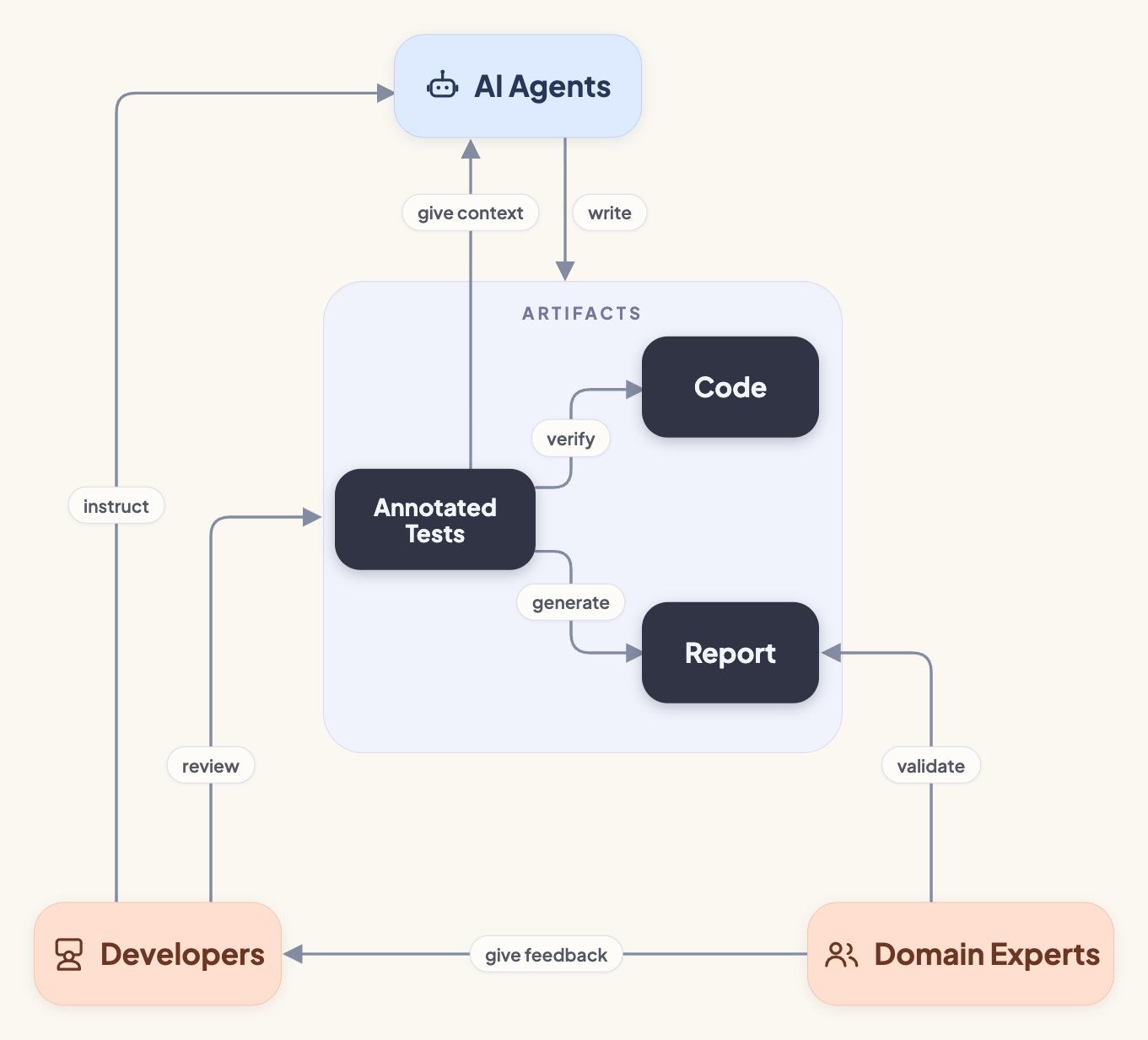
Increasingly those tests aren't hand-written at all: a human describes a scenario in prose and an AI agent generates the test alongside the code it exercises, so the narrated report — not the raw test code — becomes the artifact humans review. The diagram below sketches that loop between people, agents, and artifacts; Working with AI agents covers how to drive it.
Mark a test for inclusion in the report. Required for any test you want to appear. story= / activities= bind it to a domain story (see Domain Storytelling) — activities= takes an int or a sequence of them, never a string; group_parametrized=False declines parametrize merging. The decorated function is returned unwrapped.
@scenario('Buy coffee', tags=['billing'])
def test_buy_coffee(machine):
...Dual-purpose: use as a context manager inside a test body, or as a decorator on a fixture or helper function.
As context managers:
@scenario('Place order')
def test_order():
    with given('an empty cart'):
        cart = []
    with when('I add an item'):
        cart.append('coffee')
    with then('the cart has one item'):
        assert len(cart) == 1
Pick the phase by role, not syntax: all arrangement belongs in given — including state-mutating setup calls (machine.insert(200), seeding a database) — when performs the one action under test, and then only observes its outcome. A scenario with two when steps usually hides an arrangement in the first one, and a then that calls the action (assert machine.buy() == …) hides the action inside a check.
As a fixture decorator (only @given is allowed — fixtures are setup, so @when/@then on a fixture is rejected at runtime):
@pytest.fixture
@given('a coffee machine')
def machine():
    return {'coffees': 10, 'price': 2}
Generator fixtures work too; teardown is silent (the post-yield block runs but recording steps from it is not allowed):
@pytest.fixture
@given('a database connection')
def db():
    conn = open_conn()
    yield conn
    conn.close()
As a call-site label with Annotated (only given is allowed) — attach a given step to a fixture or a @pytest.mark.parametrize value from the test signature. This is the way to surface a parametrized input as a given (a direct parametrize value otherwise appears only in the parameter table), and it can label an undecorated or built-in fixture, or override a decorated fixture's label for one scenario:
from typing import Annotated

@scenario('Underpayment is rejected')
@pytest.mark.parametrize('cents', [0, 50, 199])
def test_rejects_underpayment(
    machine, cents: Annotated[int, given(Template('{cents} cents inserted'))]
):
    with (
        when_then('a customer tries to buy a coffee',
                  'the machine reports the shortfall'),
        pytest.raises(ValueError, match='insufficient'),
    ):
        buy_coffee(machine, cents)
A Template placeholder renders as {col} in the grouped view and as the concrete value per row. A t-string is rejected here, and so are when/then — the parameter value isn't in scope at definition time, and the action and outcome live in the test body.
As a helper-function decorator (any phase). The helper records its own step on each call; for dynamic narration, use pytest_given.Template and reference the helper's parameters:
@when('inserting money')
def insert(amount):
    ...

@when(Template('I insert ${amount}'))
def insert(amount):
    ...
Steps can be nested freely:
with when('I place a large order'):
    with when('I select 3 coffees'):
        order_count = 3
    with when('I apply loyalty discount'):
...When a single call is both the action under test and the thing you assert about — most often an expected raise — pair it with pytest.raises and let when_then narrate both an action and its outcome from one with:
from pytest_given import when_then

@scenario('Sold out is rejected')
def test_sold_out(machine):
    with given('a machine that has sold its last coffee'):
        machine['coffees'] = 0
    with (
        when_then('a customer tries to buy a coffee',
                  'the machine reports it is sold out'),
        pytest.raises(ValueError, match='sold out'),
    ):
        buy_coffee(machine)
The body runs inside the when; the sibling then is emitted once the body exits cleanly (e.g. after the inner pytest.raises catches the error). If the body raises uncaught, the when is recorded, the then is skipped, and the exception propagates.
| Form | Example | How it renders |
|---|---|---|
| Plain string (including f-strings) | with given('a cup') with given(f'a {cup_size} cup') |
Rendered verbatim. F-string interpolation happens before pytest-given runs, so values aren't highlighted. |
| T-string | with given(t'a {cup_size} cup') |
pytest-given interpolates at runtime. Values are color-coded when the interpolation expression matches a parametrize column; otherwise highlighted neutrally. |
Template in @scenario(...) |
@scenario(Template('Brew {cup_size} ml')) |
Deferred substitution against parametrize columns at report time. Unmatched placeholders raise PytestGivenError at collection. |
T-string in @scenario(...) |
@scenario(t'a {guest} checks in') |
Glossary handles render as term refs in the title. Evaluated eagerly at import, so only glossary handles are allowed; a value/expression interpolation raises PytestGivenError. |
Template on a helper-function decorator |
@when(Template('I insert {amount}')) |
Deferred substitution against the function's bound arguments at each call. Placeholders must name a positional-or-keyword parameter of the helper. Unmatched placeholders raise PytestGivenError at decoration time. |
Annotated[..., given(...)] on a test parameter |
def test(text: Annotated[str, given(Template('a {text} cup'))]) |
Synthesizes a given step for a fixture or parametrize value at the call site. Plain string renders verbatim; Template does deferred substitution against parametrize columns. Only given is allowed; a t-string is rejected. |
Two rules follow from that split:
-
pytest_given.Templateonly accepts bare identifiers —{name},{name:spec},{name!conv}. Attribute access ({obj.attr}), indexing ({d[key]}), and arbitrary expressions ({x + 1}) raisePytestGivenErrorat construction. Workaround: parametrize by the attributes directly, or move the step into a test-body t-string (which supports full expression syntax). -
Templateand a t-string are each rejected in the other's place, because the split is about scope:with given(Template(...))raisesPytestGivenErrorat entry, as does a t-string on a fixture or helper decorator. The one exception is the@scenario(...)t-string in the table — glossary handles, unlike values, are in scope at import.
Parametrized tests are automatically grouped into a single scenario with a parameter table. The grouped step tree comes from a baseline case — the first that passed — and anything varying across cases is promoted into a column of the table: a parametrize argument, a t-string interpolation whose value differs per case (the step keeps a {name} placeholder pointing at the column), and an attachment whose payload differs (the step keeps a content-less badge).
@scenario('Pricing')
@pytest.mark.parametrize('euros,expect', [(1, False), (2, True), (3, True)])
def test_pricing(machine, euros, expect):
    with when(t'I insert ${euros}'):
        can_buy = euros >= machine['price']
    with then(t'can_buy is {expect}'):
        assert can_buy == expect
For a parametrized scenario name, use pytest_given.Template — deferred substitution against the parametrize columns:
from pytest_given import Template, scenario

@scenario(Template('Brew {cup_size} ml'))
@pytest.mark.parametrize('cup_size', [200, 300])
def test_brew(cup_size):
    ...
A scenario name can also be a t-string whose interpolations are all glossary handles — they render as term refs in the title, exactly as they do in step text:
@scenario(t'a {guest} checks in')
def test_check_in(guest):
    ...
Because a t-string is evaluated at import, only glossary handles (which are in scope then) are allowed in a scenario name; a parametrize-value interpolation is rejected — use Template for that. The two don't combine in one name: a title needing both a term ref and a per-case value isn't expressible today.
What a column cannot carry is a case that narrates a different sentence. When the narration genuinely branches per case, decline the merge with group_parametrized=False:
@scenario(Template('Brew {cup_size} ml'), group_parametrized=False)
@pytest.mark.parametrize('cup_size', [200, 300])
def test_brew(cup_size):
    ...
Each case then becomes its own scenario with no parameter table, titled by its parametrize id — Brew 200 ml [200] for the Template above, whose placeholders are substituted per case first (a plain-string name is suffixed the same way). Every case carries the id, including one whose name already renders its values. On a test that isn't parametrized the argument raises at collection.
Six authoring forms are rejected outright in a parametrized scenario, because each would make the grouped tree lie. Every one fails the run and writes no report — the message names the fix:
| # | Rejected | Fix |
|---|---|---|
| 1 | A plain str (usually an f-string) whose text differs per case |
Narrate with a t-string so the varying part is a placeholder, not case 1's text |
| 2 | A varying interpolation that isn't a bare name — t'{cup_size * 0.01}', t'{m.balance}' |
Bind it to a local and narrate that local |
| 3 | An interpolation naming a parametrize column that no longer holds the case's value | Rename the local that rebound the name — or, if the body mutated the value in place before narrating it, bind the result to its own name and narrate that |
| 4 | A glossary term ref whose display differs between cases (unless the term ref is the parametrize value) | Split the term ref from the value: given(t"{pg['Customer']} {name} places an order") |
| 5 | A step whose set of attach labels differs between cases |
Keep the label constant and let the content vary — that's what the attachment column is for |
| 6 | Passed cases that narrate different templates — a different step structure, a differently shaped narration, different wording, or a different interpolated expression | Decline the merge with @scenario(..., group_parametrized=False) and let each case be its own scenario |
Three optional pillars layer Domain-Driven Design on top of the core surface. Adopt any one independently — or all three for a full vocabulary-and-story workflow. The HTML report adds a tabbed view: Scenarios (always present), Stories, and Glossary (each only shown when populated).
1. Ubiquitous-language Glossary — declare the actors, work objects, and verbs your tests speak about:
from pytest_given import Glossary

g = Glossary()
guest = g.actor('Guest', definition='Person booking accommodation.')
room = g.work_object('Room', definition='A bookable hotel room.')
search = g.verb('search', definition='Look up available options.')
Use the captured handles directly in t-strings — t'a {guest} {search("searches for")} a {room}'. Each interpolation becomes a washed, kind-colored word in the rendered step, with the term's definition as a tooltip. Glossary terms feed the Glossary tab.
Reference a term with the lightest surface form that fits the sentence — the same three forms on every handle (captured or looked up):
- Bare —
{guest}renders the term's canonical text. Use it whenever the word appears as-is; restating it asguest('Guest')is redundant. .low—{guest.low}renders the canonical lowercased, the common mid-sentence form, instead of the equivalentguest('guest').- Callable override —
guest('Alice')supplies any other surface: a verb inflection (search('searches for')), a plural (room('rooms')), or a concrete instance.
Loading a Markdown glossary file instead — if your project already keeps a GLOSSARY.md, point FileGlossary at it rather than declaring terms in code:
from pathlib import Path
from pytest_given import FileGlossary

g = FileGlossary(Path(__file__).parent / 'GLOSSARY.md')
The file must contain at least one GFM pipe table. By default the first column is the term and the second is the description; override with term_column, description_column, and kind_column (each accepts a 0-based index or a header name, case-insensitive):
g = FileGlossary('GLOSSARY.md', term_column='Term', description_column='Meaning', kind_column='Kind')Access terms by name — g['Guest'] (case-insensitive). A FileGlossary is a closed vocabulary: unlike a code-defined Glossary, both g['foo'] and g('foo') only look up, and both raise on an unknown name — new vocabulary is added as a row in the file. The returned handle is usable inline everywhere a code-defined handle is:
# In a story activity:
activity(g['Guest'], g['book']('books'), g['Room'])

# In a t-string step:
with when(t'{g["Guest"]} {g["book"]("books")} a {g["Room"]}'):
    ...
Kinds — a term's kind is either declared (g.actor(...) / g.work_object(...) / g.verb(...), or a kind_column) or inferred from story activity-slot positions at session finish: position 0 → actor, odd positions → verb, even positions ≥ 2 → work object. A declared kind is never silently overridden — it is checked against its slot when activity(...) is constructed, so misplacing it raises PytestGivenError naming the term and its kind. Inference then handles only the undeclared terms, and raises at session finish if one turns up in both a verb slot and a noun slot; add a kind_column to disambiguate.
Kindless and undefined terms — a term that no story activity references stays kindless. On a code-defined glossary g('foo') also declares a term the team hasn't classified yet (g['foo'] only looks up, and raises if unknown); it shows an Undefined badge until definition= is supplied. Both forms return a handle with the same bare / .low / callable surface forms as any other. Every declared term reaches the report, referenced or not; kindless ones render under a neutral wash instead of a kind color, and collect under Uncategorized in the Glossary tab with their own filter toggle.
Discovery — the plugin finds the glossary in one of two ways: off any story(...) that references it (a story records its glossary at construction), or, failing that, by scanning conftest.py module attributes for a Glossary / FileGlossary instance. A suite with no stories — glossary-only mode — therefore has to bind the instance by name in a conftest.py:
# conftest.py
from tests.ubiquitous_language import g  # noqa: F401 — plugin discovery
import tests.ubiquitous_language binds a module, not a glossary, so the scan finds nothing and the Glossary tab renders empty. Note that a suite supports one glossary: two distinct instances reaching the report raise PytestGivenError.
2. Domain Stories — model a flow as a sequence of activity(...) rows tied together by story(...):
from pytest_given import activity, story

book_a_group_trip = story('Book a Group Trip', [
    activity(organizer('Carol'), search('searches for'), room),
    activity(organizer('Carol'), select('selects'), room('Deluxe Suite')),
])
An activity reads left-to-right: actor → verb → work object (with optional connective words). Any part may be a bare string instead of a glossary handle — but an activity needs at least two distinct glossary terms to be matched by narration; under-anchored activities render as "not coverage-tracked" unless a step pins them explicitly. path(...) lets a story branch where alternate activity sequences share a prefix.
3. Scenario ↔ activity binding — link a scenario (and individual steps) to the story it implements:
@scenario('Carol selects a suite', story=book_a_group_trip)
def test_select_suite(carol):
    with when(t'{organizer("Carol")} {select("selects")} the {room("Deluxe Suite")}'):
        ...
Each step's term references are matched against the story's activities to compute coverage. The Stories tab shows the timeline with a coverage chip per activity and the scenarios that touch it; selecting an activity offers Open in Scenarios, which filters the Scenarios view down to those scenarios. A step can also bind explicitly with given(text, activity=...). @scenario(..., activities=[2, 3]) narrows a scenario to those 1-based activity numbers, so it can cover no others.
See the domain-storytelling design spec and the file-backed glossary design spec for the full surface, and the hotel-booking and file-glossary-booking examples for end-to-end usage.
Attach data to the current step. Strings are stored verbatim; other types are JSON-serialized.
attach('Receipt', 'Coffee x1     $2.00')             # text
attach('Machine state', {'coffees': 9, 'price': 2})  # JSON
An attachment binds to the step being recorded, so the call belongs inside a given / when / then block. Attaching from the test body with no step open raises.
The label is a plain str; a Template or t-string label raises — build it with an f-string if it needs interpolating.
In a parametrized scenario the label must read the same in every case: a payload that varies across cases becomes a parameter-table column headed by that label, and the step keeps a badge pointing at it. A label that differs between cases raises — the varying part belongs in the content.
All report outputs are opt-in — a bare pytest writes nothing. Each --given-* flag enables its own sink independently, and they combine freely (e.g. pass both --given-json and --given-html to get both files from one run).
The checks are not opt-in. Every run builds the report it would have written, so an authoring form that cannot be narrated honestly — the parametrize rules above among them — fails the run whether or not a sink was configured. Learning about it from the first run that asks for HTML, long after the test was written, is the outcome that buys.
| Flag | Default | Description |
|---|---|---|
--given-json[=PATH] |
off | Write JSON report data (bare → given-report/report-data.json). |
--given-html[=PATH] |
off | Write the HTML report (bare → given-report/report.html). |
--given-md[=PATH] |
off | Write the Markdown report; bare renders to stdout (fenced). |
--given-title=TEXT |
rootdir name | Name the report, shown as the Markdown heading and the HTML tab title and topbar. Also settable as the given_title ini. |
--given-source-link=PRESET |
none |
Editor preset (vscode, cursor, zed, pycharm, github) or raw URL template. Renders a clickable file:line anchor on each scenario card, on each story panel, and on expanded glossary term cards. Also settable as the given_source_link ini. See Source links. |
--given-all-frames |
off | Keep internal pluggy/_pytest/pytest-given frames in failure tracebacks. See Traceback frames. |
--given-lint=BOOL |
false |
Run the narration lint (true | false); an error-level finding fails the run. Also settable as the given_lint ini. See Narration lint. |
Put a bare --given-json / --given-html / --given-md last on the command line, or use the =PATH form (--given-html=out.html, not --given-html out.html) — argparse treats a path token right after a bare flag as that flag's value, not a test selection.
The ini settings live in [tool.pytest], pytest 9's native TOML table. The legacy [tool.pytest.ini_options] is still read, but the two are mutually exclusive — pytest raises UsageError if both are present.
--given-lint=true runs a rule catalog over the scenarios the run just recorded, catching steps whose narration lies about their body — an empty given, a then that checks nothing, an action smuggled into an assertion. The AST rules analyze exactly the steps the run identified (there is no parallel static discovery), so decorated helpers, fixtures, and when_then pairs are all attributed correctly.
Each rule has a fixed default severity; there is no master level. A warn finding prints in the terminal summary; an error finding also fails the run.
| Rule | Default | Catches |
|---|---|---|
empty-step |
error |
A step whose body does nothing (only constants/pass, or — for when/then — only an attach(...) call). |
then-without-check |
error |
A then whose body contains no assert and no checking call (pytest.raises, pytest.approx, …). |
missing-phase |
warn |
A passed scenario that doesn't cover all three Given/When/Then phases. Fixture @givens and Annotated[..., given(...)] parameters count; each logical scenario is evaluated once regardless of parametrization. |
check-outside-then |
warn |
An assert inside a given or when (the when half of a when_then pair is exempt). |
action-in-then |
warn |
A scenario where no when performs an action and a then folds the action into its assertion. |
unused-interpolation |
warn |
A t-string narration that interpolates {name} but never uses name in the step body. |
tag-shadows-term |
warn |
A scenario tag whose slug duplicates a glossary term — one concept named through two mechanisms. |
dead-term |
off |
A glossary term referenced by no step narration and no story activity. Opt in on suites whose glossary is meant to be fully exercised. |
Override severities per rule with given_lint_rules, and exempt individual subjects with given_lint_ignore — bare node-id globs, or scoped to one rule with a rule-id: prefix:
[tool.pytest]
given_lint = true
given_lint_rules = [
    "missing-phase=error",
    "dead-term=warn",
]
given_lint_ignore = [
    "missing-phase: *::test_*_raises",
    "tests/unit/test_math.py::test_constant_is_stable",
]
An ignore entry that suppresses no finding is itself an error-level stale-ignore finding — the list can only shrink, never rot. The --given-lint CLI flag overrides the given_lint ini value for a single run.
The lint is zero-cost when off: nothing extra is captured, and report artifacts are byte-identical with the lint on or off.
When a scenario fails, its traceback is captured into the report. By default only your own frames are kept — the pluggy dispatcher, the _pytest runner, and pytest-given's own step-recording frames are dropped, since they're implementation noise you rarely need. Dropping them before they are formatted also keeps large failing suites fast: pytest's per-frame source analysis is the dominant cost when many scenarios fail.
Pass --given-all-frames to retain every frame (each stored with an is_internal flag; the HTML report then shows a "Show internal frames" toggle on each failure). It's a debugging escape hatch for troubleshooting the plugin or pytest itself, and it re-introduces that per-frame cost.
Skipped scenarios never capture a traceback at all — they carry their skip reason instead.
Add a clickable file:line anchor to each scenario card, story panel, and expanded glossary term card so devs can jump straight to the source.
# pyproject.toml — pytest 9+ canonical form
[tool.pytest]
given_source_link = "vscode"
Or pass it on the CLI: pytest --given-html --given-source-link=vscode.
| Preset | Opens in | Template |
|---|---|---|
none |
(no link) | — |
vscode |
VS Code | vscode://file/{path}:{line} |
cursor |
Cursor | cursor://file/{path}:{line} |
zed |
Zed | zed://file/{path}:{line} |
pycharm |
PyCharm | pycharm://open?file={path}&line={line} |
github |
GitHub (web) | https://github.com/<org>/<repo>/blob/{sha}/{relpath}#L{line} — <org>/<repo> auto-detected from GITHUB_REPOSITORY or git remote get-url origin (HTTPS and SSH forms both supported) |
For a raw template, use any of these variables:
| Variable | Source |
|---|---|
{path} |
Absolute POSIX path (resolved at render time against the cwd) |
{relpath} |
POSIX path relative to pytest's rootdir |
{line} |
1-indexed line of the scenario's def |
{project} |
Basename of pytest's rootdir |
{sha} |
Commit SHA from GITHUB_SHA / CI_COMMIT_SHA / BUILDKITE_COMMIT, falling back to git rev-parse HEAD |
Examples:
# CI archives → SHA-pinned GitHub permalinks (preset auto-detects org/repo)
given_source_link = "github"

# Same as a raw template — pin org/repo explicitly. Useful when origin is a
# mirror, fork URL, or non-standard remote that the preset can't parse:
given_source_link = "https://github.com/myorg/myrepo/blob/{sha}/{relpath}#L{line}"
Caveats:
- Editor presets (
vscode/cursor/zed) resolve{path}from the current working directory at render time. Re-rendering a CI-downloaded JSON from a different directory will produce broken links. - The GitHub-permalink template is SHA-pinned, so links remain stable after the line moves — what an archived CI report wants.
Regenerate the HTML from a saved JSON file at any time:
pytest-given report path/to/report-data.json -o path/to/report.html \
    --source-link=vscode
--source-link accepts the same presets and raw templates as --given-source-link (see Source links). Omit it (or pass --source-link=none) to render plain file:line text without an anchor.
Pass --format md for Markdown instead of HTML; it is also inferred from the -o extension, so -o report.md needs no --format. Omit -o with --format md to print to stdout.
The same script owns skills install — see Agent skills.
Four example suites live under examples/, each with pre-rendered JSON + HTML committed — the rendered pages are linked at the top of this README:
coffeeshop/test_coffeeshop.py— a tour of the core feature surface:when/thenblocks, generator fixtures with teardown, plain text and JSON attachments, parametrized tests rendered as tables, t-string interpolation,Annotated[..., given(...)]labels on a parametrize value, helper functions that record their own steps, top-levelgivenblocks, deeply nested steps, failure rendering, and skipped scenarios. Output:coffeeshop.html.hotel-booking/test_hotel_booking.py— Domain Storytelling features: aGlossaryof actors / work objects / verbs, astory(...)withactivity(...)rows, scenarios bound to a story with per-activity coverage, and kindless + undefined terms (registered withg('foo')) awaiting classification. Output:hotel-booking.html.file-glossary-booking/test_file_glossary_booking.py—FileGlossaryfeatures: loading a Markdown glossary file, name-based term access, inferred kinds from story activity slots, and a deliberately kindless term (neutral wash). Output:file-glossary-booking.html.self-report/— pytest-given applied to its own backend test suite: many unit tests are@scenario-decorated and narrated in the vocabulary ofGLOSSARY.md(loaded as aFileGlossary). No hand-written test file — it's generated from the whole suite. Output:self-report.html.
Run nox -s examples to regenerate the first three, and nox -s self_report for the self-report.
The with given(...) / with when(...) / with then(...) blocks keep the claim about behavior directly adjacent to the code that implements it. That proximity is what makes the loop above work: auditing "does the code under with when('I insert $2') actually insert $2?" is cheaper and higher-leverage than reading raw test code, and far less prone to drift than documentation kept in separate files.
Know what the narration is and isn't. Narration is auditable, not verified: in an agentic workflow the same agent writes both the code and the claim about the code, and nothing mechanically checks that a step's text matches its body. The narration lint catches structural lies (an empty step, a then that checks nothing, a missing phase), never semantic truth. The report is worth as much as your review process's habit of reading step text against step bodies — treat it as a review aid, not as evidence.
What the agent itself gets out of it:
- Context economy.
pytest --given-mdrenders a run's narration as Markdown to stdout — a fraction of the tokens of the test code it summarizes, useful for orienting in an unfamiliar suite or handing a run summary to a human. Combine with pytest's own selection (-k,--lf, node ids). - Structured queries.
--given-json+jqfilter scenarios by tag, status, or glossary term. - A controlled vocabulary. A
Glossary— or aFileGlossaryover theGLOSSARY.mdyou already keep — gives the agent a stable set of domain terms to narrate with, keeping naming consistent across sessions. - Early, typed errors. Misusing a step-text form (a t-string on a decorator, a
Templatein a test body) raisesPytestGivenErrorimmediately with a clear message — cheap for an agent to learn from.
Adopt selectively: decorate the tests that assert behavior, and leave plumbing (trivial getters, constructors, round-trips) as plain tests — they add report noise, not signal. pytest-given's own suite decorates about a fifth of its tests. Codify your narration conventions where agents will read them; the bundled authoring skill ships a battle-tested set of rules for keeping narration truthful.
pytest-given skills install copies the bundled Agent Skills into your repo's .claude/skills/, where Claude Code (and other harnesses following the same format) auto-discover them. Three ship:
pytest-given-authoring— a slim router plus on-demand guides for writing truthful scenarios, glossaries, and domain stories.pytest-given-navigating— exploring a codebase through its rendered reports (--given-mdfor the prose spec,--given-json+jqfor filtering by tag, term, or status) instead of grepping test bodies.pytest-given-reviewing— a layered review of narrated tests: the narration lint as the structural gate, a semantic audit of step text against step bodies, a completeness audit of what the report leaves out, then a hygiene pass over the glossary, tags and stories.
The files are library-owned — reinstalling after an upgrade overwrites them (keep your own conventions in your project's instructions file), and --check detects drift in CI. Use --dest for a non-default skills directory.
pytest-given skills install            # copies into ./.claude/skills/
pytest-given skills install --check # exit 1 if the installed files drifted from the bundled onesSee AGENTS.md for setup, quality gates, and conventions.
MIT