

fast, quiet terminal multiplexer for linux.


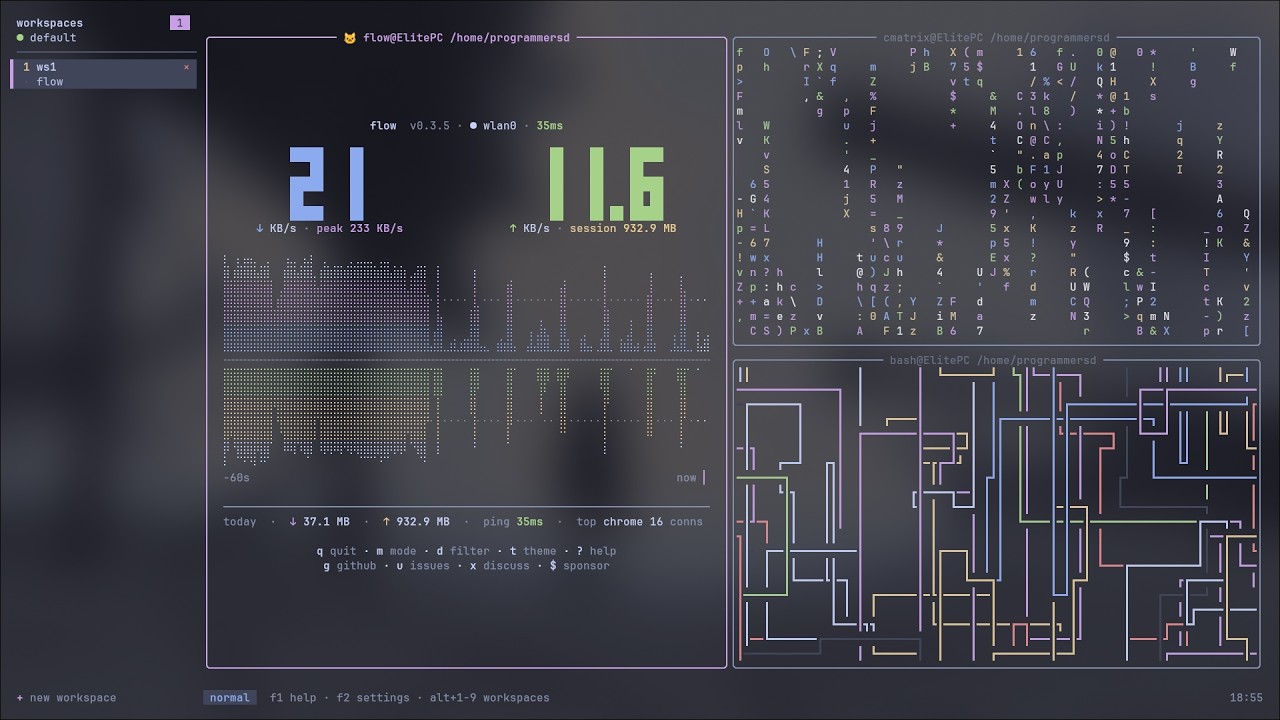
- high-performance, pure-Rust Sixel graphics: powered by
icy_sixel&ratatui-image(validated on foot & Wayland environments) - multiple workspaces: organize panes across independent workspace sets
- tiled layouts: dwindle (default) or monocle, with configurable splits
- floating panes: drag-and-drop, drag-resize corners
- four keybinding profiles: beginner (mouse+f-keys), hypr (hjkl power set), vim (vi grammar), dev (editor/IDE ergonomics)
- copy mode: vim-like scrollback search and selection
- live settings: edit 40+ options via f2, changes apply instantly
- bright ui: centered dialogs, colorful CLI
- workspace tab context menu: right-click a tab for rename / new / close, anchored at the click
- scroll indicator: optional "↑12" marker in the pane title while scrolled back
- sidebar fold:
shift+tabfolds the workspace sidebar away in every profile - fast: event-driven, diff-based updates, minimal cpu
git clone https://github.com/programmersd21/venti
cd venti
cargo build --release
sudo cp target/release/venti /usr/local/bin/ventiauto-creates config at ~/.config/venti/config.toml.
f1= help + keybindingsf2= settings menu (live editor, including switching the four profiles)f11= command palettef12= theme picker
press f1 for complete reference or read docs/keybindings.md.
alt+1..9     switch to workspace 1-9
alt+n        new workspace
alt+w        close workspace
alt+arrows    focus left/down/up/right
f10           resize mode
f3            new pane (split right)
f4            close pane
hypr/vim profiles bind alt+hjkl to focus and alt+shift+hjkl to swap; dev profile binds arrows + alt+enter new pane. see docs/keybindings.md.
f1            help
f2            settings
f5            zoom toggle (monocle)
f6            floating toggle
f8            search scrollback
f9            copy mode
f11           command palette
f12           theme menu
in hypr and vim profiles:
alt+space      command palette     (hypr)
alt+p          rotate split        (hypr)
alt+t          theme menu
alt+s          toggle sidebar
all multiplexer bindings use alt (escape-prefixed, reliable everywhere terminals speak). apps receive untouched plain ctrl+key sequences.
full reference: docs/keybindings.md
custom bindings: edit [binds] in ~/.config/venti/config.toml
~/.config/venti/config.toml (auto-created):
[general]
shell = ""   # empty: $SHELL, falls back to /bin/sh
scrollback = 10000
graphics = true  # enables native Sixel graphics pipeline

[decorations]
border_style = "rounded"
pet = true
pet_emoji = "🐱"

[ui]
show_pwd = true
show_hostname = true
workspace_bar = "top"

[theme]
name = "mocha"  # 15 builtin dark themes

[binds]
# override any keybinding
"alt+3" = "workspace_goto 2"
"alt+shift+3" = "move_to_workspace 3"
"alt+shift+w" = "close_workspace"
live editing: press f2 in venti to adjust 40+ settings.
docs: docs/configuration.md
- linux only: vt100 terminal emulation via term-wm-vt100 (patched)
- high-performance graphics: pure-Rust Sixel pipeline using
icy_sixelandratatui-image, validated against thefootterminal under Wayland - fast: event-driven, minimal allocations, diff-based rendering
- minimal deps: ratatui, crossterm, serde, nix syscalls
- no ui framework overhead: custom rendering for perfect pixel control
- bright & readable: catppuccin mocha + 14 other dark themes
- four profiles: beginner, hypr, vim, dev, composable commands, fast fingers
- alt-first keybindings: escape-prefixed combos work in most terminals (see docs)
venti                 # attach to default session
venti new -s myproject   # create and attach to a named session
venti ls            # list sessions
venti send -t default "ls -la"   # send keys to pane
venti run -t default workspace_goto 2  # run command
venti kill -t default # kill session
venti doctor          # system check
venti config check # validate configcargo build # debug build
cargo build --release # release binary
cargo test --no-fail-fast # run all tests
cargo test --test sixel_graphics_test # sixel rendering verification
cargo clippy # lintdocs/quickstart.md- hands-on tutorialdocs/keybindings.md- complete referencedocs/configuration.md- config file guidedocs/architecture.md- internal designdocs/protocol.md- wire protocol specificationdocs/zsh.md- zsh setup and completionsdocs/index.md- faq and troubleshooting
In the v0.2 Sixel Major Release, Venti standardizes on a pure-Rust Sixel-only graphics architecture:
- PTY Stream Interception:
sixel::SixelStreamParserintercepts Sixel DCS sequences (ESC P ... q ... ESC \) directly from the PTY stream before forwarding clean terminal text tovt100::Parser. - Pure-Rust Decoder: Leverages
icy_sixel::SixelImage::decode()with color quantization viaquantettewithout invoking C dependencies. - Foot Terminal Validation: Native high-performance Sixel rendering in
footunder Wayland/Hyprland serves as the primary reference test bed, guaranteeing zero layout jitter, precise border clipping, and robust scrollback synchronization. - Ratatui Rendering Integration: Sixel images are managed and displayed within pane bounds using
ratatui-image.
issues, discussions and pull requests are welcome - see contributing.md for the workflow, the code style and how to run the test suite.
mit
inspired by tmux, zellij, helix.
built with ratatui, crossterm, serde, icy_sixel, ratatui-image.
colors from catppuccin.
venti 0.2.0, 2026-11-18
a fast, quiet terminal multiplexer for linux.