
A mask-driven cutout widget for Flutter — punch a shape through content to reveal what is painted beneath it.
English · 简体中文





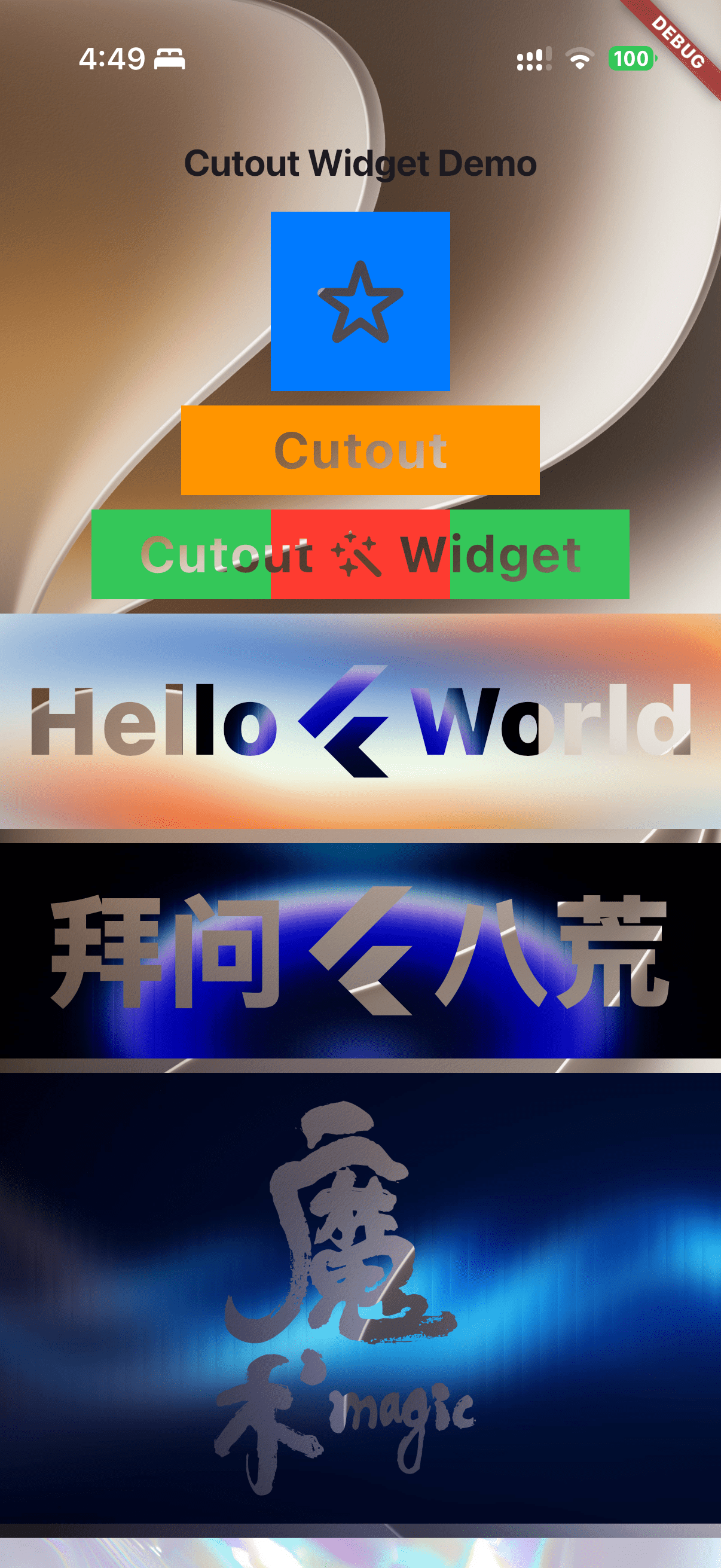
- Any widget as a mask — icons, text, shapes, transparent images, or any composition of them.
- Alpha aware — the alpha channel of the mask decides how much content is erased, so anti-aliased edges produce soft cutouts.
- Plain
Stacklayout —alignment,fit,textDirectionandPositionedchildren work exactly as they do in aStack. - Only your own content is cut — the content is isolated in an offscreen buffer, so whatever is painted behind the cutout is revealed untouched.
dependencies:
  cutout: ^1.0.3
flutter pub add cutoutRequires Dart 3.10+ / Flutter 3.38+.
Cutout takes two widgets: maskChild (the shape that is punched out) and child (the content that is punched through).
final iconMask = Cutout(
  alignment: Alignment.center,
  maskChild: const Icon(Icons.star, size: 50),
  child: Container(
    width: 100,
    height: 100,
    color: Colors.blue,
  ),
);final textMask = Cutout(
alignment: Alignment.center,
maskChild: const Text(
'Cutout',
style: TextStyle(fontSize: 30, fontWeight: FontWeight.bold),
),
child: Container(
width: 200,
height: 50,
color: Colors.orange,
),
);final composedMask = Cutout(
alignment: Alignment.center,
maskChild: const Row(
// Must shrink-wrap, otherwise the row spans the whole stack.
mainAxisSize: MainAxisSize.min,
children: [
Text('Cutout', style: TextStyle(fontSize: 30, fontWeight: FontWeight.bold)),
Icon(Icons.auto_awesome, size: 30),
Text('Widget', style: TextStyle(fontSize: 30, fontWeight: FontWeight.bold)),
],
),
child: Container(
width: 300,
height: 50,
color: Colors.green,
),
);final cutoutOverBackground = SizedBox(
height: 120,
child: Stack(
alignment: Alignment.center,
children: [
// The background shows through the holes.
Image.asset('assets/images/18-fractal-glass-hero-bg.jpg'),
Cutout(
alignment: Alignment.center,
maskChild: const Row(
mainAxisSize: MainAxisSize.min,
children: [
Text('Hello', style: TextStyle(fontSize: 56, fontWeight: FontWeight.w900)),
FlutterLogo(size: 70),
Text('World', style: TextStyle(fontSize: 56, fontWeight: FontWeight.w900)),
],
),
child: Image.asset(
'assets/images/01-colorful-smooth-gradient.jpg',
fit: BoxFit.fill,
width: double.infinity,
),
),
],
),
);final pngMask = Cutout(
alignment: Alignment.center,
// Use an image with an alpha channel (PNG, WebP, …).
maskChild: Image.asset('assets/images/magic.png', height: 220),
child: Image.asset('assets/images/16-fractal-glass-hero-gradients.jpg'),
);Animating the layout of the mask is safe — it does not push a composited layer:
double holeSize = 80; // call setState() to grow or shrink the hole

final animatedHole = Cutout(
  alignment: Alignment.center,
  maskChild: AnimatedContainer(
    duration: const Duration(milliseconds: 300),
    curve: Curves.easeInOut,
    width: holeSize,
    height: holeSize,
    decoration: const BoxDecoration(color: Colors.black, shape: BoxShape.circle),
  ),
  child: Image.asset('assets/images/22-iridescent-holographic.jpg'),
);
Rotating or translating the mask (Transform) works as well, as long as it does not have to composite.
| Parameter | Type | Default | Description |
|---|---|---|---|
maskChild |
Widget |
required | The shape that is punched out of child. Must not push a composited layer. |
child |
Widget |
required | The content that gets punched through. |
alignment |
AlignmentGeometry |
Alignment.topStart |
How the mask and the content are aligned inside the stack. |
textDirection |
TextDirection? |
null |
Resolves alignment; defaults to the ambient Directionality. |
fit |
StackFit |
StackFit.loose |
How to size the non-positioned children. |
clip |
Clip |
Clip.hardEdge |
Whether overflowing content is clipped to the box. With Clip.none the internal buffers are grown to contain every child. |
Full API reference: pub.dev/documentation/cutout.
1. The content children are rasterized into an offscreen buffer (Canvas.saveLayer).
2. The mask is drawn into a second buffer, composited onto the first one with
   BlendMode.dstOut — opaque mask pixels erase the content underneath them.
3. The first buffer is composited back onto the canvas.
Step 2 is what makes the mask a stencil: it is never painted, it only removes pixels. Step 1 is what keeps the cutout local — without it, dstOut would punch through everything painted behind the widget as well.
Canvas.saveLayer lives inside the current recording. A widget that pushes its own layer — RepaintBoundary, Opacity with an alpha below 255, FadeTransition / AnimatedOpacity, AnimatedSwitcher, BackdropFilter, ShaderMask, … — ends that recording early and appends its layer next to the dstOut buffer.
For the mask this is fatal: the layer is composited after the buffer, so the mask becomes visible on top of the content instead of cutting through it. That cannot be repaired at this level of the pipeline — it would need engine support — so debug builds assert and point at the offending widget. The canvas bookkeeping stays balanced in that case, the cutout simply stops working.
// ❌ The mask escapes the dstOut buffer: it is painted on top of the content.
final maskedOpacity = Cutout(
  maskChild: Opacity(opacity: 0.5, child: const Icon(Icons.star)),
  child: Container(color: Colors.black54),
);

// ✅ Fade the whole cutout instead of the mask.
final fadedCutout = Opacity(
  opacity: 0.5,
  child: Cutout(
    maskChild: const Icon(Icons.star),
    child: Container(color: Colors.black54),
  ),
);
If a mask really has to be produced by a compositing widget, rasterize it first (RepaintBoundary + toImage, or ship it as an image asset) and hand the resulting image to Cutout.
Layers pushed by child are appended before the dstOut buffer, so they are erased correctly. Wrapping the content in a RepaintBoundary or an Opacity is fine:
// ✅ Works: composited content is still cut correctly.
final compositedContent = Cutout(
  maskChild: const Text('Hi', style: TextStyle(fontSize: 40)),
  child: RepaintBoundary(child: ExpensiveChart()),
);- The mask is a stencil, not a child you can see. It only removes pixels, and it must not contain interactive widgets: a mask stays in the hit-test tree, so an invisible
GestureDetector/IconButtoninsidemaskChildwould still receive taps. - Shrink-wrap composite masks. A
Row/Columnmask spans the whole stack by default — passmainAxisSize: MainAxisSize.min(or wrap it inIntrinsicWidth) so only the text and icons are punched out. - Overflow. With
Clip.hardEdgeoverflow is clipped to the box. WithClip.nonethe buffers grow to cover every child's layout box (includingPositionedoverflow), but content that paints outside its own layout box (Transform,OverflowBox, …) can still be clipped by the buffers. - Cost. A cutout costs two
saveLayerlayers per paint, which forces a render-target switch on the GPU. Keep the cutout as small as the design allows, avoid a full-screenCutoutover an expensive background, and wrap static content in aRepaintBoundaryso it can be cached instead of being re-rasterized into the buffer every frame. - Something must be behind it.
Cutoutpaints no background of its own; put it in aStack(or over any other widget) so there is something to reveal.
The package ships a rendering test suite that rasterizes the widget and inspects the resulting pixels:
flutter testIt covers hole punching, alpha blending, Stack layout (alignment, Positioned, Clip.none), composited content, sibling isolation inside the same layer, and the mask assertion.
If Cutout helps you build better UIs, please consider supporting it — it only takes a few seconds and helps other Flutter developers discover the library.
| Buy Me a Coffee | Donate with PayPal |
|---|---|
 |
 |