Repository navigation
Designer UI
English · Español
The React side of the card designer: the "Diseñar" view (third tab of the app, next to "Deck" and "Library") plus its dialogs (collections, fonts/frames/symbols, "Design the deck", "Export images", crop an artwork). It only paints and keeps screen state; every render, hash and file operation is done by Rust (Designer App Layer) and the pure engine (Designer Engine).
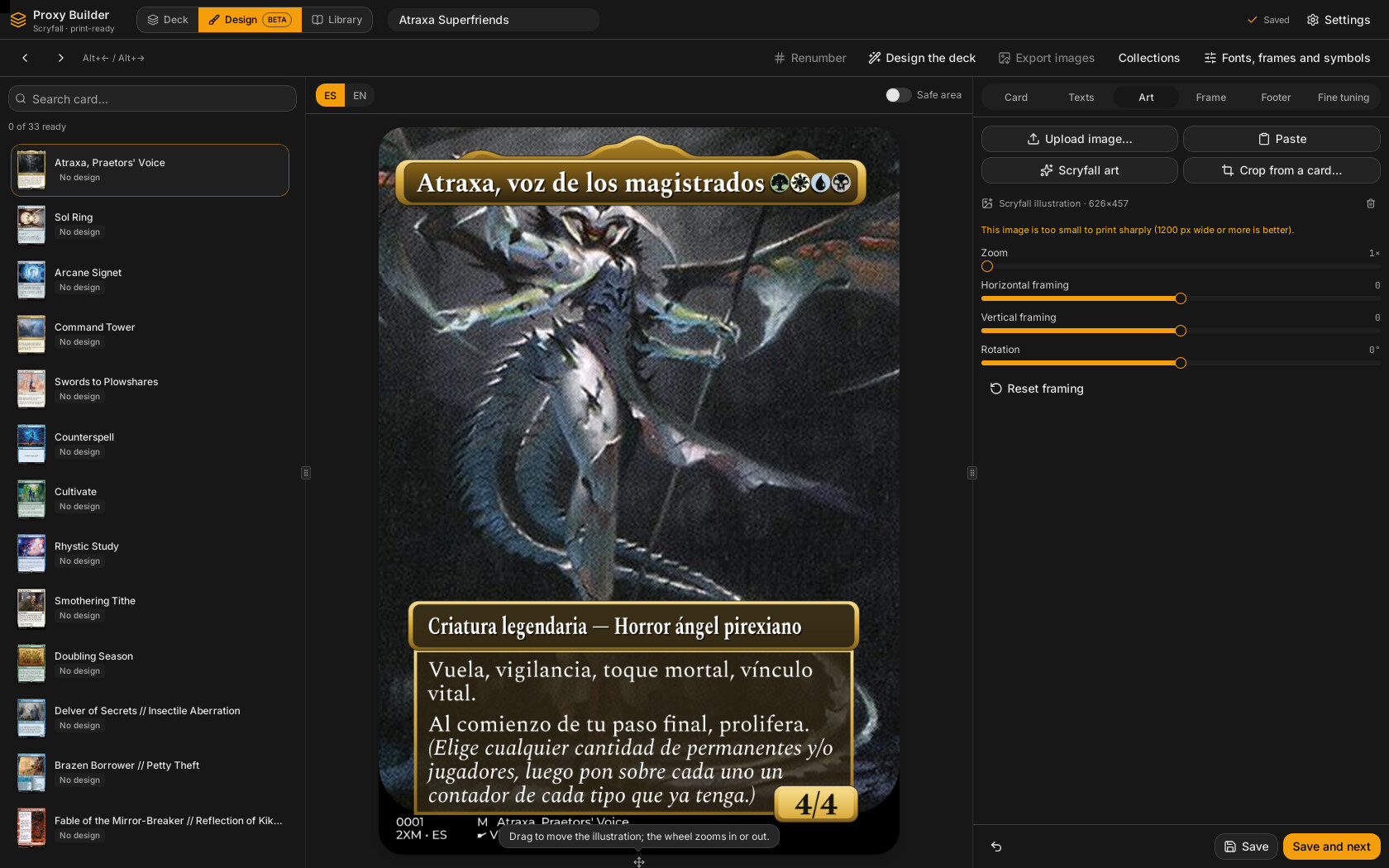
src/features/disenar/disenar-screen.tsx → DisenarScreen is passed to the shell as the disenar slot (src/App.tsx → src/features/shell/app-shell.tsx, a ToggleGroup over useUi.vista = "deck" | "biblioteca" | "disenar"). The dialogs are mounted once in src/App.tsx (ColeccionesDialog, RecursosDialog, LoteDialog, PngDialog, CardEditorDialog) and opened through useUi.getState().abrir({ tipo }) with the Dialogo kinds colecciones, recursosDiseno, disenarDeck, exportarPng (src/stores/ui-store.ts).
Ways to enter: the "Diseñar" tab, or the card context menu item "Diseñar proxy" / "Editar diseño" (src/features/preview/slot-menu.tsx, enabled when the card has a Scryfall id: scryfallDe(carta) !== null), which calls useUi.disenar(id) (sets disenando and switches vista).
┌ top bar: ‹ › Alt+←/→ │ Renumber │ Design the deck │ Export images │ Collections │ Letters, frames and symbols
├───────────┬─────────────────────────────┬────────────────────────┐
│ ListaCartas│ VistaPrevia (language, face,│ Formulario (6 tabs)    │
│ (groups)  │ safe margin, art overlay,   │ + footer: remove,      │
│           │ warnings)                   │ discard, Save, Save+next│
└───────────┴─────────────────────────────┴────────────────────────┘
The three panels are a ResizablePanelGroup (ids lista, vista, formulario); sizes persist in localStorage under proxybuilder.paneles.disenar (useDefaultLayout). Scrolling uses the shared ScrollArea (project rule: never overflow-auto), lists with ringed items use p-1 padding.
| File | Role |
|---|---|
disenar-screen.tsx |
Screen shell: selection, design language, face, resources, keyboard shortcut, save buttons |
use-borrador.ts |
The editing hook: loads/creates the design, registers previews, warnings, save/remove |
use-resumen.ts |
Debounced design_structure (layout kind and how text splits) |
por-cara.ts |
Style and settings per face: proyectar, cambiarEnCara, conAjustesPropios, tieneAjustes
|
grupos.ts |
Grouping of deck cards by Scryfall card; aplicarAlDeck, quitarDiseno, antesDe, numerosUsados
|
lista-cartas.tsx |
Left list with status badges and search |
vista-previa.tsx |
Centre: the card image, language selector and face toggle, live artwork dragging |
incidencias.tsx |
The errors / warnings / information strip under the card, with its hover popover |
arte-en-vivo.tsx |
The overlay compositor used while dragging artwork |
encuadre.ts |
Framing maths shared with Rust (moverEncuadre, geometriaArte, claveCapa) |
formulario.tsx |
Right panel, 6 tabs; also exports EditorMarco (reused by collections) |
ajustes-finos.tsx |
Fine-tuning controls (AjustesFinos, AJUSTES_CERO, hayAjustes) used by the form and collections |
estilos.ts |
Built-in styles and pack-specific styles in one selector; nombreEnIdioma picks a pack name in the interface language |
renumerar.ts |
renumerar, rehacerMiniaturas, ponerIdiomaDiseno (change the deck's design language) and completarIdioma (the design_complete_lang job) |
textos.ts |
Label tables (styles, palettes, rarities, layouts) and textoAviso/esGrave
|
traduccion.tsx |
"Suggested translation" panel |
colecciones-dialog.tsx |
Collections manager |
recursos-dialog.tsx |
Fonts, frame packs (including downloadable), symbols |
lote-dialog.tsx |
"Design the deck" |
png-dialog.tsx |
"Export images" |
recortar-dialog.tsx |
Draw a rectangle on a finished card to use as artwork |
renumerar.ts |
renumerar, rehacerMiniaturas, aplicarCambiadas
|
marcos-originales.ts, packs-descargables.ts
|
Small zustand stores for download state of "Original" frames and downloadable packs |
src/lib/imagen-viva.ts |
Real-time image loading utilities (also used by Card Editor Dialog) |
There is no dedicated designer store. State is split by lifetime:
| State | Where | Lifetime |
|---|---|---|
The deck (cards, each with an optional design) |
useDeck (src/stores/deck-store.ts) |
The truth; undoable via setCartas
|
Which card is being designed (disenando), current tab (vista), open dialog |
useUi |
App session |
cara (face index), soloEsta, colecciones, packs, simbolos, versionLetras
|
useState in DisenarScreen
|
While the view is mounted |
design, original, huella, avisos, cargando, guardando
|
useBorrador |
Per selected card |
| Remembered collection for new drafts |
localStorage key proxybuilder.disenar.coleccion (coleccionRecordada/recordarColeccion) |
Per machine, wrapped in try/catch |
| Download progress of Original / downloadable packs |
useMarcosOriginales, usePacksDescargables
|
App session |
DisenarScreen reads lang straight from deck.settings.designLang (it is not screen state), so what the designer shows is what the PDF prints (see Designer App Layer). The language selector of the preview calls ponerIdiomaDiseno(lang) (renumerar.ts), the same function as the selector in the export panel: it writes designLang with setAjustes, and for any language other than Spanish and English runs completarIdioma (the design_complete_lang job, job type "idioma": downloads the Japanese/Korean/Chinese font if needed and fetches the printing of every designed card missing that language; see Designer App Layer), then rehacerMiniaturas(). When it finishes versionLetras is bumped; it is part of the resources key, so the preview is requested again (a newly downloaded CJK font changes the image without changing anything else the screen knows about).
agrupar(cartas) (grupos.ts) groups deck cards by Scryfall id (s:<id>), including tokens and custom cards linked to Scryfall (scryfallDe); blank slots are skipped; custom cards without a link go alone (c:<cardId>) and cannot be designed (disabled row with a tooltip pointing to "Link with a card…"). A design applies to all copies in a group unless "Solo esta copia (hay N)" is ticked. The copy being edited is the card that ui-store.disenando names (its position in the group is copia, which useBorrador takes as grupo.cartas[copia]), so a group with several copies shows a "Copia:" row of numbered buttons in the footer to pick one; picking a copy ticks "Solo esta copia" and asks before discarding unsaved changes. "Remove design" follows the same box (this copy only, or the whole group). The state of a group is that of its first copy (estadoDe): sinVincular, sinDiseno, borrador, listo (design.status).
flowchart TD
  Sel["selected group changes"] --> Has{"principal.design?"}
  Has -->|yes| Load["design = original = principal.design"]
  Has -->|no| Draft["call design_draft(card, usados, collection)"]
  Draft --> Set["design = original = draft.design; avisos = draft.avisos"]
  Load --> Edit
  Set --> Edit["cambiar(f): setDesign(f(d))"]
  Edit --> Reg["effect: call design_register (one in flight, last wins)"]
  Edit --> Warn["effect: 400 ms debounce, design_fit_report"]
  Edit --> Struct["use-resumen: 200 ms debounce, design_structure"]
  Reg --> Hash["huella -> pbimg d/huella/ancho"]
  Edit --> Save["guardar: design_save -> aplicarAlDeck -> setCartas"]
Key behaviours (all in use-borrador.ts):
-
Turn counter (
turnoref): responses from a previous card never overwrite the current one. -
Unsaved draft vs original:
cambiado = JSON.stringify(design) !== JSON.stringify(original). A fresh draft counts as unchanged ("Discard" returns to it). Choosing another card (list, arrows,Alt+←/→) whilecambiadoasks aConfirmardialog ("Discard the changes?") with a third, focused button "Save and continue" (accionAlternativaofConfirmar): it saves throughguardarCarta()and then runs the pending move, so there is no cancel, save, repeat dance. If saving fails the dialog stays open (the error was already shown). "Discard" stays in the middle and Cancel on the left; while saving, all three buttons are disabled and the dialog cannot be dismissed. -
Registration for other screens (
stores/edicion-store.ts,useEdicion): whilecambiadois true,DisenarScreencallsuseEdicion.poner({ guardar })(an effect that clears it withponer(null)on cleanup, so it vanishes when the changes are saved or discarded or the screen unmounts).guardargoes through a ref to the latestguardarCarta, so the registered callback never goes stale. The shell uses it to offer the same "Save and continue" when leaving the Design tab and when closing the app, without knowing how a card is saved (Settings and Shell). - External changes: if the deck's design for this card changes from outside (bulk drafts, undo, renumber, re-thumbnailing) and nothing is unsaved here, the new design is adopted.
-
Real-time registration: every change calls
design_registeras soon as the previous call finishes; if several arrive meanwhile only the last runs (registro.enVuelo/pendiente). No timer: the preview follows typing and sliders. The response is stored as{ h, de: design };alDia = huella.de === designtells the preview whether the hash belongs to the design as of now. -
Resources signal:
useBorrador(..., recursos)takes an opaquerecursosvalue ({ colecciones, packs, simbolos }); when it changes (collections edited, packs downloaded, symbols fetched) the design is re-registered and warnings recomputed even though the design is identical. -
Warnings (
design_fit_report) wait 400 ms because Rust renders every face to compute them. -
Save (
guardar(todas, listo?)): callsdesign_savewith the deck'sdesignLang, applies the result with onesetCartas(aplicarAlDeck(...))so undo works, remembers the design's collection for the next drafts, and resetsdesign/originalto the saved design. Withtodas = truethe other copies get the same design with their ownbeforepreserved (antesDe). -
Create variant: the "Create variant" button (
CopyPlusicon, in the footer on the same row as the "Copy:" buttons, shown whenever a card is chosen) runscrearVarianteindisenar-screen.tsx. If the draft has unsaved changes it first callsguardar(false)(this copy only) so the variant starts from them; thenduplicar(lib/deck-ops.ts) inserts a copy right after the current one with a new id and the same design, that copy getsmarca: "variante"(printed, but left out of deck size, copies and statistics byproxy_core::model::cuentan), "only this copy" is switched on andui-store.disenar(id)selects it. The group keeps the same Scryfall id, so the list does not gain a row; the "Copy: 1 2…" buttons appear because the group now has several copies. The footer line with the copy buttons is only shown with more than one copy; the button row is always there. -
Remove: the "Remove design" button (trash icon plus label, in the footer, shown only when the card has a design) calls
quitar, which uses the localquitarDiseno(cartas, ids)(restoresdesign.before) and bumps arecargacounter (a dependency of the card-change effect) so the editor asks for a fresh draft instead of keeping the removed design on screen; the Rust commanddesign_removeis registered but not used by the UI.
DisenarScreen extras:
- Auto-selects the first designable card when entering with none selected.
-
Alt+←/Alt+→(windowkeydown) move to the previous/next designable group (wrap-around); also the chevron buttons. Both go throughpasarConAviso, which asks the discard dialog above when the draft has unsaved changes (they used to callpasardirectly and dropped the changes silently). With the preferenceui-store.disenarCopias(box "Recorrer también las copias con las flechas", off by default, remembered), the arrows and "Guardar y siguiente" go copy by copy instead (vecinaingrupos.tscomputes the target), and saving applies to the current copy only ("Solo esta copia" is ticked on entering each copy), so every copy of a card can carry its own design. - "Save and next" saves then
pasar(1).pasaris the unguarded move on purpose: it only runs after a successful save, so there is nothing left to ask about. - On entering,
symbols_status({ refresh: false })is called once: the first time it downloads Scryfall mana symbols (needs a connection), then bumpssimbolosso the preview repaints; with 0 loaded it shows a warning toast. - Collections and packs lists are re-read when a dialog opens/closes or when a download finishes (
versionOriginales,versionDescargables).
The card shown is whatever Rust paints for the registered hash: <img src={urlDiseno(huella, ancho)}>.
-
Resolution: a
ResizeObserveron the frame picks 1000 / 745 / 488 px fromclientWidth × devicePixelRatio(>760, >500, else). -
Burst mode:
useRafaga(huella)is true while the hash changes more often than every 250 ms; the URL then asks for at most 488 px so it follows the cursor, and the full resolution comes when the burst ends. -
Never blank:
useImagenVivakeeps showing the last loaded image until the next one has finished loading. -
Controls: the language selector (
SelectorIdiomafromsrc/components/selector-idioma.tsx: the 15 languages with flag and native name), face toggle when the design has more than one face ("Face n" for printed faces, "Part n" for split/adventure parts, usingresumen.carasImpresas), and a "Safety margin" switch drawing a dashed rectangle inset 3 mm from each edge (3/63,3/88percentages). -
Incidences strip under the card (
incidencias.tsx→Incidencias, always rendered at a fixed height so the preview never jumps when a warning appears or goes away): one counter per level, even at 0 — errors, warnings and information — fromnivelAviso(a)intextos.ts(esGrave= error: text does not fit, missing symbols, missing fonts;sinTextoOficialandreglasEditadas= information; everything else, where the frame or text degrades, = warning). Hovering (or focusing) a counter opens a popover (PopoverwithPopoverAnchor, controlled, closing 150 ms after the pointer leaves so it can be entered) listing its messages, or "no errors/warnings/information to show" when empty.textoAviso(a, t)maps eachAvisovariant to translated text (languages by their native name). ThefaltanLetraserror carries a "Download the fonts" button, which simply selects that language again, socompletarIdiomadownloads the font.
Problem: moving the artwork with a full Rust render per mouse move is too slow. Solution (Decision: render the card once without artwork and move the artwork with CSS):
sequenceDiagram
  participant U as Pointer / wheel
  participant VP as VistaPrevia
  participant R as Rust
  U->>VP: pointerenter / down / wheel
  VP->>R: design_overlay(design, cara, lang, ancho)
  R-->>VP: CapaInfo { huella, arte[x,y,w,h], radio, cara, giro }
  VP->>VP: ArteEnVivo mounts: art img (/b/blob/1000|2000) + overlay img (/c/huella/ancho)
  U->>VP: move (dx, dy) / wheel (zoom)
  VP->>VP: moverEncuadre -> vivo (CSS, instant)
  VP-->>VP: onEncuadre pushed to design every 100 ms
  U->>VP: release / 200 ms after last wheel tick
  VP->>R: normal design_register path renders the exact card
How it fits together:
-
claveCapa(design, cara, lang)(encuadre.ts) is the JSON of the design with theframingof the artwork being moved (cara) nulled; the other parts' framing counts, because a composed card's layer paints them. While the key is unchanged the overlay layer stays valid; on a change of anything else (text, frame, language, the other part's framing) a new layer is requested lazily.pedidaref ("<clave>|<ancho>") prevents duplicate requests and discards stale answers. A change ofrecursosclears the layer. - The layer is requested ahead of time, 500 ms after the card stops changing (
CAPA_ANTES_MS), and also onpointerenter,pointerdown,wheeland when the framing changes through the form's sliders (framingClaveeffect). Why ahead of time: before, the first drag waited for the layer, and its first steps went through whole-card renders (noticeable on sagas, whose render is heavier). -
ArteEnVivo(arte-en-vivo.tsx) is always mounted while a valid layer exists, so both images are already loaded when needed;visibletoggles it. Structure: black rounded container (borderRadiusfromcapa.radioas percentages) → the artwork<img>inside a box positioned atcapa.arte(percentages of the card) withwidth/height/transform: translate(...) rotate(...)computed bygeometriaArte→ the overlay<img>on top. It reportsonLista(true)when both images are loaded. - In a rotated piece (
capa.giro= ±90: aftermath bottom half, split halves) the artwork goes in an unrotated box the size of the hole as the artwork sees it (huecoSinGirar: the hole's sides swapped), centred in the hole and turned with CSSrotate(giro); the fade extension is not used there. A drag is turned into the piece's frame (arrastreEnLaPieza) beforemoverEncuadre, so the artwork still follows the pointer. A harness check against the Rust render of an aftermath bottom half with zoom, offsets and rotation matched pixel for pixel apart from resampling. -
moverEncuadre(framing, change, hole)(in mm: hole =capa.arte× 63×88 mm, orHUECO_TIPICO=[0.08, 0.12, 0.84, 0.45]if no layer yet) returns the new framing: zoom clamped to 1–3, offsets in [-1, 1] scaled by the slack on each axis so that the artwork follows the pointer 1:1 until it reaches an edge, regardless of zoom or rotation.geometriaArtere-implements the artwork placement used by the engine'spintar_arte(same cover-the-hole maths with rotated bounding box); the unit tests in__tests__/encuadre.test.tspin the geometry in TypeScript only (no cross-language parity test). - While dragging:
vivo(local framing) is applied instantly;onEncuadrepushes it to the design at most everyEMPUJE_MS = 100; on release (orFIN_RUEDA_MS = 200ms after the last wheel tick)acabar()flushes the final value. During the drag the displayed URL is frozen (congeladaref) so intermediate Rust renders are not shown;componer = enVivo && (vivo !== null || mostrada !== exacta)keeps the overlay visible until the exact render (urlDiseno(huella, ancho)of the up-to-date hash) is on screen. - Plain wheel zooms by ±0.04 per tick (Ctrl+wheel is ignored). Dragging is disabled when the face has no artwork.
- The artwork that moves is that of
caraArte: the selected part, or part 1 when the selected part has no artwork of its own (resumen.artePropio === false: part 2 of a flip or adventure shows part 1's). Faces without artwork, and the meld back, getnulland use the old path (each change repaints through/d/).
| Export | Behaviour |
|---|---|
CargaUltima |
Loads one image at a time; if more arrive meanwhile, only the last is kept; reports busy/idle |
useImagenViva(url) |
Keeps the last successfully loaded URL (mostrada) until the new one loads; cargando flag |
useRafaga(valor, ms=250) |
true while the value changes faster than every ms
|
useAlRitmo(valor, ms=60) |
Passes a value through at most every ms, always delivering the last |
cargarEnNavegador |
Default loader (an Image object warms the browser cache) |
Tests: src/lib/__tests__/imagen-viva.test.ts (CargaUltima).
Six tabs in a Tabs component; cambiar(d => d') is the only way to edit the design. All labels go through t() with Spanish source strings.
| Tab | Content |
|---|---|
| Carta (Card) | Read-only original data (name, cost, type, P/T, rarity, set/number, detected layout via MAQUETACIONES), Partes (how the text splits), style selector, variant selector (pack styles with variantes), collection selector + "Manage collections…", "Ready to print" switch (status) |
| Textos (Texts) | Two blocks: the deck's design language and, below it, English (the original); with English as design language, English and Spanish. Each has themed name, the type line (every language except English; edits typeLine of the card data for that language, an empty field goes back to the English line on blur; the placeholder is the English line), flavour text, rules (official text shown read-only; "Write by hand" sets rulesOverride; "Restore the official" clears it); TraduccionSugerida. Texts are read and written with textosDe/conIdioma from src/lib/por-idioma.ts, because the generated ByLang type only declares es and en (see Frontend Architecture); a language other than Spanish or English shows empty fields rather than the English texts, matching FaceDesign::textos in Rust. "Show flavour text" switch (options.showFlavor); any text may contain emoji, painted in colour by the engine (see Designer-Engine) |
| Arte (Art) | Upload image / Paste / Scryfall art / Crop from a card; source and size; warning under 900 px width; sliders for zoom (1–3), horizontal/vertical offset (-1..1), rotation (-180..180); "Initial framing" |
| (Texts and Art) | Both tabs start with the part selector (SelectorParte) when the design has more than one face: «Cara n» / «Parte n» plus the face's name, the same state as the preview's selector, so the second artwork of an aftermath or split card is set right where the artwork is edited. In Art, a part without artwork of its own (resumen.artePropio === false) shows «Esta parte no lleva ilustración propia…» and an «Ir a la parte 1» button instead of the controls. |
| Marco (Frame) | "Own frame for this card" switch (design.frame), EditorMarco, emblem (collection's / none / own), custom title squeeze |
| Pie (Footer) | Collection number (typing sets numberManual), rarity letter, set code, artist, credit, universe, year, "original name" placement; empty means "from the collection" (placeholder shows the inherited value) |
| Ajustes finos (Fine tuning) | Own fine-tuning for this card, or the collection's; "Use these settings for the whole collection" |
Details worth knowing:
-
Artwork sources (
PestanaArte): "Upload" opens the native file dialog throughabrirParaImportar(src/lib/dialogos.ts), imports it withblob_import_files, thenart_from_blob. "Paste" callsart_from_clipboard(Rust reads the clipboard because WebKitGTK deniesnavigator.clipboard.read()). "Scryfall art" callsart_from_scryfallfor the card'sscryfallIdand current face. "Crop from a card…" opensRecortarDialog. Sliders and the preview drag write the sameframing. -
Styles (
estilos.ts): the selector merges built-inESTILOS(Borderless, Extended, Classic, Full art) with the pack's own styles, named withnombreEnIdioma(nombres, lang, id): the pack's name in the interface language, else English, else the id (the same for variants). A pack style is stored asstyle(its built-in base, used as fallback if the pack lacks it) +estiloPack(its id), and shown as the valuepack:<id>;elegirEstiloconverts back.packEfectivo(design, colecciones)= card frame pack, else collection's, else"builtin". Changing the frame pack in the Marco tab clearsestiloPackif the new pack lacks it. -
Frame editor (
EditorMarco, exported and reused by collections): pack selector, colour (auto / one palette colour / gradient / custom hex), legendary crown (auto/on/off), rules box (auto/dark/light/tint). Packs not yet installed appear as "Original (download)" and " (download)"; picking one starts the Rust download with a progress bar and then applies the pack. -
Fine tuning (
ajustes-finos.tsx→AjustesFinos): size of title/mana symbols/type/rules/P-T/footer (50–160 %), rules and footer line spacing (70–160 %), per-element vertical offset in mm (-3..3), extra opacity of the rules box, own radius for the artwork window and for the card corners. A 100 % size is stored asundefined; for rules,rulesSize === undefinedmeans "automatic" (the toggle "Rules: automatic size").hayAjustesreports whether anything differs fromAJUSTES_CERO. "Own settings for this card" copies the collection's fine tuning as a starting point. Under "Rules box": "Rules box height" (-10..10 mm in 0.5 steps; 0 = as the frame, stored asundefined) and "Height follows the text", a three-waySelector(alturaDe/AlturaCaja: "By frame" =undefined, "Dynamic" =true, "Fixed" =false) that writesrulesBoxDynamic. In the frame editor (EditorMarco) the custom-tint box colour comes with a "Tint opacity" slider (FilaDeslizador): the native colour input has no alpha, so the opacity is stored as the alpha pair of an 8-digit hex (opacidadDe/alfaHex) and preserved when the colour changes. Under the art: a "Custom art fade" switch that storesartFade: 12, artFadeExtension: 7(the extended frame's values) and shows the sliders "Art fade" (0–25 mm) and "Fade extension" (0–35 mm); switching it off clears both.hayAjustesalso countsartFade,artFadeExtension,rulesBoxHeightandrulesBoxDynamic. -
Pass to collection:
PestanaAjustes.pasarAColeccionsaves the card's fine tuning into its collection (collection_save), clears the card's own, and callsrehacerMiniaturas()so other cards' thumbnails update. -
Style and settings per face (
por-cara.ts,AjustesDeCarainformulario.tsx): on cards with two printed faces (resumen.carasImpresas > 1) the Card, Frame and Fine tuning tabs start with the face selector and, from face 2 on, a switch "Style and settings of its own for this face". Off, the face follows the card (face 1) and the tab is shown dimmed and not editable; on,conAjustesPropiosgives it a copy of the card's style, variant, frame, emblem and options (faces[i].ajustes). The tabs know nothing about faces: they receive the projected design (proyectar(design, cara)) and acambiarwrapped bycambiarEnCara, which sends what changes in style, frame, emblem and options to the face'sajustesand everything else (collection, status) to the card. Footer, texts and artwork keep their own per-face or per-card logic. Tests in__tests__/por-cara.test.ts. -
Suggested translation (
traduccion.tsx): works on the deck's design language. Hidden for English and for the languages without printed cards (idioma(lang).impresasfalse); otherwise shown only when that language has no official text (sinTextoEn(card, lang)frompor-idioma.ts) or its type line equals the English one. "Search official phrases" callsdesign_suggest_translation(design, cara, lang)(slow: one Scryfall search per sentence); the result shows found sentences (traducida, green) vs. left in English (amber), with "Use" for the type line and "Use as rules in {idioma}" (setsrulesOverrideon that language's text). The response is dropped if the card/face changed meanwhile (claveActualref).
| Dialog | File | Commands | Notes |
|---|---|---|---|
| Collections | colecciones-dialog.tsx |
collection_list/save/delete, fonts_list, packs_list, blob_import_files
|
Sidebar list with per-row menu (duplicate, delete); editor sections General, Frame, Emblem, Fonts (title/rules family, weights 400–900), Footer (set code, rarity letter, artist, credit, universe, year, Spanish and English footer templates plus one for the deck's design language when it is another ("Footer template ({idioma})", written with conIdioma), with tokens {num} {rarity} {original} {set} {lang} {artist} {credit} {universe} {year} {brush} {star}, tab = column, newline = row, text after {>} right-aligned), Fine tuning. Closing with unsaved changes asks for confirmation (cambiosSinGuardar). On close, if anything was saved or deleted, rehacerMiniaturas() runs. |
| Letters, frames and symbols | recursos-dialog.tsx |
fonts_list/import/remove, fonts_free_list, font_free_download, packs_list/import/remove, original_*, packs_downloadable_*, pack_extra_use, symbols_status
|
Tabs Letters / Frame packs / Symbols. Imports .ttf/.otf, pack from folder or .zip; free OFL fonts catalogue with PNG samples from src/assets/letras/; downloadable pack rows with a "Contents" panel whose extras (backs, tokens, basic lands, finished cards) can be set as the deck back (useDeck.aplicar({ defaultBack })) or inserted as a custom card (cartaPropia + insertar). On close, rehacerMiniaturas() if anything changed. |
| Design the deck | lote-dialog.tsx |
design_drafts_for_deck, job_cancel, events design://progress/done
|
Scope all/selection, collection selector, progress bar, cancel. Results collected and applied to the deck in one setCartas even when cancelled. Network/rate-limit errors abort; per-card failures are counted and reported. |
| Export images | png-dialog.tsx |
design_export_png, design_complete_lang (via completarIdioma), job_cancel, events designpng://progress/done
|
300/600/900 dpi; "Languages": a checkbox per language of the 15 (flag + native name), the deck's design language ticked by default; folder via elegirCarpetaParaExportar. Before exporting, each chosen language other than Spanish and English is completed on the chosen cards, then thumbnails are redone, because Rust paints whatever data the design has. Languages are sent in table order; each lands in a folder named by its code. Copies export once. |
| Crop artwork | recortar-dialog.tsx |
art_from_card |
Lists deck cards that have an image and are not already designed, one per blob; drag a rectangle (initial guess x .08, y .11, w .84, h .45); must be at least 5 % per side; the result is a PNG blob. |
All long jobs use lanzarTrabajo (src/lib/trabajos.ts): it subscribes to the progress and done events before launching so a fast job cannot lose its final event, and buffers events until the jobId is known.
-
renumerar(t, mensaje)→design_renumber→aplicarCambiadas(one history step) and an announcement ("N cards renumbered" / "Numbering already up to date"). -
rehacerMiniaturas()→design_rerender→useDeck.refrescarCartas(antes, nuevas): replaces only cards that are still identical to what was sent, marks the deck dirty without a history entry (it is not a user edit; if the user changed the card meanwhile their change wins). Called when a deck opens (src/features/shell/use-deck-inicial.ts) and when the collections/resources dialogs close, and after "pass to collection". Errors are swallowed (it will retry next time).
Rules from the project: all text through t("Spanish source string"); each language's translation in src/i18n/<code>/disenar.json (an object keyed by the Spanish string); label tables that live outside components use paraTraducir("…") (a no-op marker so pnpm idiomas sees the literal) and are translated with t() where rendered (textos.ts, GROSORES, TIPOS_EXTRA). pnpm idiomas (scripts/idiomas.mjs) fails when a requested string is missing, and a string must not appear in two area files. Rust never writes user prose: warnings arrive as Aviso variants and are turned into text by textoAviso; errors by useLang().mensaje(e). See Internationalization.
| File | Covers |
|---|---|
src/features/disenar/__tests__/encuadre.test.ts |
moverEncuadre (1:1 following, bounds, zoom 1–3), claveCapa (ignores framing only), geometriaArte (centered, edges, aspect-only, 90° rotation), huecoSinGirar and arrastreEnLaPieza (rotated pieces) |
.../estilos.test.ts |
built-in + pack styles in one selector; elegirEstilo
|
.../grupos.test.ts |
scryfallDe, agrupar, estadoDe, antesDe, numerosUsados, aplicarAlDeck, quitarDiseno
|
.../renumerar.test.ts |
aplicarCambiadas, renumerar, rehacerMiniaturas (errors, concurrent edits) |
.../textos.test.ts |
every Aviso variant has text, languages named by their native name (faltanLetras, reglasEditadas, faltaNombre), esGrave, unique layout names |
src/lib/__tests__/imagen-viva.test.ts |
CargaUltima |
There are no component tests for the form or the preview; the live behaviour is checked by running the app. Run with pnpm check (Testing and CI).
- Do not compute card geometry in the screen. The only geometry here is artwork placement during a drag, and it deliberately mirrors the engine's own computation; a final Rust render always replaces it.
-
design/originalcomparison isJSON.stringify, so key order matters: always spread existing objects rather than rebuilding them. -
useBorrador's effects intentionally omit some dependencies (they key on card id/group key); adding them would reload the draft on every deck change. - Per-face state:
cararesets to 0 when the selected group changes. In split/aftermath layouts the "faces" are parts of one printed face (carasImpresas === 1, the selector says "Part N"); each part still has its own artwork, so the Art tab with "Part 2" selected sets the art of an aftermath card's bottom half, and its "Scryfall art" button fetches only the second half's illustration (art_from_scryfallwithcara = 1, see Designer-App-Layer). - A
huellafrom before the latest edit may arrive late; always checkalDiabefore treating it as exact. -
WithTooltipinstead of nativetitle=(checked bypnpm check:title); modals are fully opaque.
- New form field: add the field to the Rust model (
CardDesign/DesignOptions/FooterOptions,#[derive(TS)]), regenerate bindings (pnpm bindings), add a control in the rightPestana…function usingcambiar, make sure the engine reads it (otherwise the hash will not change visibly), write the Spanish source strings and add their translation to every language'sdisenar.json(pnpm idiomasfails otherwise). - New dialog: add a
Dialogokind inui-store.ts, mount it insrc/App.tsx, reuselanzarTrabajofor jobs. - New warning: add the
Avisovariant in Rust, a case intextoAviso(Inferred: theswitchhas nodefault, so the compiler should flag the missing case), and a test line intextos.test.ts.