Repository navigation
Set Browser
English · Español
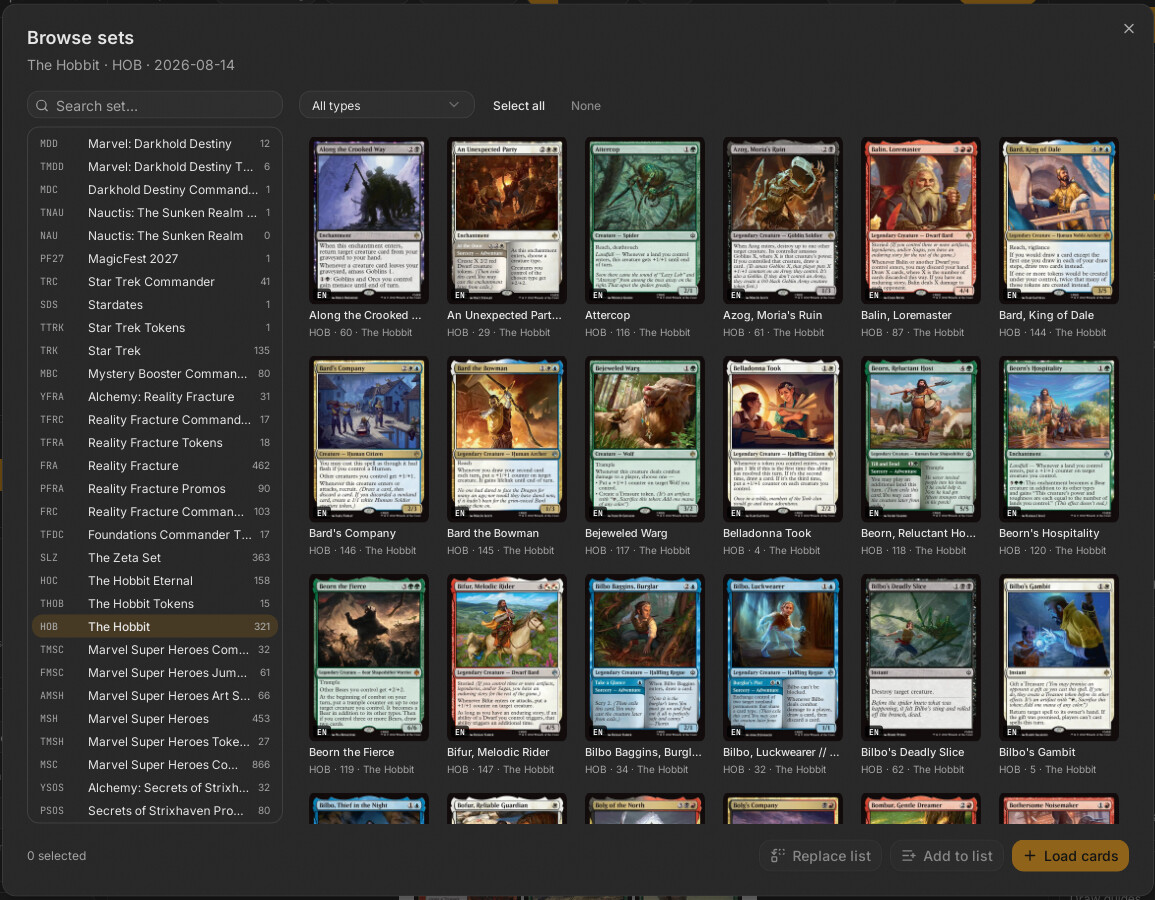
"Browse sets" is a modal dialog (src/features/set-browser/set-browser-dialog.tsx) to pick a Magic set from Scryfall's list, optionally filter it by card type, select cards in a thumbnail grid and either load them straight into the deck or send them to the text list. Its Rust side is two commands in src-tauri/src/commands/cards.rs: sets_list and set_cards.
| File | Responsibility |
|---|---|
src/features/set-browser/set-browser-dialog.tsx |
SetBrowserDialog (open/close shell) and its Contenido (set list, type filter, grid, footer actions), comoLista
|
src/features/variants/rejilla-cartas.tsx |
RejillaCartas: the shared thumbnail grid (see Add Card and Variants) |
src/features/decklist/acciones.ts |
cargarLista: used by "Load cards" |
src-tauri/src/commands/cards.rs |
sets_list, set_cards, consulta_set, resumir
|
src-tauri/src/scryfall/client.rs |
Scryfall::sets, CardApi::search, buscar_paginas
|
src-tauri/src/scryfall/models.rs |
SetInfo, SetRaw, SetList
|
The dialog is mounted in src/App.tsx and opened by the "Sets" button in the header of the Decklist Panel with useUi.getState().abrir({ tipo: "sets" }) (the button is disabled while a background job runs). It is opened with cambiosSinGuardar={false} because it holds no unsaved edits.
| Command | Args | Returns | Notes |
|---|---|---|---|
sets_list |
none | SetInfo[] |
state.scryfall.sets() -> GET /sets. SetInfo = { code, name, setType, releasedAt?, cardCount } (models.rs). A 404 yields an empty list. Not cached in memory by the client: it is asked each time the dialog opens. |
set_cards |
code, typeFilter?
|
CardSummary[] |
Builds a query with consulta_set and runs state.scryfall.search(&q, false, 175), then resumir (summaries + thumbnail registration). |
consulta_set(code, type_filter) builds e:<code> and optionally t:<type>. Decision: both inputs are filtered to safe characters (code: ASCII alphanumerics; type: ASCII letters only, cleaned before checking emptiness). Why: they come from the screen and are interpolated into a Scryfall query; this prevents injecting extra clauses (neo) or (e:dmu becomes e:neooredmu) and a type like -! cannot leave a dangling t:. This is pinned by the test el_set_y_el_tipo_no_dejan_colar_otra_consulta.
The search is called with prints = false: no unique=prints, no include_multilingual, so the grid shows one entry per card in the set's default language (English), not every printing. The Cockatrice token merge done by card_search is not done here.
CardApi::search clamps the limit to TOPE_BUSQUEDA = 175 (client.rs), which equals Scryfall's page size; buscar_paginas follows next_page only until limit is reached. Consequence: for sets with more than 175 matching cards, the grid shows the first 175 and "Select all" selects only those. To get the rest, use the type filter to split the set (for example creatures, then instants). Inferred: the grid has no pagination or "more" control (none appears in set-browser-dialog.tsx).
Search results are remembered in memory for one hour (VIDA_BUSQUEDA, busquedas.rs), so switching back to a set or type already viewed does not hit Scryfall again.
State in Contenido: sets, filtroSet, set (selected SetInfo), tipo ("all" or a lowercase type), cartas, elegidas (Set<string> of card ids), cargando.
- On mount,
sets_listfills the left list. Each row shows the code in monospace, the name andcardCount. The order is Scryfall's. - The search field filters the loaded list client-side: case-insensitive substring of the name, or exact equality with the code.
- Clicking a set (or changing the type selector) runs an effect that calls
set_cards { code: set.code, typeFilter: tipo === "all" ? null : tipo }and clears the selection. Avigenteflag in the effect cleanup drops responses that arrive after a newer request.NotFoundis not toasted (empty grid: "No results"); other errors are. - Type options: all,
creature,instant,sorcery,artifact,enchantment,planeswalker,land,token. The "Tokens" option filters witht:token. - The grid is
RejillaCartasinside the dialog's ownScrollArea, which publishes its viewport viaRaizScroll.Providerso thumbnails are only mounted near the viewport. Clicking toggles a card inelegidas. "Select all" / "None" act on the loaded cards only. - The footer shows "N selected" and three actions, all disabled with an empty selection.
| Button | What it does | Touches |
|---|---|---|
| "Replace list" | Writes the selected cards, one per line, as the whole text of the list box |
deck.decklistText only (via setSinHistorial); no cards are created |
| "Add to list" | Appends the lines to the existing text (trailing whitespace trimmed, newline separator; if the text is empty it just sets it) |
deck.decklistText only |
| "Load cards" | Closes the dialog and runs cargarLista(texto, "anadir", t): resolves the lines and appends the cards to the deck |
deck.cards; the text box is untouched |
Both list buttons announce "N cards moved to the list" and close the dialog; the user then presses "Load list" in the Decklist Panel (which replaces the deck's cards) or "Add" (which appends). There is no way to replace the deck's cards directly from this dialog: "Load cards" always appends.
Each line produced by comoLista has the exact printing: 1 <name> (<SET>) <collectorNumber> with the set code upper-cased. Why: a plain name would let the resolver choose a printing according to the image policy; with set and number the printing the user clicked is the one fetched. Quantity is always 1.
"Load cards" goes through the normal resolver job (progress in the panel footer, cancellable, Busy if another job runs; warning toast for unresolved lines), so it downloads images exactly like pasting the same lines. It uses the current language and token preferences of the panel (useUi.lang, addTokens): with a non-English language each printing may be swapped for a translated one or fall back to English, and with addTokens on, tokens created by the loaded cards are appended too. Details in Decklist Panel.
| Situation | Result |
|---|---|
| No network |
sets_list fails -> error toast, empty list with spinner; set_cards -> error toast, empty grid |
| Rate limited |
RateLimited after retries (toast) |
| Set with no cards for the filter | Empty grid, "No results" |
| Closing during a load | The effect cleanup ignores the late response; the dialog content unmounts so no state leaks |
-
src-tauri/src/commands/cards.rs:el_set_y_el_tipo_no_dejan_colar_otra_consulta(query sanitising). - No Vitest file exists for the dialog;
comoListais not exported, so the line format is only covered indirectly by the parser tests (see Decklist Parsing).
- Paging or "load the whole set": extend
set_cardsto follow more pages (it would need a limit aboveTOPE_BUSQUEDAinsearch) and add pagination or a "more" action inContenido. - Search by language or all printings: pass
prints = true(ascard_printsdoes) and add the language filter thatFiltrosBusquedaalready provides. - Replace the deck's cards from here: reuse
cargarLista(texto, "reemplazar", t), remembering the panel asks for confirmation first whenpedirConfirmacionAlCargaris on.